
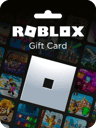
Beli Robux Tanpa Kartu Kredit dengan Aman
Beli Robux tanpa kartu kredit menggunakan kartu hadiah, saldo toko aplikasi, PayPal, atau kartu prabayar dengan langkah-langkah mudah untuk menghindari penipuan.
Cara Membeli Robux untuk Steal a Brainrot dengan Aman Tanpa Kartu Kredit
Ya - Saya bisa membeli Robux tanpa kartu kredit dan tetap menjaga keamanan akun Roblox saya. Jawaban singkatnya sederhana: Saya sebaiknya menggunakan kartu hadiah Roblox, saldo Apple atau Google Play, PayPal, atau kartu Visa/Mastercard/Amex prabayar, dan saya hanya boleh membayar melalui Roblox.com, aplikasi Roblox, atau penjual ritel resmi.
Berikut adalah ringkasan seluruh artikel:
- Opsi terbaik tanpa kartu: Kartu hadiah Roblox, saldo toko aplikasi, PayPal, dan kartu prabayar
- Aturan keamanan terbaik: Jangan pernah memberikan kata sandi atau kode 2FA saya
- Tempat terbaik untuk membeli: Roblox.com atau penjual resmi seperti Walmart, Target, GameStop, CVS, Walgreens, Amazon, atau Roblox
- Tanda penipuan umum: "Robux Gratis" atau harga yang jauh di bawah harga normal
- Pengecekan awal yang baik: Pastikan situs menampilkan https:// dan URL-nya adalah roblox.com
- Peringatan seluler: Pembelian melalui Apple dan Google bisa lebih mahal per Robux karena biaya layanan toko aplikasi sebesar 30%
- Setelah saya membayar: Saldo Robux saya mungkin akan diperbarui dalam 5 hingga 30 menit
Saya juga perlu mengingat satu poin dasar: Robux dibeli terlebih dahulu, kemudian dibelanjakan di Steal a Brainrot. Setelah Robux masuk ke akun Roblox saya, saya bisa menggunakannya di perangkat apa pun tempat saya masuk (login).
Cara Membeli Robux Menggunakan PayPal Tanpa Kartu Kredit (2026) ✅

Perbandingan Singkat

Cara Membeli Robux Tanpa Kartu Kredit: Perbandingan Metode Pembayaran
| Metode | Cara saya membayar | Cocok untuk | Hal utama yang perlu diperhatikan |
|---|---|---|---|
| Kartu Hadiah Roblox | Tunai atau pembelian di toko | Anak-anak, hadiah, anggaran terbatas | Saya perlu menukarkan kode di Roblox |
| Saldo Apple / Google Play | Kartu hadiah yang ditambahkan ke toko aplikasi | Pemain iPhone dan Android | Biaya 30% bisa berarti lebih sedikit Robux per dolar |
| PayPal | Saldo PayPal atau bank yang tertaut | Pembeli melalui desktop | Saya perlu saldo yang cukup atau dana yang tertaut |
| Visa/Mastercard/Amex Prabayar | Kartu hadiah prabayar | Pembeli yang tidak ingin menggunakan kartu bank | Saya mungkin perlu menambahkan kode pos penagihan terlebih dahulu |
Intinya: jika saya menginginkan cara teraman, saya harus membeli melalui checkout resmi Roblox atau toko resmi, mulai dengan jumlah kecil jika saya ragu, dan periksa saldo Robux saya sebelum membelanjakan apa pun di Steal a Brainrot.
Cara membeli Robux tanpa kartu kredit
Berikut adalah cara utama membeli Robux tanpa kartu kredit. Cara termudah adalah memulai dengan sumber dana yang sudah Anda miliki: kredit Roblox, saldo toko aplikasi, PayPal, atau kartu prabayar.
Kartu hadiah Roblox dan kredit Roblox

Kartu hadiah Roblox adalah opsi tanpa kartu yang paling sederhana. Anda bisa membeli kartu fisik di Walmart, Target, GameStop, CVS, dan Walgreens. Jika Anda menginginkan kode digital, Anda bisa mendapatkannya dari Amazon atau Roblox.com.
Untuk menggunakannya, buka roblox.com/redeem, masuk, dan masukkan PIN. Dana akan masuk ke akun Anda sebagai kredit Roblox. Dari sana, Anda bisa mengubah saldo tersebut menjadi Robux atau menyimpannya sebagai kredit Roblox untuk nanti.
Penukaran umum meliputi:
- $10 = 800 Robux
- $25 = 2.000 Robux
- $50 = 4.500 Robux
- $100 = 10.000 Robux
Setelah Anda menukarkannya, Robux siap dibelanjakan di Steal a Brainrot.
Jika Anda membeli melalui ponsel, saldo toko aplikasi biasanya lebih masuk akal.
Saldo Google Play dan saldo Apple
Jika Anda bermain Roblox di iPhone atau Android, Anda bisa membayar melalui saldo toko aplikasi Anda. Pertama, tukarkan Kartu Hadiah Apple atau kartu hadiah Google Play ke akun Anda. Kemudian buka aplikasi Roblox dan pilih paket Robux.
Biaya akan diproses melalui penagihan Apple atau Google, dan Anda mengonfirmasinya dengan Face ID, Touch ID, sidik jari, atau kode sandi.
Satu hal yang perlu diketahui: Apple dan Google mengenakan biaya dalam aplikasi sebesar 30%. Itu berarti pembelian seluler biasanya memberikan lebih sedikit Robux per dolar dibandingkan membeli di Roblox.com.
Jika Anda lebih suka menggunakan Roblox.com, PayPal atau kartu prabayar biasanya merupakan pilihan yang lebih baik.
PayPal, kartu prabayar, dan Buffget

PayPal: Anda bisa menggunakan PayPal di Roblox.com dengan menautkan rekening bank Anda atau menggunakan saldo PayPal, lalu mengonfirmasi pembayaran.
Kartu prabayar: Anda juga bisa menggunakan kartu hadiah Visa, Mastercard, atau Amex prabayar. Sebelum melakukan pembayaran, daftarkan kartu tersebut dengan kode pos penagihan. Jika Anda melewatkan langkah itu, situs Roblox kemungkinan akan menolak pembayaran.
Buffget: Jika Anda menginginkan top-up digital, gunakan sumber checkout terverifikasi seperti Buffget. Buffget menjual opsi pembayaran Roblox digital yang aman bagi pemain yang menginginkan checkout online yang cepat.
Cara menyelesaikan pembelian Robux dengan aman
Tukarkan kredit atau tambahkan dana terlebih dahulu
Sebelum menuju ke checkout, isi dana Anda terlebih dahulu. Jika Anda memiliki kartu hadiah Roblox, tukarkan di roblox.com/redeem. Jika Anda membayar melalui Apple atau Google Play, tambahkan Kartu Hadiah Apple atau kartu hadiah Google Play Anda ke saldo akun tersebut sebelum membeli.
Menggunakan PayPal atau kartu prabayar? Periksa kembali apakah saldonya mencukupi untuk paket yang Anda inginkan. Pengecekan saldo yang cepat dapat menyelamatkan Anda dari kegagalan pembayaran di saat-saat terakhir.
Setelah dana tersedia, tetap gunakan Roblox atau toko terverifikasi saja.
Beli Robux di Roblox atau melalui toko terverifikasi
Saat dana Anda siap, buka roblox.com dan klik ikon Robux, atau buka aplikasi Roblox dan ketuk ikon yang sama. Kemudian pilih paket yang sesuai dengan saldo Anda:
| Harga (USD) | Jumlah Robux |
|---|---|
| $4.99 | 400 |
| $9.99 | 800 |
| $24.99 | 2.000 |
| $49.99 | 4.500 |
| $99.99 | 10.000 |
Saat checkout, pilih metode pembayaran Anda dan selesaikan pesanan. Hanya bayar di halaman yang menampilkan https:// dan ikon gembok.
Jika ada sesuatu yang tampak aneh atau tidak biasa pada halaman checkout, segera berhenti dan jangan membayar.
Konfirmasi saldo Anda dan belanjakan di Steal a Brainrot

Setelah pembelian berhasil, lihat penghitung Robux di sudut kanan atas Roblox. Angka tersebut akan diperbarui setelah pembelian diproses.
Jika saldo Anda tidak langsung berubah, beri sedikit waktu. Tunggu 5 hingga 30 menit, lalu segarkan (refresh) browser atau aplikasi. Jika masih belum muncul, keluar dan masuk kembali untuk memaksa sinkronisasi. Anda juga harus memeriksa email Anda untuk mendapatkan tanda terima dari Roblox, Apple, atau Google yang menunjukkan transaksi telah diproses.
Setelah Robux muncul, buka Steal a Brainrot dan gunakan di dalam game.
Jika saldo masih belum diperbarui, periksa tanda-tanda peringatan sebelum mencoba lagi.
Cara mengenali dan menghindari penjual Robux palsu
Tanda peringatan penipuan umum
Sebelum membayar, periksa penjual dan halaman checkout untuk melihat tanda bahaya.
Yang terbesar sangat sederhana: situs mana pun yang menjanjikan Robux gratis atau dengan harga yang sangat murah. Roblox tidak mengizinkan situs acak untuk menyetorkan Robux langsung ke akun Anda. Dan pembelian yang sah tidak akan pernah meminta kata sandi Anda. Jika harganya terlihat jauh lebih rendah dari biasanya, itu adalah sinyal penipuan.
Tanda buruk lainnya adalah penjual yang meminta akses akun atau mengklaim dapat mengirimkan Robux melalui metode tidak resmi. Itu melanggar Ketentuan Penggunaan Roblox dan dapat menyebabkan pembatasan atau pemblokiran akun. Penipu juga suka mendesak orang dengan kalimat seperti "stok terakhir" atau "beli sekarang atau habis" agar Anda melewatkan pemeriksaan dasar.
Langkah-langkah untuk diperiksa sebelum membayar
Gunakan beberapa pemeriksaan dasar sebelum memasukkan detail pembayaran.
Ketik roblox.com langsung ke browser Anda. Kemudian pastikan halaman checkout dimulai dengan https:// dan menampilkan ikon gembok. Jangan pernah memasukkan kata sandi Roblox Anda di situs penjual. Penjual yang sah hanya memerlukan alamat email Anda untuk mengirimkan kode kartu hadiah.
Jika checkout meminta kata sandi Roblox, kode pemulihan 2FA, atau kata sandi Roblox Anda, segera tutup tab tersebut. Hindari juga situs apa pun yang hanya menerima mata uang kripto atau pembayaran PayPal "Teman dan Keluarga". Metode pembayaran tersebut menghilangkan kemampuan Anda untuk menyanggah biaya jika terjadi kesalahan.
Jika Anda mencoba platform baru, mulailah dari yang kecil. Pesanan uji coba sekitar $5 adalah cara yang lebih aman untuk memeriksa apakah penjual tersebut sah.
Cara mengamankan akun Anda setelah pembelian
Setelah pembelian, segera kunci akun Anda.
Aktifkan verifikasi dua langkah dan gunakan aplikasi autentikator alih-alih SMS. Aplikasi autentikator lebih aman daripada SMS. Periksa login terbaru Anda untuk perangkat atau lokasi yang tidak Anda kenali.
Pastikan juga alamat email yang ditautkan ke akun Roblox Anda memiliki kata sandi yang kuat dan terpisah. Jika seseorang masuk ke email Anda, mereka dapat mengatur ulang kata sandi Roblox Anda. Dan tukarkan kode kartu hadiah segera setelah Anda mendapatkannya, karena kode yang tersimpan di kotak masuk Anda dapat dicuri jika email Anda pernah disusupi.
Memilih metode pembayaran yang tepat untuk situasi Anda
Bagaimana perbandingan setiap metode pembayaran
Setelah Anda menyingkirkan penipuan, langkah selanjutnya sederhana: pilih metode pembayaran yang sesuai dengan perangkat Anda dan cara Anda ingin membayar. Tabel di bawah ini membantu Anda menyesuaikan setiap opsi dengan pengaturan yang terasa paling cepat dan aman.
| Metode | Sumber Pendanaan | Kelebihan | Batasan | Terbaik untuk |
|---|---|---|---|---|
| Kartu Hadiah Roblox | Tunai / ritel | Tidak ada kartu kredit yang terhubung ke akun Anda; batas pengeluaran alami | Memerlukan penukaran manual di browser | Pemain yang lebih muda dan pemberi hadiah |
| Saldo Apple / Google Play | Saldo Apple ID / Google Play | Pembayaran cepat dengan Face ID atau Touch ID | Biaya toko aplikasi dapat mengurangi jumlah Robux per dolar | Pengguna khusus seluler yang mengutamakan kecepatan |
| Visa/Mastercard Prabayar | Dana yang dimuat sebelumnya | Membelanjakan dana yang dimuat sebelumnya tanpa mengekspos detail rekening bank Anda | Mungkin memerlukan pendaftaran online untuk kode pos penagihan | Pembeli yang peduli privasi atau berfokus pada anggaran |
| PayPal | Bank atau saldo yang terhubung | Perlindungan pembeli dan opsi pengembalian dana (chargeback) | Akun harus diverifikasi dan memiliki saldo yang dapat digunakan atau sumber pendanaan yang terhubung | Pengguna desktop yang menginginkan perlindungan pembeli |
Jika Anda mencoba mendapatkan Robux terbanyak untuk uang Anda, kartu hadiah Roblox dan top-up terverifikasi biasanya memberikan nilai terbaik per dolar.
Poin utama untuk diingat
Tetap gunakan satu metode pembayaran tepercaya dan beli melalui checkout resmi. Sebelum membayar, pastikan saldo Anda siap dan periksa apakah URL dimulai dengan https:// dan cocok dengan roblox.com.
Gunakan hanya Roblox atau pengecer terverifikasi. Dan tidak peduli apa yang diklaim oleh penjual atau situs, jangan pernah membagikan kredensial login Roblox Anda kepada siapa pun.
Satu langkah praktis terakhir: periksa saldo Robux Anda sebelum membelanjakan apa pun di Steal a Brainrot. Setelah pembelian selesai, Anda dapat menggunakan Robux tersebut di Steal a Brainrot.
FAQ
Bisakah saya membeli Robux dengan uang tunai?
Tidak secara langsung. Namun, Anda masih bisa membeli Robux dengan uang tunai jika Anda mengambil opsi prabayar di toko ritel.
Cara termudah adalah kartu hadiah Roblox atau kartu prabayar lainnya. Beli dengan uang tunai, lalu tukarkan kodenya di situs web resmi Roblox untuk menambahkan kredit ke akun Anda. Anda juga bisa menggunakan kartu debit prabayar atau kartu Cash App.
Mengapa kartu prabayar saya ditolak?
Kartu prabayar biasanya ditolak karena beberapa alasan umum: detail kartu dimasukkan dengan salah, tidak ada cukup uang di kartu, atau kartu belum diaktifkan.
Beberapa penerbit kartu mungkin juga menandai pembelian Roblox sebagai mencurigakan. Periksa kembali apakah kartu Anda memiliki alamat penagihan yang tertaut, apakah alamat tersebut cocok dengan yang Anda masukkan saat checkout, dan apakah kartu tersebut dapat digunakan untuk pembelian online atau pembelian tanpa kartu fisik. Jika perlu, hubungi penerbit kartu Anda dan minta mereka untuk menyetujui pembelian tersebut.
Apa yang harus saya lakukan jika Robux saya tidak pernah muncul?
Jika Robux Anda tidak langsung muncul, beri waktu 5 hingga 10 menit lalu segarkan aplikasi atau browser. Anda juga bisa keluar dan masuk kembali untuk memuat ulang data akun Anda.
Jika pembelian masih belum ada, lihat riwayat transaksi Anda untuk memastikan pembelian tersebut berhasil. Periksa juga apakah Anda masuk ke akun yang benar dan tinjau email tanda terima pembayaran Anda.
Jika masih belum muncul, hubungi dukungan resmi Roblox.