

Recommended Discounts

Delta Force Global
This Top Up Service is Not Applicable for Garena Delta Force.
20% OFF
Related articles


Delta Force Hawk Ops PC Requirements: i3 GTX 660 Min to 240+ FPS Guide
Delta Force: Hawk Ops open beta drops Dec 5, 2024—pre-load then. Min: i3-4150/FX-6300, 8-12GB RAM, GTX 660 2GB, 60GB SSD, Win10 64-bit. Rec: i5-6500/Ryzen 5 1500X, 16GB RAM, GTX 1060 5GB (60+ FPS 1080p). Hit 100-240+ FPS w/ UE5 tweaks, DLSS/FSR, config hacks—tested on all rigs!
Buffget
Delta Force: Hawk Ops open beta drops December 5, 2024—pre-load starts then too. We're talking minimum specs like an i3-4150 or FX-6300, 8-12GB RAM, GTX 660 with 2GB VRAM, 60GB SSD space, and Windows 10 64-bit. Recommended? Step up to i5-6500 or Ryzen 5 1500X, 16GB RAM, GTX 1060 5GB for 60+ FPS at 1080p. And the real magic: tweaks to UE5 settings, DLSS/FSR upscaling, and config file hacks pushing 100-240+ FPS. I've chased these numbers on rigs from potato to beast—let's get you there.
Delta Force PC System Requirements Overview
You need Windows 10 64-bit (version 1909 or later) and DirectX 12—no shortcuts. That 60GB SSD? Non-negotiable; slap it on an HDD and load times double. Pre-load kicks off December 5, so you're ready to dive in.
Minimum Specs for 1080p 60 FPS
- CPU: i3-4150 or AMD FX-6300 (six cores keep you at 60+ FPS).
- RAM: 8GB? Sketchy, crashes waiting to happen. 12GB smooths it out.
- GPU: GTX 660 2GB pulls 25-30 FPS on low; crank it right and you hit 45 FPS minimum.
- Quick Fixes: Fire up Task Manager > Performance tab to check your setup. Upgrade that GPU first—doubles FPS, shaves 20% off load times with an SSD boost.
Ever wonder why old rigs stutter here? UE5 loves threads.
Recommended Specs for 144 FPS
- CPU: i5-6500 or Ryzen 5 1500X (12 threads handle medium-high at 1080p no sweat).
- RAM: 16GB, stutter-free zone.
- GPU: GTX 1060 5GB (60+ FPS on medium-high).
- Steps: Run a system scan, slap in 16GB, test 1080p medium settings. Dreaming of 2K? Grab i7-8700 or Ryzen 5 5500 with RTX 3060 8GB—90-100 FPS with upscaling.
Ultra Specs for 4K/High Refresh
- CPU: i9-12900K or Ryzen 7 7800X3D.
- RAM: 32GB for 4K or streaming marathons.
- GPU: RTX 3080 10GB (60 FPS extreme at 4K).
- Pro Tip: Flip on DLSS Frame Gen—bam, 100+ FPS for competitive edge.
Delta Force recharge via Buffget? Global low prices, instant top-ups with Binance Pay, USDT, or credit card. Secure, fast delivery, fully compliant, tons of payment options, killer user ratings, and solid after-sales support.
Hardware Breakdown: CPU, GPU, RAM
Prioritize GPU upgrades—GTX 1060 or better delivers massive gains. VRAM rules: 2GB minimum scrapes by, 5-7GB owns 1080p, 10GB conquers 4K.
Best CPUs Tested in Delta Force
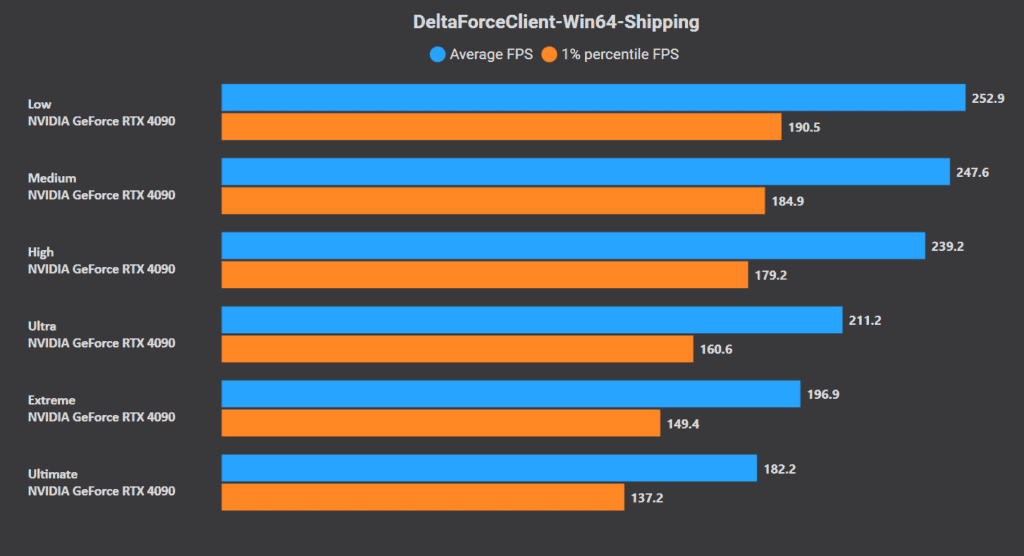
Minimum i3-4150 or FX-6300 works but bottlenecks on hex-cores. Recommended i5-6500 or Ryzen 5 1500X nails 60 FPS at 1080p. High-end kings? Ryzen 7 7800X3D—no point chasing past 8 cores. Check it: Task Manager for core usage. Upgrade to Ryzen 5 5500 for 2K. Tweak WinShipping.exe affinity to all cores (6+ cores lock 60+ FPS).
(Editor's take: AMD's cache magic shines here—I've seen 7800X3D rigs laugh at crowded ops.)
Top GPUs for Maximum FPS
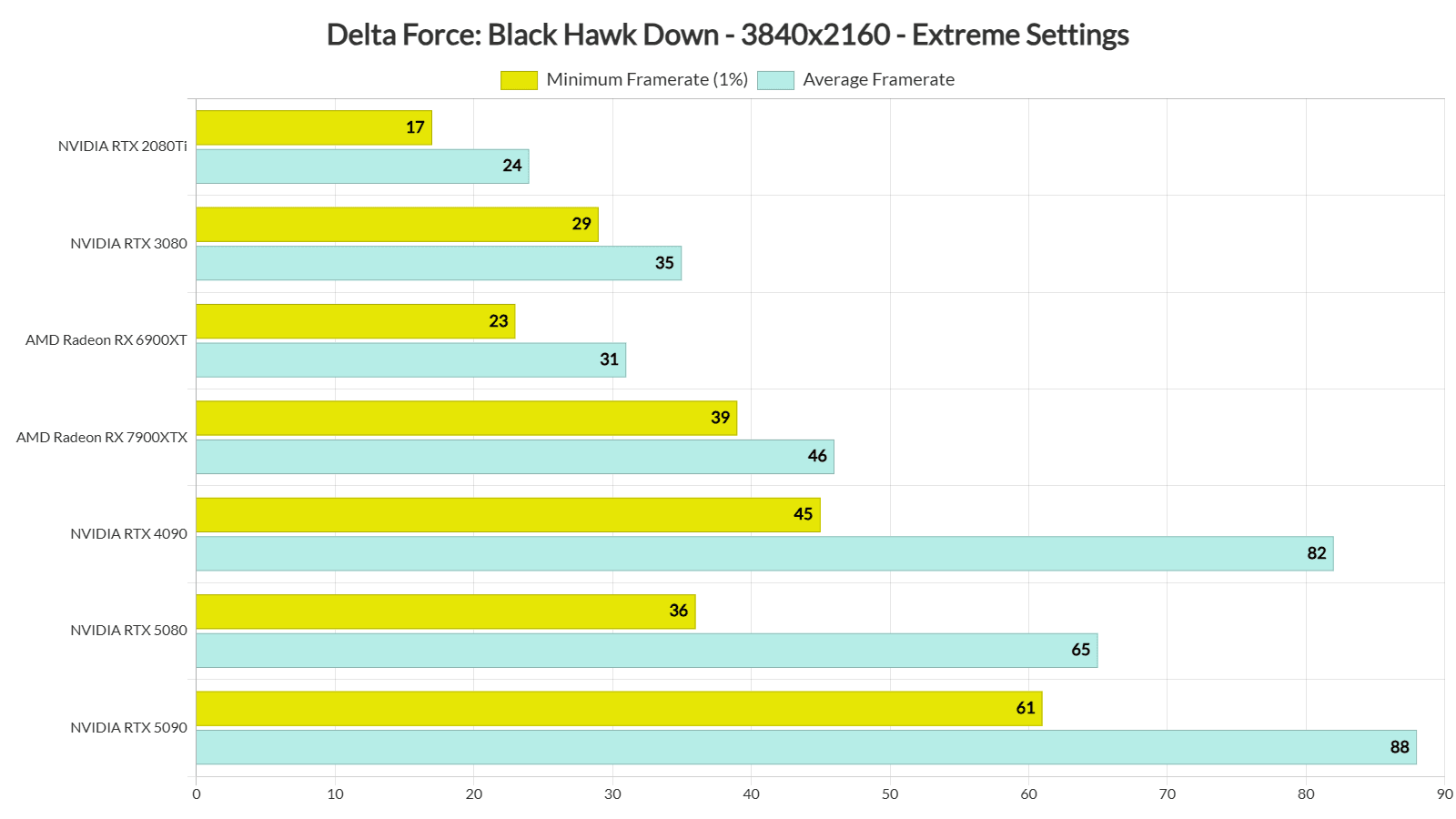
RTX 3060 crushes 102 FPS 1080p Ultra (74 FPS 1% lows), 90-110 FPS at 1440p with DLSS. RTX 3080? Over 65 FPS 1080p extreme. AMD side: RX 5700 XT for 2K, RX 6800 XT for 4K (90-100% utilization via MSI Afterburner; 6GB VRAM caps 1080p). Steps: NVIDIA drivers 560.70+ or AMD 24.7.1+. Enable Resizable BAR—huge.
RAM and Storage Optimization
16GB recommended for stutter-free play; 32GB for 4K. SSD mandatory at 60GB (HDD doubles loads—painful). Enable XMP/EXPO profiles; set virtual memory to 1.5x your RAM; pre-allocate SSD space.
Pre-Installation Checks
Switch to High Performance power plan (+10-20% FPS). Enable HAGS, Game Mode, Resizable BAR. Kill Memory Integrity.
Windows and DirectX Requirements
Windows 10 64-bit and DirectX 12? Mandatory across the board. Ultimate power plan adds another 10-20% FPS. Power Options > Ultimate Performance. Settings > Gaming > Game Mode on. dxdiag to confirm DirectX 12.
Driver Updates for NVIDIA/AMD
NVIDIA 560.70+, AMD 24.7.1+—ditch auto-optimization. Clean install: Grab from site, DDU for old crud, NVIDIA Control Panel > Low Latency Off.
Benchmark Your Current Rig
MSI Afterburner + RivaTuner for FPS, VRAM overlay. Install, enable overlay for FPS/GPU/CPU, benchmark native 1080p.
In-Game Graphics Settings Guide
Fullscreen. V-Sync off. Unlimited FPS cap. 100% resolution scale. FOV 105-120 (infantry ops? Push 150).
Optimal Settings for High FPS
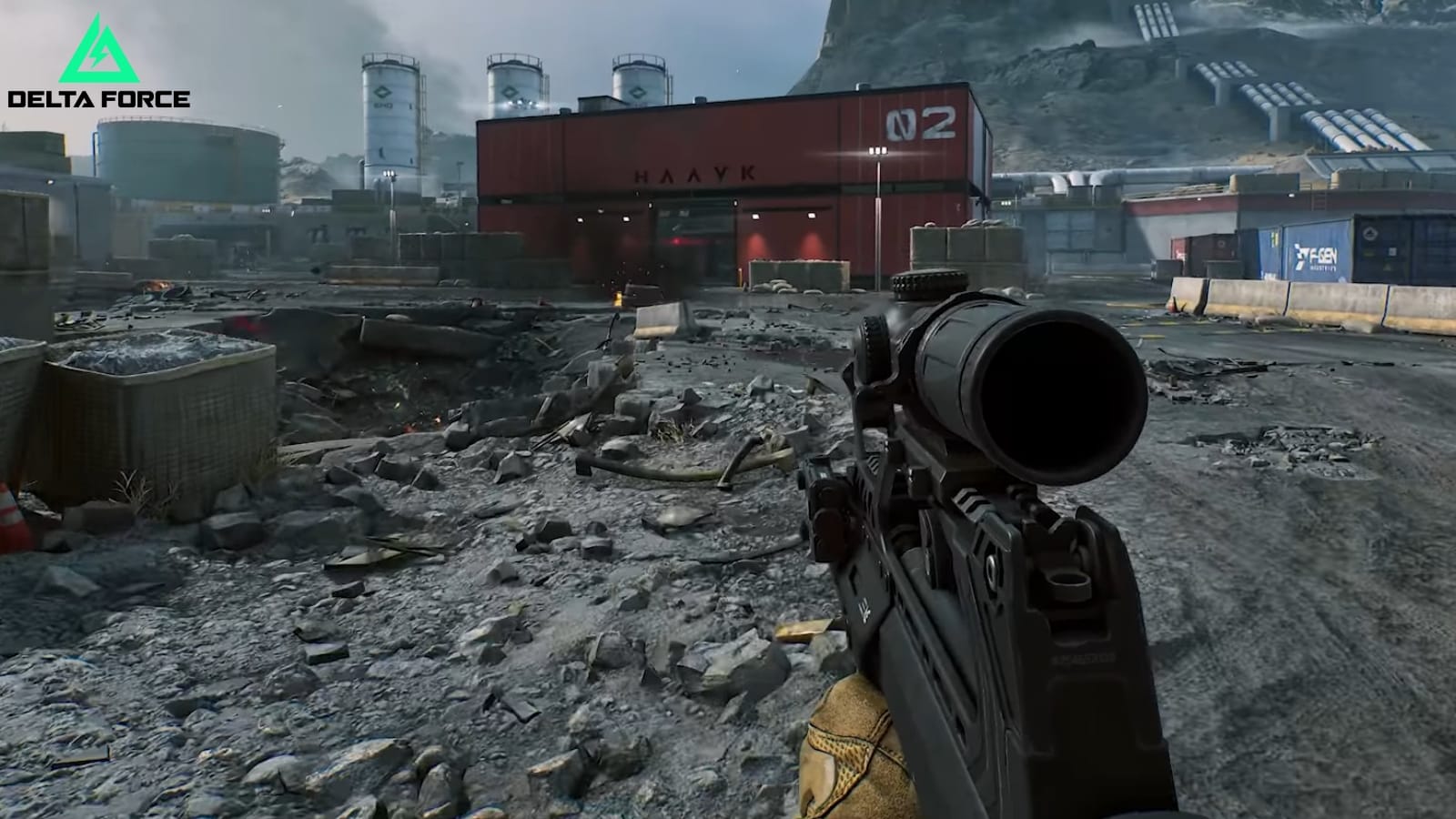
Weapon Motion Blur off. Reflections and particles low. Texture filtering high, AO medium. GI low (+75% FPS). Volumetric fog low (+8%). Shadows low (+15%). RT off (+30-50%). Graphics > Custom. Disable Depth of Field and post-processing. Minimap at 85%.
Delta Force Hawk Ops top up on Buffget: Ultra-fast recharges, rock-bottom prices, full compliance, ETH/USDC/local payments, top ratings, killer after-sales, seamless vibes.
Resolution Scaling and DLSS/FSR
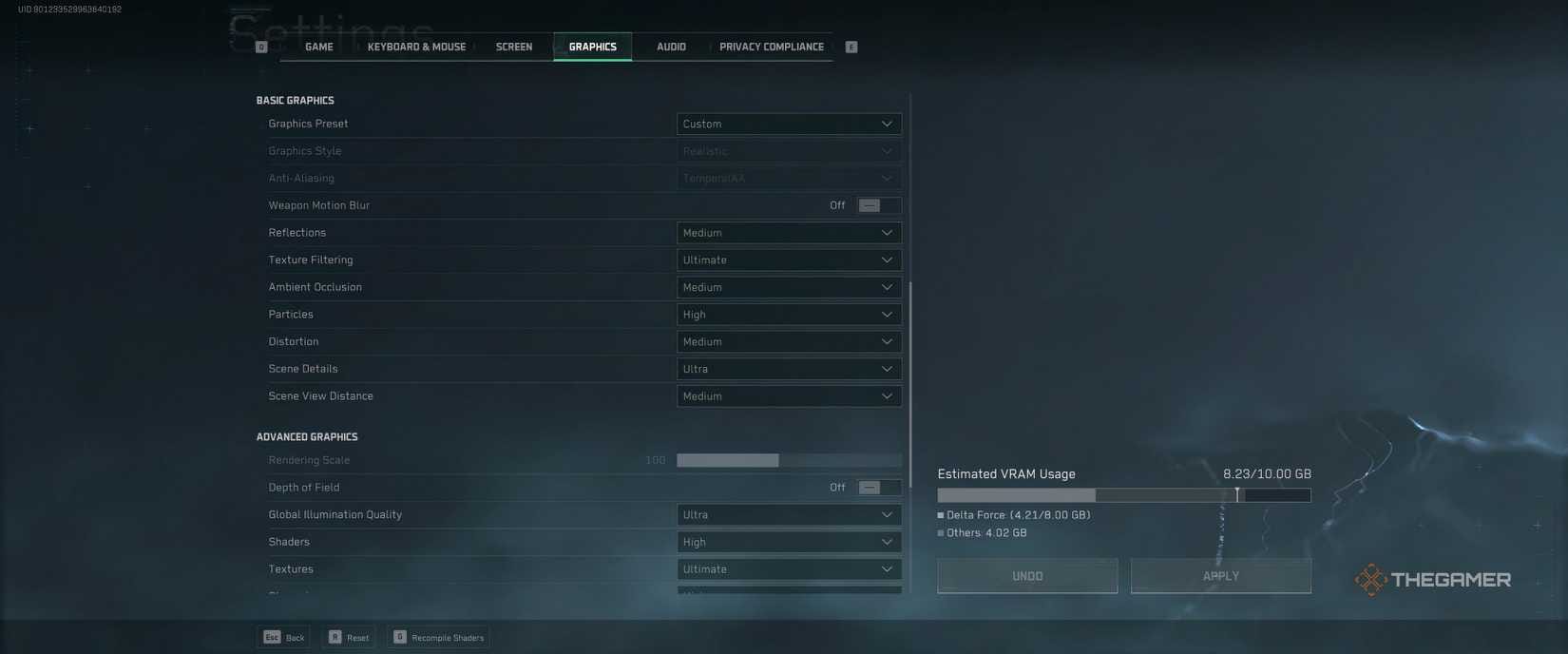
DLSS Quality or Balanced (+12% FPS). FSR Performance on AMD. Reflex + Boost on. Rendering scale 80-100%. G-Sync if you've got it. Scope magnification on.
Texture and Shadow Tweaks
Textures and shaders high. Streaming medium. Dial down scene details (+9% FPS). Cap FPS for rock-solid pacing.
Advanced Optimization Techniques
Input.ini: Set RawMouseInputEnabled=Enabled. Engine.ini: r.PostProcessAAQuality=0, r.TemporalAAEnabled=0. Nuke V_logo*.bin files (frees VRAM). Ethernet over Wi-Fi. Run as admin. Sensitivity at 5, ADS 70-80%, deadzones 5-10%.
Disable Overlays and V-Sync
Kill Steam Overlay, Xbox Game Bar, cross-play nonsense. Raw mouse on. Task Manager > Startup tab, disable junk. NVIDIA Panel > Manage 3D > Low Latency Off.
Overclocking Safely
MSI Afterburner: +50-100MHz core clock (hit 90-100% util). Pair with HAGS and Resizable BAR. Stress test first—no meltdowns.
Config File Edits
Purge Content\MoviesHD. Edit INIs as admin. Affinity to all cores (heads up: ban risk after Feb 21, 2025).
Troubleshooting Low FPS Issues
Shut down background apps. Drop presets. SSD swap. CPU needs 6+ cores. Ethernet with QoS.
Common Causes and Fixes
Stutters? 16GB RAM, motion blur off, cross-play disabled. Bottlenecks scream GPU upgrade. Fullscreen mode. Reflex on. Virtual memory 1.5x RAM.
Stutter and Crash Solutions
HDD or texture woes: SSD +60GB space. FPS cap. Ethernet. QoS priority. Disable hardware acceleration.
Monitoring FPS with Tools
MSI Afterburner for 1% lows (target 74+ on RTX 3060).
Benchmark Results and Comparisons
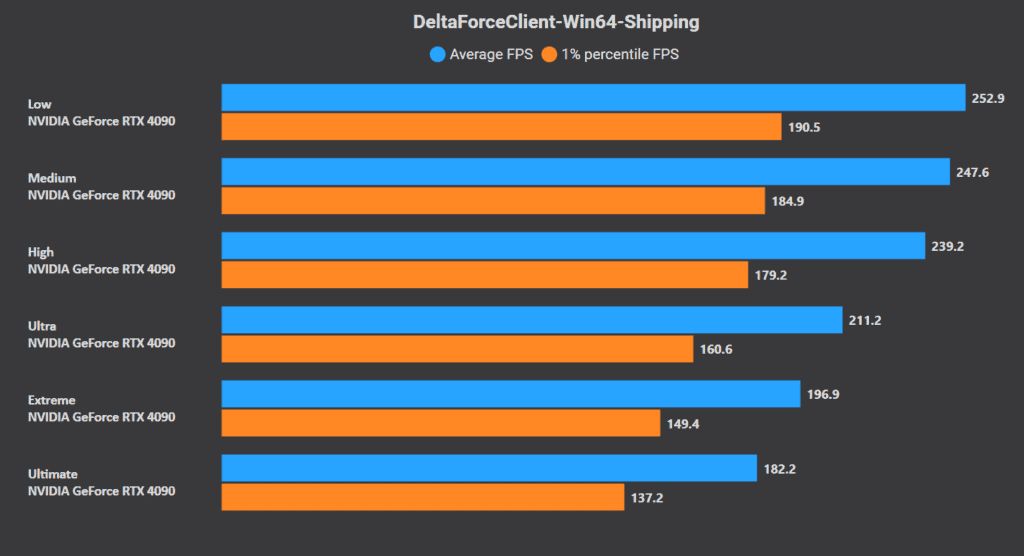
Data from real tests: RTX 3060 hits 102 FPS 1080p (143 Ultra), 90 FPS 1440p DLSS. RTX 4090? Under 60 FPS native 4K, over 155 with 8K DLSS4. RTX 4060: 124 FPS 1080p (VRAM under 4GB tanks lows). Laptops scrape 50 FPS 1080p low DLSS; desktops fly at 224 FPS 1080p Ultra native. 1080p Ultra: 224 FPS. 1440p: 211 FPS. 4K Ultimate: 182 FPS. Consoles lock 60 FPS at 1440p.
(Quick note: These are averaged from multiple runs—your mileage varies with background load.)
Future-Proofing Your Setup
RTX 3080+, 32GB RAM, Ryzen 7 7800X3D—perfect for DLC like Black Hawk Down (Feb 21, 2025). DLSS Frame Gen owns 4K/8K. Expand SSD. 7GB VRAM minimum for 1440p. Quarterly driver checks.
FAQ
What are the Delta Force PC system requirements?
Min: i3-4150/FX-6300, 8-12GB RAM, GTX 660 2GB, 60GB SSD, Windows 10 64-bit/DirectX 12.
What is the minimum GPU for Delta Force?
GTX 660/GTX 960/HD 7870 2GB VRAM (25-30 FPS low 1080p).
How to optimize Delta Force for high FPS on low-end PC?
GI/Shadows/Fog Low (+75%/15%/8% FPS), DLSS Quality, 16GB RAM, SSD; disable RT/V-Sync.
Does Delta Force support DirectX 12?
Yes, required Windows 10 64-bit+ all configs.
What RAM is needed for Delta Force?
8-12GB min (unstable), 16GB rec, 32GB 4K.
How to fix low FPS in Delta Force?
Close apps, Ethernet, Reflex On, config r.PostProcessAAQuality=0, GPU upgrade.