

Recommended Discounts
_37751.webp)
Honor of Kings Global
Official Automatic Top-up!! And get extra 100% tokens bonus on first top-up!
44.35% OFF
Related articles


Honor of Kings Advanced Targeting: Kill Marksmen First
Honor of Kings advanced targeting settings let you override the default nearest-enemy logic that wastes damage on tanks. Switch to Free Attack Mode: Advanced, set priority to Lowest HP Percentage, and master avatar lock mechanics to consistently focus the marksman instead of the frontline tank. This guide covers every toggle, key binding, and manual technique you need.
Buffget
Why Your Attacks Keep Hitting the Tank
The default system follows one rule: attack the nearest enemy. In a 5v5 team fight, that's a liability. Tanks stand at the front by design — high HP, damage mitigation, crowd control. The game doesn't distinguish between a 4,000-HP tank and a 1,800-HP marksman standing 200 units behind it.
The cost is real. Every second your assassin dumps damage into a tank is a second the enemy marksman freely shreds your backline. Team fights are frequently decided by who eliminates the enemy damage carry first — not who has better heroes. Wasting your burst window on a tank is functionally the same as not using it.
The marksman (ADC/damage carry) is almost always the highest-priority target: sustained physical damage, low base HP, no inherent tankiness. One full rotation eliminates them entirely, collapsing the enemy's sustained damage output and swinging the fight.
Advanced Targeting Settings: Full System Breakdown
Where to Find the Menu
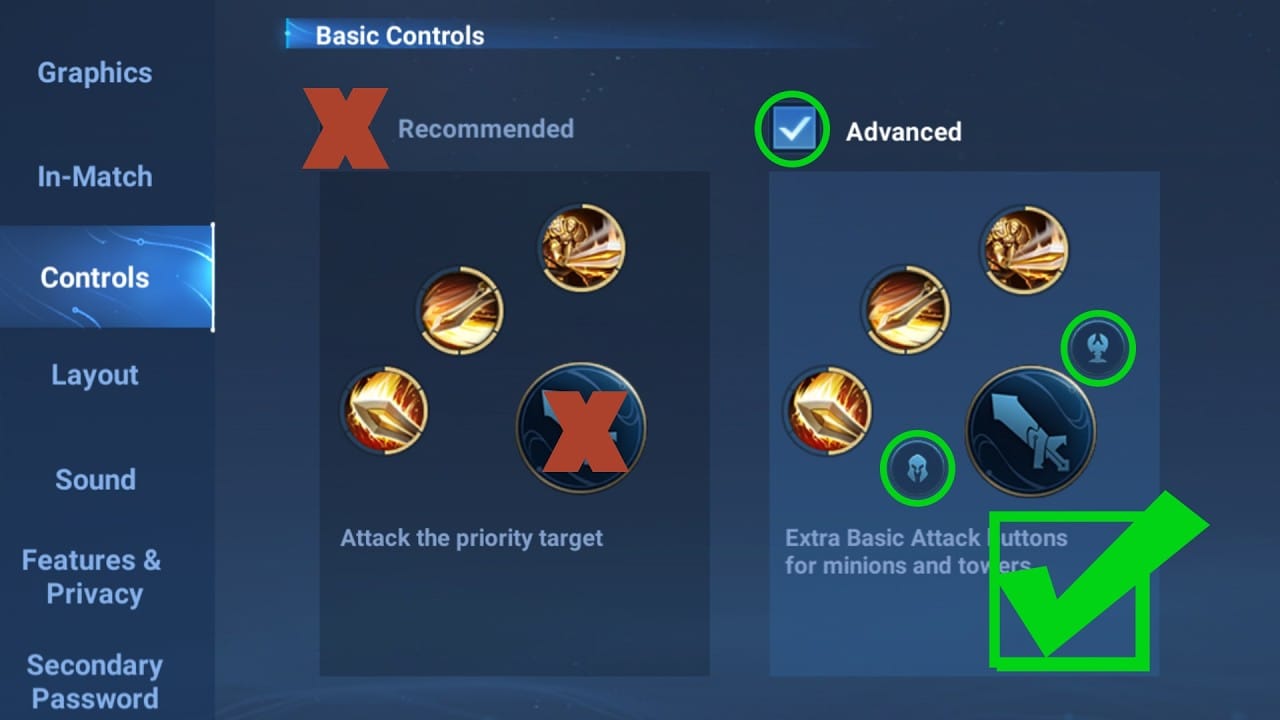
- Open Settings (gear icon, top-right corner)
- Navigate to the Controls tab
- Scroll to Attack Settings / Targeting
- Switch Free Attack Mode from default to Advanced
This is the core unlock. Without it, most priority options stay inactive.
For players building out their marksman and assassin roster, safe HOK Tokens direct top up through buffget offers competitive pricing and fast delivery.
Every Targeting Option Explained
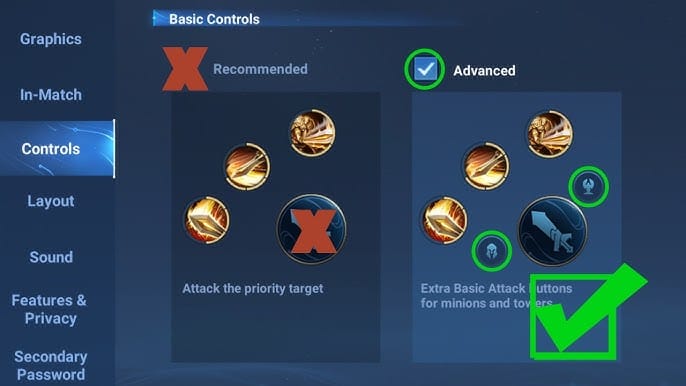
Once Advanced is active, you get three priority modes:
- Nearest Unit: Targets the closest enemy unit — hero, minion, or monster. Default behavior. Source of most tank-hitting problems.
- Lowest HP Percentage: Redirects to the enemy with the smallest remaining health percentage. Effective for finishing carries, but can pull attacks toward a 5% HP minion over a hero.
- Absolute Minimum HP: Targets the lowest raw health value. A marksman at 1,800 HP beats a tank at 30% of 5,000 HP (1,500 HP) — so this correctly identifies the marksman as the lower-value target.
Key distinction: Percentage-based priority is generally more reliable for targeting squishies because a full-HP marksman still has a lower percentage ceiling than a half-HP tank in most scenarios.
Nearest Enemy vs. Lowest HP: When to Use Each
- Nearest Enemy: Split-push or solo wave clear with no enemy heroes nearby
- Lowest HP Percentage: Assassins diving the backline, mages finishing fleeing carries
- Absolute Minimum HP: Marksmen in sustained team fights targeting the squishiest hero present
How to Configure Settings to Stop Hitting Tanks
Recommended Setup for Damage Dealers
- Free Attack Mode → Advanced
- Basic attack priority → Lowest HP Percentage
- Display Attackable Avatars → On (shows clickable portrait icons above enemies)
- Auto Basic Attack → On (hero keeps attacking after you initiate)
- Auto Chase Distance → Close-Range (prevents chasing a fleeing tank out of position)
- Basic Attack Target Selection → Off (disables automatic mid-combo target switching)
The combination of Lowest HP Percentage priority + Basic Attack Target Selection off means your hero locks onto your chosen target and doesn't re-acquire the nearest tank when the fight repositions.
Key Bindings That Separate Hero Attacks From Minion Attacks
Free Attack Mode: Advanced gives you three separate attack bindings most players never configure:
- Basic attack key: Prioritizes nearest hero or monster — use for hero combat
- Tower attack key: Exclusively attacks buildings — use during tower dives to avoid hitting heroes
- Minion attack key: Exclusively attacks minions — use for wave clear to avoid triggering enemy defensive abilities
Separating these three eliminates a massive category of mis-targeting errors caused by one button trying to do everything.
Hero Lock Mode and Its Hidden Impact on Targeting
What It Does
Hero Lock Mode forces continuous attacks on a single selected target until it dies or leaves range. It overrides your movement joystick's attack direction and commits auto-attacks to one enemy.
The problem: combined with default nearest-enemy targeting, it locks you onto the first enemy detected — almost always the tank walking into your face.
When to Enable vs. Disable
Enable when:
- Playing marksman in a structured team fight with clear sightlines to the enemy carry
- You've already manually selected the correct target via avatar click
- 1v1 duel with only one valid target
Disable when:
- Playing assassin diving through the frontline — you need fluid target switching
- Team fights involve heavy repositioning and the carry is constantly moving
- Playing AoE mage where locking one target wastes splash damage
Pro tip: If Lock Target is enabled and you've clicked the enemy marksman's avatar, the system respects your manual selection over automatic priority. That's the intended use case.
Manual Targeting: How to Focus the Marksman Mid-Fight
Avatar Lock: The Most Reliable Method
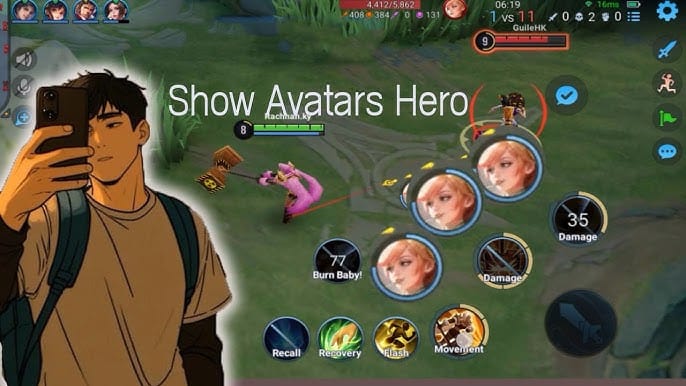
- When enemies are visible, their portrait icons appear above their heads or along the HUD edge
- Click the target's avatar to manually select that enemy — bypasses all proximity logic
- Your hero automatically attacks the selected target
- After releasing a skill, click the opponent's headshot again to re-confirm — skills can reset target selection
- In chaotic fights, click the headshot in the team fight HUD to lock onto the backline carry even when obscured by tank models
You can also drag a skill directly to a hero's avatar to aim at that target. This bypasses the tank's hitbox entirely for skillshots aimed at a marksman standing behind the frontline.
Building the Habit
- Spend 10 minutes in practice mode clicking enemy avatars instead of tapping hero models
- Before every team fight, identify the enemy marksman's portrait and pre-click it
- After each death in ranked, review whether you attacked the correct target
For players investing in high-tier marksmen and assassins, Honor of Kings Tokens top up via player ID on buffget provides a secure, fast transaction process with high user ratings from the community.
Role-Specific Settings Recommendations
Assassins: Diving the Backline
- Free Attack Mode: Advanced
- Basic attack priority: Lowest HP Percentage
- Basic Attack Target Selection: Off
- Hero Lock Mode: Off
- Auto Chase Distance: Close-Range
Mages: Landing Skills on the Right Target
- Display Attackable Avatars: On
- Use avatar drag-to-target for skillshots aimed at backline carries
- Basic attack priority: Absolute Minimum HP for finishing low-health targets between cooldowns
Marksmen: Sustained Focus Without Repositioning Errors
- Hero Lock Mode: On — but only after manually selecting the enemy carry via avatar click
- Auto Basic Attack: On
- Auto Chase Distance: Close-Range (prevents walking into the tank frontline)
- Use the minion attack key for wave clear to avoid accidentally targeting heroes during laning
Skill Aim Settings That Complement Targeting Priority
Manual skill release gives significantly more control than auto-release. With auto-release on, skills fire at the nearest detected target — defaulting back to the tank problem.
With manual release active, you control the exact moment and direction of each ability. Combined with avatar drag targeting, your burst combo lands on the marksman you selected, not the tank who walked into your skill's path at the last second.
For AoE mages, this combination prevents the common mistake of centering abilities on the tank cluster at the front rather than the squishy cluster at the back.
Common Misconceptions (Debunked)
Smart targeting always picks the highest-value target. The default system prioritizes proximity, not threat level. It has no built-in understanding of which enemy is more dangerous.
Tapping the hero model always locks attacks onto them. In crowded fights, overlapping hitboxes frequently cause wrong-target selection. Clicking the avatar portrait is significantly more reliable.
These settings only matter at high rank. Targeting errors cost games at every rank. Build correct habits early and you'll climb through Platinum and Diamond faster — that's where team fight efficiency becomes the primary differentiator.
Pre-Match Targeting Checklist for Ranked Play
Run this before every competitive game:
- ✅ Free Attack Mode → Advanced
- ✅ Basic attack priority → Lowest HP Percentage (assassins/mages) or Absolute Minimum HP (marksmen)
- ✅ Basic Attack Target Selection → Off
- ✅ Auto Basic Attack → On
- ✅ Auto Chase Distance → Close-Range
- ✅ Display Attackable Avatars → On
- ✅ Hero Lock Mode → Off for assassins / On for marksmen after manual selection
- ✅ Tower and minion attack keys bound separately from basic attack key
After every major patch (typically every 4–6 weeks), revisit these settings. Patches adjusting auto-attack behavior or targeting logic can silently reset your configuration. A 60-second check before your first ranked game post-patch prevents an entire session of mis-targeting.
FAQ
Q: How do I change targeting settings in Honor of Kings? Settings → Controls → Attack Settings. Switch Free Attack Mode to Advanced to unlock priority toggles and separate attack key bindings.
Q: Why does my hero keep attacking the tank instead of the marksman? Default logic prioritizes the nearest enemy. Tanks position at the front, making them the closest target. Switch to Lowest HP Percentage priority and use avatar lock to manually select the marksman.
Q: What is Hero Lock Mode and should I turn it off? It locks attacks onto a single selected target. Turn it off for assassins who need fluid target switching. Keep it on for marksmen only after manually selecting the correct target via avatar click.
Q: How do I manually select a specific enemy in a team fight? Click the enemy's portrait avatar in the HUD. More reliable than tapping the hero model directly — especially in crowded fights where hitboxes overlap.
Q: Can I set Honor of Kings to always attack the lowest HP enemy? Yes. In Free Attack Mode: Advanced, set priority to Lowest HP Percentage or Absolute Minimum HP. The percentage option is generally more reliable for targeting squishies over tanks.
Q: Do these settings need updating after patches? Yes. Check after every major patch — updates can alter your saved configuration. A 60-second review before your first ranked game post-patch is all it takes.