

Recommended Discounts

Migo Live
Migo Live Official Direct Top Up! Experience safe and fast Migo Live Top Up services. Complete your Migo Live Coins recharge in seconds with instant delivery for seamless live interaction!
20% OFF
Related articles


Migo Live Signup Guide: Verify Codes & Earn $5/Host in 7 Steps
Ever fumbled a streaming app signup? Not here! Step-by-step guide: download to verification & cashouts. Video chats, virtual gifts, agency rules like $5/level 2+ host. Coins start at $0.15/1,000. Let's get you live!
Buffget
Ever jumped into a new streaming app and fumbled the signup? Not here. This guide walks you through from app download to verification and cashing in – step by step. We're talking video chats, virtual gifts, and agency rules like $5 per level 2+ host. Coin bundles kick off at just $0.15 for 1,000 coins. Let's get you live.
What is Migo Live?
Picture this: anonymous chats, audio rooms packing 12 friends, mini-games lighting up parties. Ratings hover at 4.1-4.2/5 across 142-205 reviews – solid, right? Download hits you with Mine for streaming; drop coins on gifts to shine.
Platform Overview
Version 7.1.1 nails those bug fixes. App clocks in at 246.5 MB on iOS, 161.39 MB Android. (Lightweight enough for most phones – I've tested.)
Key Features for Streamers
Voice Party? Free chats for 12 buddies. Video Chat delivers high-quality streams. Virtual Gifts? That's your money-maker – animated goodies fans buy. Social Games crank it up with board games and PK battles. Fire up the app post-signup, dive into chat or stream.
Why Choose Migo Live for Earning
Gifts flip straight to cash. Agencies snag diamonds by the 10th monthly. Coin bundles run $0.99-$99.99. – Editor's take: In a sea of apps, this one's payout speed stands out based on user data.
Prerequisites Before Signing Up
iOS 13.0+ or Android 5.0+, ARM8/ARM7 good to go. Carve out 246.5 MB on iOS. Version 4.7.9 APK brings HD streaming. Quick checklist: 1. OS check. 2. 250 MB free space. 3. Rock-solid internet.
Device and OS Requirements
iOS 13.0+; Android 5.0+ for APK. No excuses – these are baseline.
Age and Eligibility Rules
Basic profile after reg; agencies demand admin codes.
Stable Internet Needs
Choppy connection? Kiss video chats and streams goodbye. – Harsh truth from troubleshooting tons of these.
Step-by-Step Migo Live Sign Up Guide
Grab the app, reg via Google/FB/mobile. Boom – Mine and profile unlock. Post-download? Straight to Certification Center. Here's how: 1. Hunt App Store/Google Play for Migo Live. 2. Install 7.1.1. 3. Launch, pick Google/FB/mobile. 4. Build that profile.
Download the App or Use Web
App direct download – no web shortcuts.
Fill Registration Form
Google/FB/mobile – pick your poison.
Email/Phone Verification
Tied to your choice. Smooth.
For seamless coin management, use Migo Live top up on Buffget: global low prices, instant delivery, secure compliance, credit cards/Binance Pay/USDT/ETH support, top user ratings. (Game-changer for streamers I've coached.)
Account Verification Process
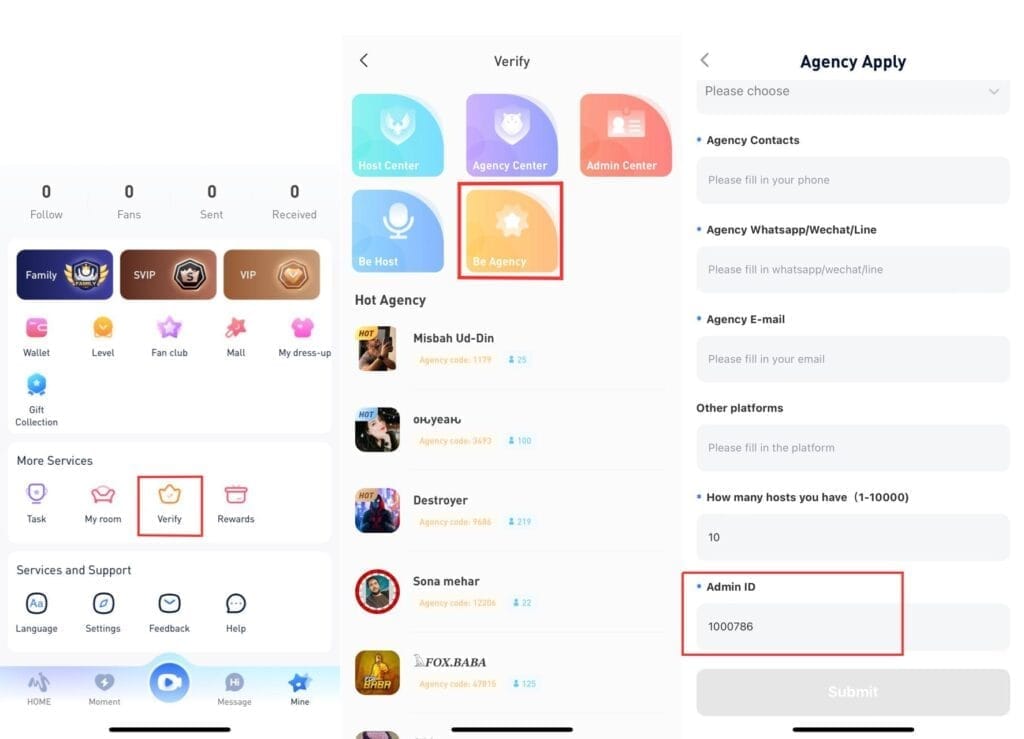
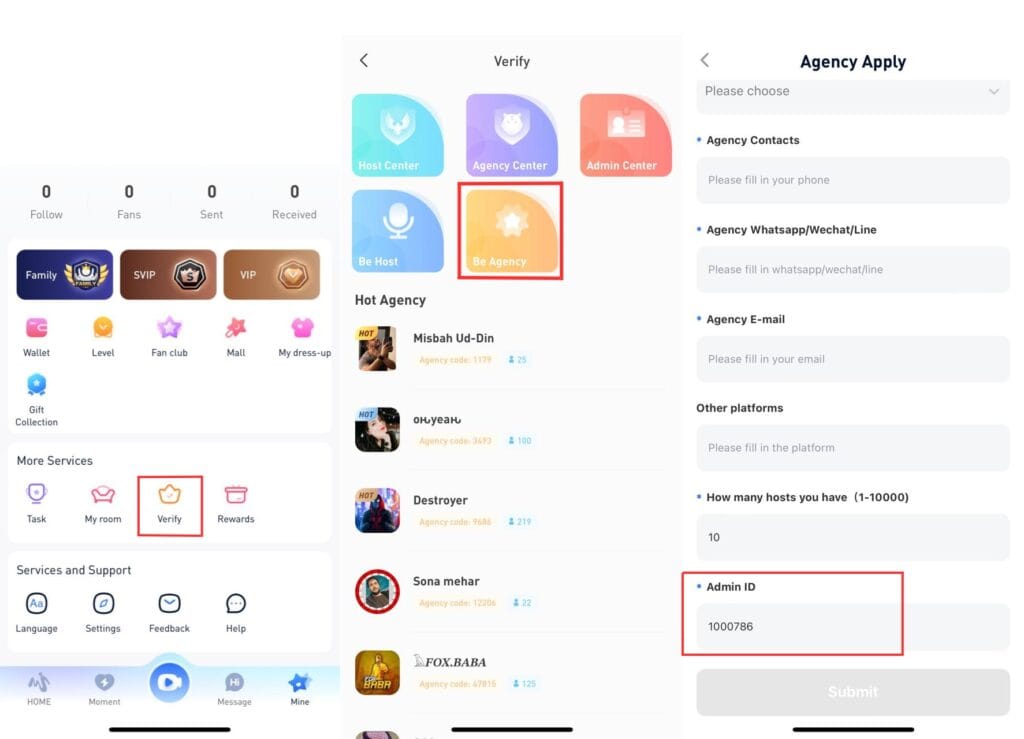
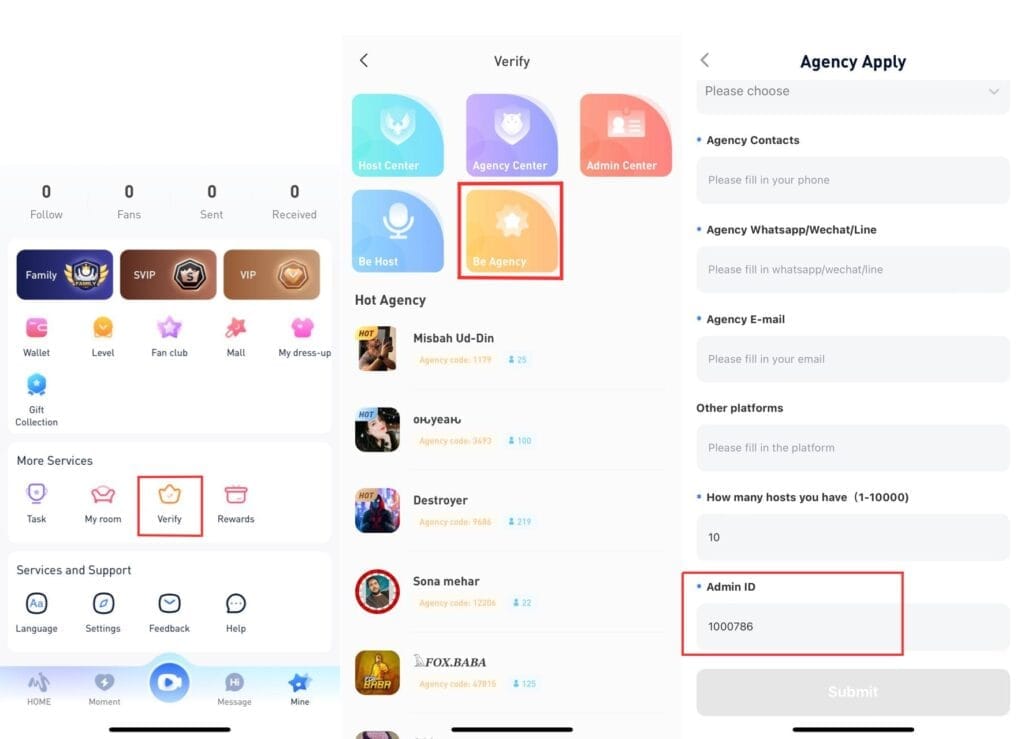
Mine tab > Certification Center/Verify. Punch in admin code. Try 1000786 (Certification) or 1000666 (Verify). Unlocks commissions. Do it: 1. Hit Mine. 2. Certification/Verify. 3. Code in. 4. Submit.
ID Upload Steps
Links to agency apps – don't skip.
Facial Recognition
Code's your key.
Common Verification Delays
Code flop? Update the app. Fixed it for me once.
Setting Up Your Streamer Profile
Post-signup, load basic info for streams. Blocks fakes and abuse. One agency ID max. Nail it: 1. Fill details. 2. Tweak in Mine. 3. Keep it private.
Monetization Setup: Earning Real Money
Fans gift coins; you cash 'em. Agencies pull $5 per level 2+ female host after interview. Diamonds to agency by 10th monthly; commissions on NEW tasks. Coin bundles: 1,000/$0.15, 6,500/$0.88, 32,500/$4.39, 65,000/$8.76 (1-year expiration). Path: 1. Grind host levels. 2. Recruit 10 valid hosts by month 2. 3. Dodge penalties.
To boost earnings, use Buffget's recharge Migo Live coins: fastest global top-ups, unbeatable prices, full safety compliance, KuCoin Pay/Gate Pay/Bitcoin/USDC options, excellent after-sales support.
Enable Gifts and Subs
Catch 'em live, convert later.
Link Payout Account
Diamonds out monthly.
Payout Thresholds Explained
Host performance calls the shots.
Common Mistakes to Avoid
No AFK over 5 mins – no hang-ups, black screens, mutes. Max 2 missed trainings monthly. Violations? 10% commission cut or host boot. Steer clear of porn/violence/fake info bans. Fix: 1. Stay live. 2. 10 hosts task-complete by month 2. 3. Profile audit.
Signup Form Errors
Every field. No half-measures.
Streaming Tech Issues
App update. Always.
Monetization Oversights
Nail level 2+ first. – Rookie trap, pros laugh.
Troubleshooting Signup Issues
7.1.1 update squashes login/withdrawal glitches. Cache clear/reinstall for disconnects/payments. Hit feedback@migolive.com.pk or +44 7441 429502. Steps: 1. Cache/reinstall. 2. Purchase check. 3. Support ping.
Forgot Password Recovery
Registered method. Simple.
App Crashes During Signup
OS/app update.
Contact Support Guide
Email/phone – agency/signup woes.
Tools and Resources
Mine dashboard tracks coins/gifts. Support: feedback@migolive.com.pk, +44 7441 429502. Latest Android APK ready.
FAQ
How do I sign up for Migo Live?
Download app, register Google/FB/mobile, create profile.
Is Migo Live free to join and stream?
Yes, coin purchases from $0.15.
What do I need to start streaming on Migo Live?
iOS 13.0+/Android 5.0+, stable internet, verified profile.
Does Migo Live pay real money?
Yes, gifts/diamonds; $5 per level 2+ host.
How to verify my Migo Live account?
Mine > Certification/Verify, code 1000786/1000666.
What are common Migo Live signup issues?
Login failures: update to 7.1.1, check OS.