

Recommended Discounts

Migo Live
Migo Live Official Direct Top Up! Experience safe and fast Migo Live Top Up services. Complete your Migo Live Coins recharge in seconds with instant delivery for seamless live interaction!
20% OFF
Related articles


Migo Live Top Up Malaysia: TNG & Bank Payment Guide 2026
Malaysian and Middle Eastern Migo Live users can now purchase coins using TNG eWallet and local bank transfers through platforms supporting 700 payment methods across 123 currencies. This guide covers Touch n Go payments, FPX-enabled bank transfers from Maybank, CIMB, Public Bank, plus UAE and Saudi Arabia banking options with fee structures, transaction limits, and troubleshooting.
Buffget
Understanding Migo Live Payment Options in Malaysia & Middle East
Migo Live top up now supports regional currencies: Malaysian Ringgit (RM), UAE Dirham (د.إ), Saudi Riyal (﷼), and Kuwaiti Dinar (KD). Packages range from 1,000 to 650,000 Coins.
Malaysian pricing:
- 1,000 Coins: RM0.70
- 6,500 Coins: RM4.00
- 65,000 Coins: RM40
- 130,000 Coins: RM80
- 650,000 Coins: RM400
Middle East pricing:
- Saudi Arabia: 0.56﷼ per 1,000 Coins
- UAE: 0.55د.إ per 1,000 Coins
Local payment eliminates currency conversion fees (typically 2-3%). For a 65,000 Coins purchase at RM40, you save RM0.80-RM1.20 per transaction.
For competitive rates and instant delivery, buffget offers Migo Live top up with TNG eWallet and major Malaysian banks, delivering in 1-5 minutes.
Why Local Payment Methods Matter
Three key advantages:
- Faster processing: TNG completes in 1-5 minutes
- Lower fees: Zero conversion markup
- Enhanced security: Bank Negara Malaysia and UAE Central Bank compliance
FPX (Financial Process Exchange) connects directly to Malaysian banking systems without intermediary delays. Regional methods provide consumer protection absent in some international processors.
TNG eWallet and Bank Transfer Overview
Touch n Go eWallet:
- Malaysia's leading digital payment (45% market share)
- 280,000+ merchant touchpoints
- Real-time QR code or app integration
FPX Gateway:
- Connects 23 Malaysian banks
- Processes 2.3 million daily transactions
- 99.2% uptime
- Major banks: Maybank, CIMB, Public Bank, RHB, Hong Leong, AmBank
Middle East systems:
- UAE: Emirates NBD, ADCB, First Abu Dhabi Bank
- Saudi Arabia: Al Rajhi Bank, National Commercial Bank via SADAD
- 78% of UAE retail banking is digital
Regional Payment Landscape
Malaysia: eWallet adoption leads (TNG 45% market share), FPX second most popular online payment method.
Middle East: Stronger preference for direct bank transfers. UAE Dirham fixed at 3.6725 AED/USD, Saudi Riyal at 3.75 SAR/USD provides pricing stability.
Currency considerations: Malaysian Ringgit fluctuates 2-3% annually. Kuwaiti Dinar (1 KD = 3.27 USD) makes USD pricing occasionally more favorable despite conversion fees.
Complete Guide to TNG eWallet Top Up
Prerequisites:
- Verified TNG account
- Sufficient eWallet balance
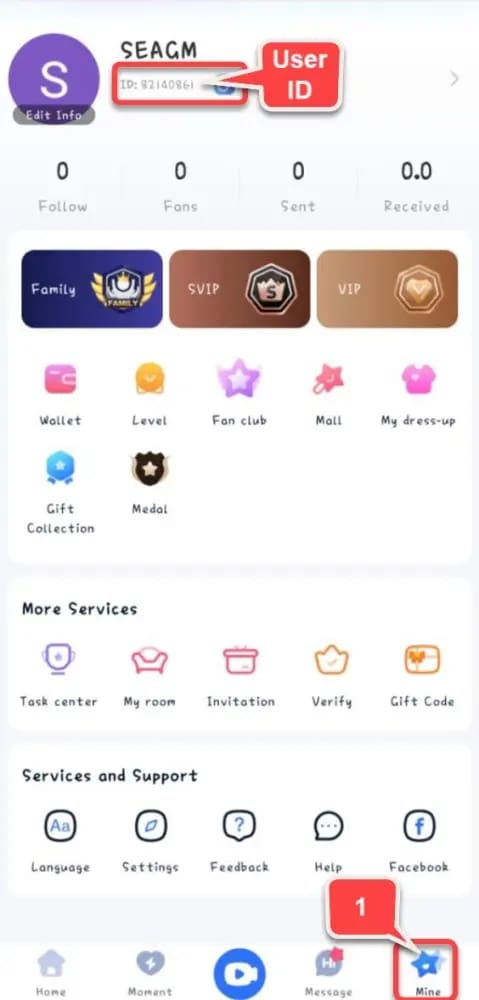
- Migo Live User ID (3-20 digits under profile nickname)
Find your User ID: Open Migo Live app → Profile/Mine icon → copy numeric digits under nickname. No spaces or special characters.
Check buffget's Migo Live diamonds price comparison for real-time rates before purchasing.
Step 1: Preparing Your TNG Account
Balance check: TNG app home screen displays available balance. Reload via:
- Linked bank accounts
- Credit cards
- Cash deposits at 7-Eleven, 99 Speedmart, MyNews
eKYC verification: Upload MyKad/passport plus selfie. Processes within 24 hours. Unlocks higher transaction limits.
Enable biometric authentication: Reduces checkout from 45 to 15 seconds while maintaining PCI-DSS security standards.
Step 2: Accessing Payment Interface
Select coin package, enter User ID carefully (no refunds for incorrect entries), review order summary showing coin quantity, User ID, and total RM amount.
Pro tip: Copy-paste User ID directly from profile to avoid transcription errors. Incorrect User ID accounts for 23% of support inquiries.
Step 3: Selecting TNG Payment
Choose TNG eWallet from payment dropdown. System redirects to TNG's secure gateway.
Authorization screen displays:
- Merchant details
- Transaction amount
- Current eWallet balance
Authorize using TNG PIN, biometric, or TAC (Transaction Authorization Code). Processes in 3-8 seconds.
Step 4: Completing Transaction
TNG generates digital receipt with transaction ID, timestamp, merchant details, amount. Screenshot immediately for dispute proof.
Delivery time: 1-5 minutes (standard), 15-30 minutes during peak hours (8-11 PM MYT).
Verify receipt: Migo Live app → My/Mine → Wallet → Transaction Record. Check coin quantity, timestamp, Completed status.
TNG Fees and Limits
Fees:
- Below RM500: Zero fees
- Above RM500: 1% processing fee
Transaction limits:
- Basic accounts (unverified): RM1,500 daily, RM5,000 monthly
- Premium accounts (eKYC): RM10,000 daily, RM30,000 monthly
- Single transaction max: RM5,000
Space multiple large purchases 5-10 minutes apart to avoid fraud detection.
Malaysian Bank Transfer Methods
FPX enables direct account-to-account payment supporting 23 banks. Real-time processing during banking hours (9 AM-5 PM weekdays).
Advantages:
- Higher limits (up to RM30,000)
- No eWallet balance management
- Consolidated banking records
Processing: 5-15 minutes during banking hours, 30-60 minutes outside.
Maybank2u Process
Malaysia's largest online banking (8.2 million users).
Steps:
- Login to Maybank2u
- Navigate to Pay → FPX/Online Payment
- Enter payment amount
- Authorize via Secure2u app or SMS TAC
- Record 16-digit FPX transaction ID
Fees: Zero for transactions below RM10,000.
CIMB Clicks Payment
4.1 million active users, 98.7% success rate (2025 data).
Process:
- Access CIMB Clicks (web/mobile)
- Select Pay & Transfer → Pay Bills/Online Payment
- Confirm pre-filled merchant details
- Authorize transaction
OCTO app: Reduces transaction time from 90 to 45 seconds with biometric authentication.
Public Bank PBe Banking
Features:
- Transaction signing and dual-factor authentication
- Daily limits: RM10,000 (standard), RM30,000 (Premier)
- RM0.50 flat fee per FPX transaction
- 24/7 customer service: 1-800-22-5555
Confirmation via SMS within 30 seconds, email receipt follows.
FPX Gateway Details
Malaysia's national payment gateway connecting 23 banks to 45,000+ merchants. Processes 2.3 million daily transactions, 99.2% uptime.
How it works:
- Select bank from dropdown
- Redirect to bank's secure login
- End-to-end encryption maintained
- Unique reference number links bank debit to merchant credit
Bank Transfer Processing and Fees
Processing times:
- Maybank/CIMB: 5-8 minutes (banking hours)
- Smaller banks: 15-20 minutes
- Weekend/holidays: Queue until next business day (24-48 hour delay)
Fee comparison:
- Zero fees: Maybank, CIMB, RHB
- Flat fees: Public Bank (RM0.50), Hong Leong (RM0.30), AmBank (RM1.00)
- For RM40 purchase: 0.75-2.5% additional cost
Daily limits: RM5,000 (basic) to RM30,000 (premier accounts).
Middle East Local Bank Payments
Each country maintains independent payment networks with region-specific gateways.
UAE Banking: Emirates NBD, ADCB, FAB
Emirates NBD:
- 14 million customers
- 24/7 digital banking
- Processes in AED (no conversion fees)
Transaction limits: 50,000 AED daily for verified accounts (sufficient for 650,000 Coins at ~146 AED).
Security: Two-factor authentication required for transactions exceeding 1,000 AED (adds 15-30 seconds).
Saudi Arabia: Al Rajhi, NCB
Al Rajhi Bank:
- Saudi Arabia's largest Islamic bank (10 million customers)
- Processes via SADAD payment system
- Pricing: 0.56﷼ per 1,000 Coins
Saudi National Bank (formerly NCB):
- Alahlionline platform
- 5-10 minutes during business hours
- 30-60 minutes outside standard times
Absher verification: Required for transactions exceeding 5,000 SAR (adds 2-3 minutes first time).
Qatar and Kuwait Integration
Qatar: Qatar National Bank, Commercial Bank of Qatar use Visa/Mastercard networks (1.5-2.5% fees).
Kuwait: National Bank of Kuwait, Gulf Bank use KNET domestically, international card networks for cross-border. Pricing: 0.05 KD per 1,000 Coins.
Processing: 10-20 minutes due to international fraud screening.
Currency Conversion Considerations
USD vs local pricing comparison (650,000 Coins):
UAE:
- USD pricing: $87.64 = ~322 AED (conversion)
- Direct AED: 358 AED (650 × 0.55)
- Premium: 11% for local currency convenience
Saudi Arabia:
- USD pricing: $87.64 = ~329 SAR
- Direct SAR: 364 SAR (650 × 0.56)
- Premium: 10.6%
Kuwait:
- USD pricing: $87.64 = 26.8 KD
- Direct KWD: 32.5 KD (650 × 0.05)
- USD saves 21% despite conversion fees
Payment Method Comparison
Speed Rankings
- TNG eWallet: 2-4 minutes average
- Malaysian banks (FPX): 5-15 minutes (banking hours), Maybank/CIMB fastest
- UAE banks: 8-12 minutes
- Saudi SADAD: 10-20 minutes
- Qatar/Kuwait: 30-45 minutes
Weekend/holiday bank transfers may delay 24-48 hours.
Fee Structure Analysis
Zero fees:
- TNG eWallet (below RM500)
- Maybank, CIMB, RHB, Hong Leong Bank (FPX)
Flat fees:
- Public Bank: RM0.50
- AmBank: RM1.00
- Affin Bank: RM0.30
Percentage fees:
- Middle East banks: 1.5-2.5% (UAE lower at 1.5-1.8%)
- Some smaller Malaysian banks: 0.5% with RM2-5 caps
Transaction Limits Summary
TNG eWallet:
- Basic: RM1,500 daily, RM5,000 monthly
- Premium: RM10,000 daily, RM30,000 monthly
- Single max: RM5,000
Malaysian banks:
- Standard: RM5,000-10,000 daily
- Premier: RM30,000-50,000 daily
- Single max: RM30,000
Middle East banks:
- UAE: 50,000-100,000 AED daily
- Saudi: 50,000-75,000 SAR daily
- Kuwait: 10,000-15,000 KD daily
Security Features
TNG eWallet:
- Biometric authentication
- Device binding
- Transaction PIN
- Real-time fraud monitoring
- RM100,000 annual insurance (report within 24 hours)
Malaysian banks:
- Bank Negara Malaysia oversight
- Provisional credits within 10 business days for disputes
- FPX audit trails
Middle East banks:
- Central Bank cybersecurity standards
- Two-factor authentication
- SAMA regulations (Saudi)
- Absher integration for high-value transactions
Maximizing Value
Payment Method Bonuses
Some platforms offer:
- First-time TNG users: 5-10% bonus coins
- Bank transfer promotions: 3-5% bonuses
- Seasonal promotions (Ramadan, Chinese New Year): 20-25% bonuses
Requirement: Matching User ID and payment account names for bonus eligibility.
Optimal Purchase Amounts
Per-coin value comparison:
- 650,000 Coins (RM400): 0.062 sen per coin
- 1,000 Coins (RM0.70): 0.070 sen per coin
- Bulk saves 11%
Calculate monthly consumption:
- Daily gifting (2,000 Coins): 60,000 monthly
- VIP membership: 10,000-50,000 quarterly/monthly
- Special events: 20,000-50,000 during promotions
Strategy: Purchase 1-2 months' usage during bonus events. Example: 80,000 monthly consumption → buy 130,000 Coins (RM80) during 15% bonus = 149,500 effective coins at 0.054 sen each.
Promotional Timing
Major promotion windows:
- Monthly first week (1st-7th): First purchase bonuses
- Mid-month (15th-17th): Flash sales
- Month-end (28th-31st): Bonus coin offers
- Holiday periods: Enhanced bonuses
Flash sales last 24-48 hours with limited inventory. Set calendar reminders and maintain sufficient balance.
Using buffget for Enhanced Benefits
buffget aggregates 700 payment methods across 123 currencies with:
- 98% of transactions delivered in 1-5 minutes
- 24/7 customer support
- Real-time price comparison tools
- Encrypted payment processing
- PCI-DSS compliance
- Transaction insurance
Troubleshooting Common Issues
Failed Transaction Causes
Insufficient funds (40% of failures): Verify balance before purchase. Maintain RM5-10 buffer for fee variations.
Incorrect User ID (25%): No refunds for user errors. Copy-paste from profile, don't manually type.
Network timeouts (15%): If authorization freezes beyond 60 seconds, wait 5 minutes. Check transaction history before retrying to avoid duplicate payments.
Solutions:
- Verify available balance
- Double-check User ID
- Wait 5 minutes after timeout
- Check transaction history for debit confirmation
Payment Pending Status
Pending typically resolves within 30 minutes. Check payment history to verify funds debited.
Extended pending (beyond 60 minutes):
- Retrieve transaction reference number
- Contact customer support
- Don't initiate duplicate payments
Coins Not Received
Verification steps:
- Check bank/eWallet for debit entry
- Confirm in Migo Live: My/Mine → Wallet → Transaction Record
- Wait 60 minutes before contacting support
Contact support with:
- Transaction reference number
- Payment timestamp
- User ID
- Purchase amount
- Payment confirmation screenshot
Resolution: 2-4 hours (business hours), 24 hours (outside).
Bank Rejection Reasons
Common causes:
- Daily limit exceeded (35%)
- Suspected fraud (30%)
- Insufficient funds (20%)
- Technical errors (15%)
Fraud detection solutions:
- Contact bank to whitelist merchant
- Temporarily increase fraud thresholds
- Takes 5-15 minutes via phone support
Two-factor authentication failures (12%):
- Ensure registered mobile receives SMS OTP
- Use app-based authentication (Maybank Secure2u, CIMB OCTO) when traveling
When to Contact Support
Contact when:
- Payment debited but no coins after 60 minutes
- Transaction failed but funds debited
- Repeated failures despite correct information
- Bonus coins not credited
Prepare:
- Transaction reference number
- Exact timestamp
- User ID
- Purchase amount
- Payment confirmation screenshot
- Wallet screenshot showing missing coins
Support channels:
- Live chat: 5-15 minutes (fastest, 9 AM-6 PM)
- Email: 24-48 hours
- Phone: High-value transactions
Security Best Practices
Protecting Banking Information
Never share:
- TNG PIN
- Banking passwords
- SMS OTP codes
Legitimate support only requires User ID, never payment credentials.
Password security:
- Use unique, complex passwords
- Enable biometric authentication
- Set transaction notifications (SMS/push alerts)
- Review transaction history regularly
Recognizing Legitimate Interfaces
Security indicators:
- HTTPS padlock icon
- Official bank/eWallet branding
- Correct domains (maybank2u.com.my, touchngo.com.my)
Red flags:
- Similar but incorrect domains (maybank2u-secure.com)
- Different payment amounts at authorization
- Requests for full card details for FPX/TNG
Transaction Records
Best practices:
- Screenshot all receipts
- Organize by date and platform
- Cloud storage backup (Google Drive, iCloud)
- Verify receipt details match transaction
- Reconcile against bank statements monthly
Most banks allow disputes within 60-90 days.
Common Scams
Phishing messages:Payment failed, click to retry links to fake pages. Access payment only through official app/website navigation.
Fake support: Social media accounts requesting transaction screenshots enable fraudulent refund claims. Share details only through official channels.
Fake bonuses: Promotions requiring upfront payments or credentials. Legitimate bonuses credit automatically.
Advanced Tips
Recurring Payment Setup
While Migo Live lacks native subscriptions:
- Set monthly calendar reminders
- Use TNG Favorites for one-tap access (reduces checkout from 90 to 30 seconds)
- Schedule monthly transfers to TNG for consistent balance
Managing Multiple Methods
Recommended combination:
- TNG eWallet (speed)
- Maybank FPX (high limits)
- Credit card (international backup)
Payment decision matrix:
- Small (<RM50): TNG (zero fees, fastest)
- Large (>RM200): Bank transfer (higher limits)
- Promotions: Method specified in terms
- Urgent: TNG (fastest delivery)
Store credentials in password managers (1Password, Bitwarden).
Tracking Spending
Monthly analysis:
- Export transaction reports from TNG/banking apps
- Consolidate into spreadsheet
- Calculate average monthly expenditure
- Identify seasonal patterns
- Set budget alerts
Categorize by purpose:
- Regular gifting
- VIP membership
- Special events
- Seasonal bundles
Use banking app budgets with real-time tracking.
Mobile vs Desktop
Mobile advantages:
- 40% faster (biometric authentication)
- Saved credentials
- Best for routine purchases
Desktop advantages:
- Better for first-time setup
- Easier User ID verification
- Simplified screenshot management
- Multi-tab comparison shopping
Optimal workflow: Setup on desktop, routine purchases on mobile.
Regional Regulations
Malaysian Financial Regulations
Governing laws:
- Payment Systems Act 2003
- Financial Services Act 2013
TNG eWallet: Operates under e-money license requiring segregated customer funds (protects balances if company faces difficulties).
Transaction monitoring: Banks flag suspicious patterns (multiple large transactions, rapid funding/withdrawal). Legitimate purchases rarely trigger alerts, but >RM5,000 may receive verification calls.
Middle East Compliance
UAE Central Bank:
- Two-factor authentication for >1,000 AED
- Transaction monitoring for >35,000 AED
SAMA (Saudi Arabia):
- Absher integration for high-value transactions
- Government-backed validation
Qatar/Kuwait: Similar frameworks emphasizing traceability. Maintain records for 12 months minimum.
Tax Implications
Malaysia: 6% Sales and Service Tax (SST) may apply depending on platform registration. Most international platforms don't collect SST on virtual goods.
Middle East VAT:
- UAE: 5%
- Saudi Arabia: 15%
- Other GCC countries: Varies
Registered platforms display tax-inclusive pricing.
Business users: Maintain proper documentation (official receipts with merchant details, dates, amounts, payment methods) for expense claims.
FAQ
How do I top up Migo Live using TNG eWallet in Malaysia?
Select coin package, enter User ID (3-20 digits from profile), choose TNG eWallet, authorize with PIN/biometric. Coins deliver in 1-5 minutes. Packages: RM0.70 (1,000 Coins) to RM400 (650,000 Coins). Ensure sufficient balance first.
What Malaysian banks support Migo Live purchases?
All 23 FPX-connected banks: Maybank, CIMB, Public Bank, RHB, Hong Leong, AmBank, Affin, Alliance. Maybank/CIMB offer zero fees, fastest processing (5-8 minutes). Public Bank charges RM0.50 flat fee. Limits: RM5,000-30,000 daily depending on account type.
Is TNG faster than bank transfer?
Yes. TNG averages 2-4 minutes vs bank FPX 5-15 minutes (banking hours). TNG processes real-time without interbank delays. But banks offer higher limits (RM30,000 vs TNG's RM10,000 daily) and consolidated records.
What are Migo Live top up fees in Malaysia?
TNG: Zero fees below RM500. Maybank/CIMB/RHB FPX: Zero fees. Public Bank: RM0.50, AmBank: RM1.00, Hong Leong: RM0.30 per transaction. Represents 0.1-2.5% additional cost.
Can I use Middle East banks for Migo Live?
Yes. UAE: Emirates NBD, ADCB, FAB (0.55د.إ per 1,000 Coins). Saudi: Al Rajhi, Saudi National Bank via SADAD (0.56﷼ per 1,000). Qatar/Kuwait: International card networks (1.5-2.5% fees). Processing: 8-45 minutes depending on country.
What if my payment fails?
Verify sufficient funds and daily limits. Check transaction history for debit—if debited but no coins after 60 minutes, contact support with transaction reference. If genuinely failed, wait 5 minutes before retry. Common causes: incorrect User ID (no refunds), network timeout, fraud detection requiring bank whitelisting.
Ready to top up instantly? Visit buffget for fastest, most secure payments with exclusive bonuses for Malaysian and Middle East users. More coins, lower costs, seamless TNG and local bank support!