

Recommended Discounts

PUBG Mobile UC (Global)
Official Midasbuy Partner. Get 30% OFF UC Top Up. Not for Japanese / Korean / Taiwan / Vietnam servers. Fast, secure, and the lowest price guaranteed.
29.4% OFF
Related articles


PUBG Mobile 120 FPS Devices 2026: Best Competitive Phones
Summary: PUBG Mobile supports 120 FPS on select high-end devices including the Samsung Galaxy S24 series, Xiaomi 14, iPhone 13 Pro and newer, and gaming phones like RedMagic 9. Officially supported since version 3.2 (May 2026), this feature requires a Snapdragon 8 Gen 2+ or equivalent chipset, 8GB+ RAM, and a 120Hz display. Enabling 120 FPS reduces input lag to 28-35ms and frame time to 8.3ms, providing a significant competitive edge in recoil control and reaction time.
Buffget
Why 120 FPS is the Standard for Competitive Play in 2026
120 FPS is now the baseline for high-tier play. This frame rate doubles visual updates compared to standard 60 FPS, reducing frame time to just 8.3ms versus 16.7ms. For competitive players, this means superior target tracking and smoother visual transitions during fast rotations. The difference isn't just aesthetic; it provides a tangible mechanical advantage in close-quarters combat.
The most critical impact is reduced input lag. At 120 FPS, input lag drops to approximately 28-35ms, whereas 90 FPS hovers around 45-50ms. This 15-20ms improvement allows for faster peeking mechanics and quicker reactions to enemy movements. In a game where milliseconds determine the winner of a duel, this latency reduction is often the deciding factor between securing a kill and getting knocked.
Achieving this performance requires top-tier hardware, but having the right in-game equipment is equally vital. To acquire the latest weapon skins or battle pass tiers without delay, many players prefer to use PUBG Mobile recharge services on buffget, which offers competitive pricing and instant delivery to enhance your gameplay experience.
Pro tip: The Vulkan API, mandatory for 120 FPS on many devices, boosts performance by 10-15%, ensuring the CPU doesn't bottleneck the GPU during explosions or smoke rendering.
Visual Clarity and Recoil Control Higher frame rates make recoil patterns appear smoother and more predictable. At 60 FPS, visual steps between frames can make vertical recoil feel jerky, leading to over-correction. At 120 FPS, these steps are halved, allowing for precise micro-adjustments using the gyroscope or thumb. This is particularly beneficial when using high-recoil weapons like the M762 or Beryl M762 in full-auto mode.
Minimum Requirements for 120 FPS Support
Not all devices can sustain 120 FPS due to the heavy processing load. The game demands specific hardware specifications to maintain stability without overheating or draining the battery instantly.
Key Hardware Needs:
- RAM: Minimum 8GB (12GB is the sweet spot for multitasking).
- Storage: UFS 3.0+ required to load textures quickly without stuttering.
- Battery: 5000mAh+ recommended to counteract high power consumption.
- Display: Must support 120Hz+ refresh rate.
Android Chipset Criteria The barrier to entry is strictly defined by the processor. The minimum requirement is a Snapdragon 8 Gen 2+ with an Adreno 740+ GPU. This ensures the device can handle the graphical load while maintaining thermal efficiency. Equivalent flagship chipsets from the same generation (like Dimensity 9200/9300 series) found in devices like the Vivo X series or OnePlus 12 are generally capable, provided they support the Vulkan API.
iOS Device Generations Apple's integration allows broader support within its Pro lineup. The iPhone 13 Pro and Pro Max (A15 Bionic) were the first to unlock this capability. Support continues through the iPhone 14 Pro (A16), iPhone 15 Pro (A17 Pro), and the latest iPhone 16 Pro models. iPad users with M1 or M2 chips are also fully supported.
Note: Non-Pro models, such as the standard iPhone 15 or iPhone 16, typically do not support 120 FPS due to display limitations (60Hz panels).
PUBG Mobile 120 FPS Supported Devices List 2026
The list of supported devices has expanded significantly since the feature's introduction in version 3.2. As of the stable release of version 4.2 (January 2026), almost all modern flagships are included.
Samsung
- S Series: Galaxy S24, S24+, S24 Ultra (Exynos and Snapdragon variants), S23 series, S22 series.
- Foldables: Z Fold5, Z Fold4, Z Flip5, Z Flip4.
- Tablets: Galaxy Tab S9 series.
Top Tier Flagship Android Devices
- Xiaomi: 14, 13, 14 Pro, Ultra, Mix Fold3.
- Redmi: K70, K60 series.
- POCO: F5 Pro, X6 Pro, F6.
- Google: Pixel 8 Pro.
- OnePlus: 12, 12R, 11, 11R.
Apple Pro Models
- iPhone 13 Pro / 13 Pro Max
- iPhone 14 Pro / 14 Pro Max
- iPhone 15 Pro / 15 Pro Max
- iPhone 16 Pro / 16 Pro Max
- iPad Pro (M1/M2 Chip)
Dedicated Gaming Smartphones Devices specifically designed for gaming, such as the Nubia RedMagic 9 Pro and 9, and the Asus ROG Phone 8, are optimized for sustained performance. These phones often feature advanced cooling systems to maintain 120 FPS stability during long sessions, preventing the thermal throttling common in standard flagships.
How to Enable 120 FPS in PUBG Mobile Settings
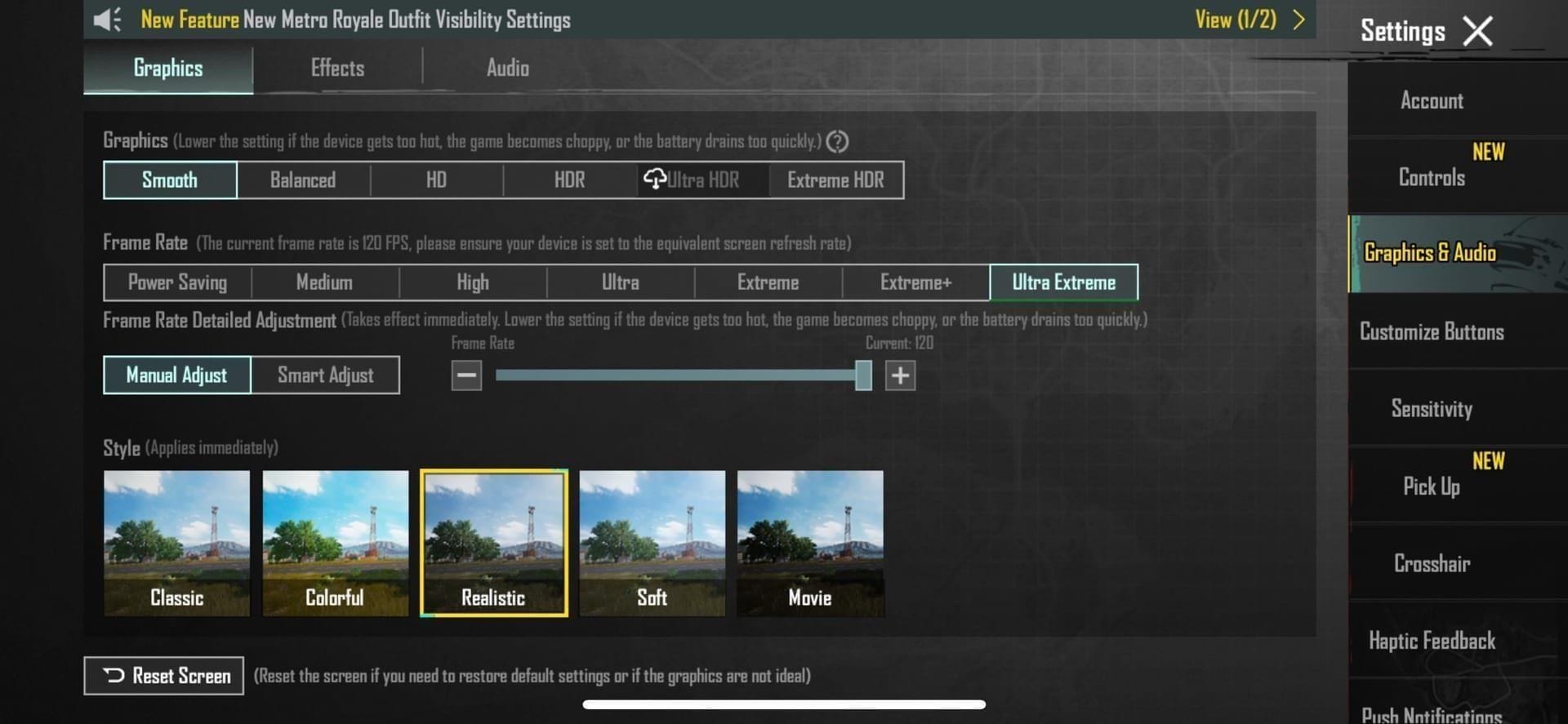
Having the right phone isn't enough; correct software configuration is essential. The feature was introduced in version 3.2 (May 13, 2025) and refined through updates like v3.5 (January 2025) and v4.2 Beta (December 4, 2025).
Step-by-Step Configuration Guide
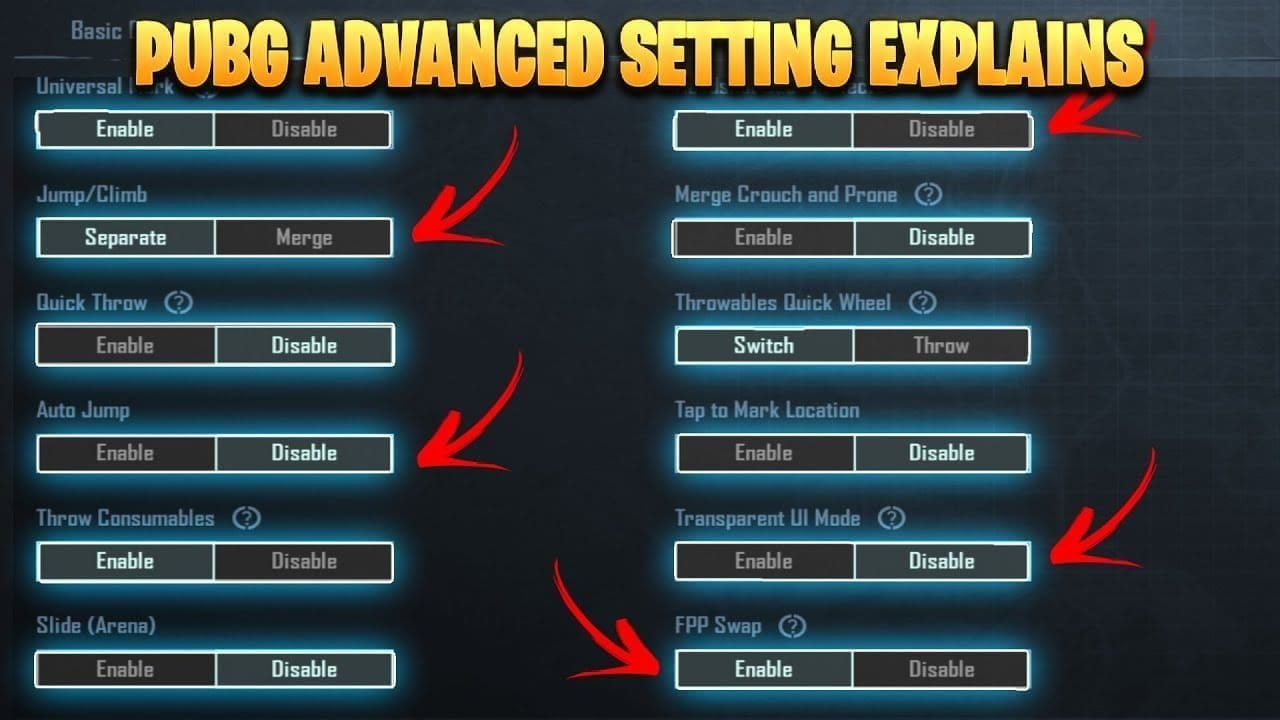
- Update the Game: Ensure PUBG Mobile is updated to version 3.2 or later (ideally v4.2 stable).
- System Settings: Set your phone's display refresh rate to High or 120Hz.
- In-Game Graphics: Go to Settings > Graphics. Set Graphics to Smooth. Higher presets like Balanced or HD often lock the frame rate to 90 FPS or lower.
- Frame Rate Selection: Select Ultra Extreme (120 FPS).
- Enable Vulkan: Set the Rendering API to Vulkan. This boosts performance by 10-15% and is often required for stability.
- Performance Mode: Activate Game Launcher or Game Booster Performance Mode to prioritize CPU/GPU resources.
Troubleshooting Missing Options
- iOS Workaround: Go to iOS Settings > Accessibility > Motion > Enable Limit Frame Rate. Launch PUBG Mobile, let it load, then close the game. Disable Limit Frame Rate and relaunch.
- Android: Clear the PUBG Mobile cache weekly to resolve glitches where settings revert or disappear.
90 FPS vs 120 FPS: Is the Upgrade Worth It?
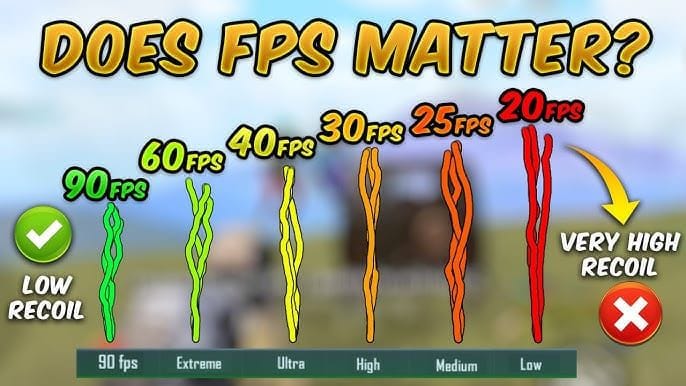
The jump from 90 FPS to 120 FPS offers diminishing returns compared to 60 FPS to 90 FPS, but for competitive players, it remains significant.
Key Differences:
- Input Latency: 90 FPS is ~45-50ms; 120 FPS drops to 28-35ms. This 15ms difference is imperceptible to casuals but noticeable to pros relying on snap-aiming.
- Visuals: 120 FPS reduces motion blur, making it easier to track moving targets while spraying. The Galaxy S24 Ultra holds a steady 118-120 FPS, making enemy movement look fluid.
- Consistency: The Z Fold5 achieves 98.5% FPS consistency at 120 FPS, meaning frame drops are rare.
Performance Impact The cost is battery life and thermals.
- Battery Drain: Increases to 18-24% per hour at 120 FPS vs. 12-15% at 90 FPS.
- Temperature: Devices can reach 42-45°C after 20 minutes of gameplay.
Optimizing Performance for Stable 120 FPS
Running 120 FPS generates significant heat, leading to CPU throttling. To maintain the 8.3ms frame time consistently, optimize your settings.
Best Graphics Settings The Smooth preset is the only one that reliably supports 120 FPS.
- Disable Anti-Aliasing: Saves 10-15% GPU usage with minimal visual impact.
- Disable Shadows: Reduces GPU load and improves visibility in dark corners.
- Disable Particles: Less visual clutter during explosions and smoke usage.
- Brightness: Set to 125-150% for optimal visibility (impacts battery life).
Managing Heating and Battery To sustain performance, keep the device cool. Remove the phone case during gameplay and use a fan or cooling pad if possible. Since battery drain is high (18-24%/hr), players should engage in PUBG UC global transactions via buffget to purchase energy drink crates or battery packs if they rely on in-game items for extended play. buffget provides a secure way to manage currency so you can focus on settings.
Common Issues and Solutions
Even on high-end devices like the RedMagic 9 Pro or ROG Phone 8, issues occur.
Frame Drops and Stuttering
- Cause: Usually thermal throttling after 15-20 minutes.
- Fix: Lower screen brightness slightly and ensure airflow isn't blocked.
- RAM: Check RAM usage. Background apps consume memory needed for the game. Close all background apps before launching.
- Storage: Ensure storage isn't full. UFS 3.0+ storage slows down if capacity is critically low, causing texture loading stutters.
Device Overheating Fixes If the device exceeds 45°C, the system will force a lower frame rate.
- Play in a cool environment, avoiding direct sunlight.
- Use Low Power Mode in game settings (if available). This limits CPU frequency slightly, reducing heat while often maintaining a stable 90-100 FPS—better than a fluctuating 120 FPS.
Best Sensitivity Settings for High Refresh Rate
Moving to 120 FPS changes the feel of the game. Because the screen updates more frequently, camera movement feels smoother and slightly faster. You often need to lower your sensitivity slightly to maintain precision.
Gyroscope Adjustments The gyroscope becomes more responsive at higher frame rates.
- Reduce 3rd Person No Scope sensitivity by 5-10% to prevent over-rotation.
- Fine-tune Red Dot, Holographic, and Aim Assist sensitivities on the Training Grounds.
- Lower sensitivities often yield better recoil control patterns due to the smoother visual flow.
Camera and ADS Settings For ADS (Aim Down Sight) sensitivity, a slight decrease (3-5%) helps in tracking targets smoothly without the crosshair snapping past the enemy. The higher the frame rate, the lower the sensitivity needs to be to achieve the same physical swipe distance, due to the increased number of tracking points rendered per second.
FAQ
Which phones support 120 FPS in PUBG Mobile 2026? Supported devices include the Samsung Galaxy S24/S23 series, Z Fold5/4, Xiaomi 14/13 series, Redmi K70/K60, POCO F5/X6 Pro, iPhone 13 Pro and newer, iPad Pro M1/M2, RedMagic 9 Pro, OnePlus 12/11, and ROG Phone 8.
Is 120 FPS worth it for competitive PUBG Mobile? Yes. It reduces input lag to 28-35ms (compared to 45-50ms at 90 FPS) and lowers frame time to 8.3ms, providing a distinct advantage in reaction time and recoil control.
How do I enable 120 FPS on my device? Update to PUBG Mobile v3.2 or later. Go to Settings > Graphics, select Smooth quality, choose Ultra Extreme (120 FPS) frame rate, and ensure the Vulkan API is enabled.
Why is 120 FPS option not showing in PUBG Mobile? This usually means your device is not supported, the display is not set to 120Hz in system settings, or the game needs an update. For iOS, try toggling Limit Frame Rate in Accessibility > Motion.
Does 120 FPS drain battery faster? Yes, significantly. It consumes approximately 18-24% per hour and generates more heat, with devices reaching 42-45°C after 20 minutes of gameplay.
What is the difference between 90 FPS and 120 FPS? The main difference is fluidity and latency. 120 FPS offers 8.3ms frame time and lower input lag (28-35ms), making gameplay feel smoother and more responsive compared to the 16.7ms frame time and higher input lag of 90 FPS.