

Recommended Discounts

Where Winds Meet
This Top Up service is not applicable to Playstation User.
20% OFF
Related articles


Where Winds Meet Best Settings: 100+ FPS on RTX 4060
Crank up frames: DX12 on RTX 20+ for 40-60% boosts w/ DLSS/Frame Gen; kill Volumetric Clouds; tweak Engine.ini to squash stutters; temps <75°C. RTX 4060 hits 108fps @1080p Perf. Mid-range? 100+ FPS w/ Reflex (10-30ms latency cut) & NVMe SSD.
Buffget
Crank up those frames: Switch to DX12 on RTX 20+ cards for 40-60% boosts with DLSS/Frame Gen; kill Volumetric Clouds; tweak Engine.ini to squash stutters; keep temps under 75°C. RTX 4060 hits 108fps at 1080p Performance. Mid-range rigs? Nail 100+ FPS using Reflex (shaves 10-30ms latency) and an NVMe SSD. (48 words)
Introduction to Where Winds Meet PC Optimization
That Messiah Engine? It hitches hard during LOD streaming or shader compilation—think new zones, cutscenes, boss fights. DX12 flips the switch for DLSS, XeSS, or FSR (though it adds some CPU load); stick to DX11 if you're on GTX 900/1000 series for rock-solid stability.
- Minimum: Win10/11, i7-4770K/R5 2400G, GTX 750 Ti/RX 550/Arc A380, 8GB RAM, 60GB HDD (grab an SSD though; standard install's 110GB, Lite's 68GB).
- Recommended: i7-10700/R7 3700X, RTX 2070 Super/RX 6700 XT/Arc A750, 32GB RAM, 100GB SSD.
- High-end: i7-12700K/R9 5950X, RTX 3080/RX 6800 XT, 32GB RAM.
Quick readiness check: First, snag 32GB RAM (16GB works if you shut down background hogs); ensure your NVMe SSD has 15-20% free space. Then, baseline your FPS and 1% lows in Qinghe or the forest using MSI Afterburner.
top up where winds meet global on Buffget: global low prices, instant delivery, credit/Binance Pay/USDT support, top safety ratings, 24/7 service.
Benchmarking Your Current Performance
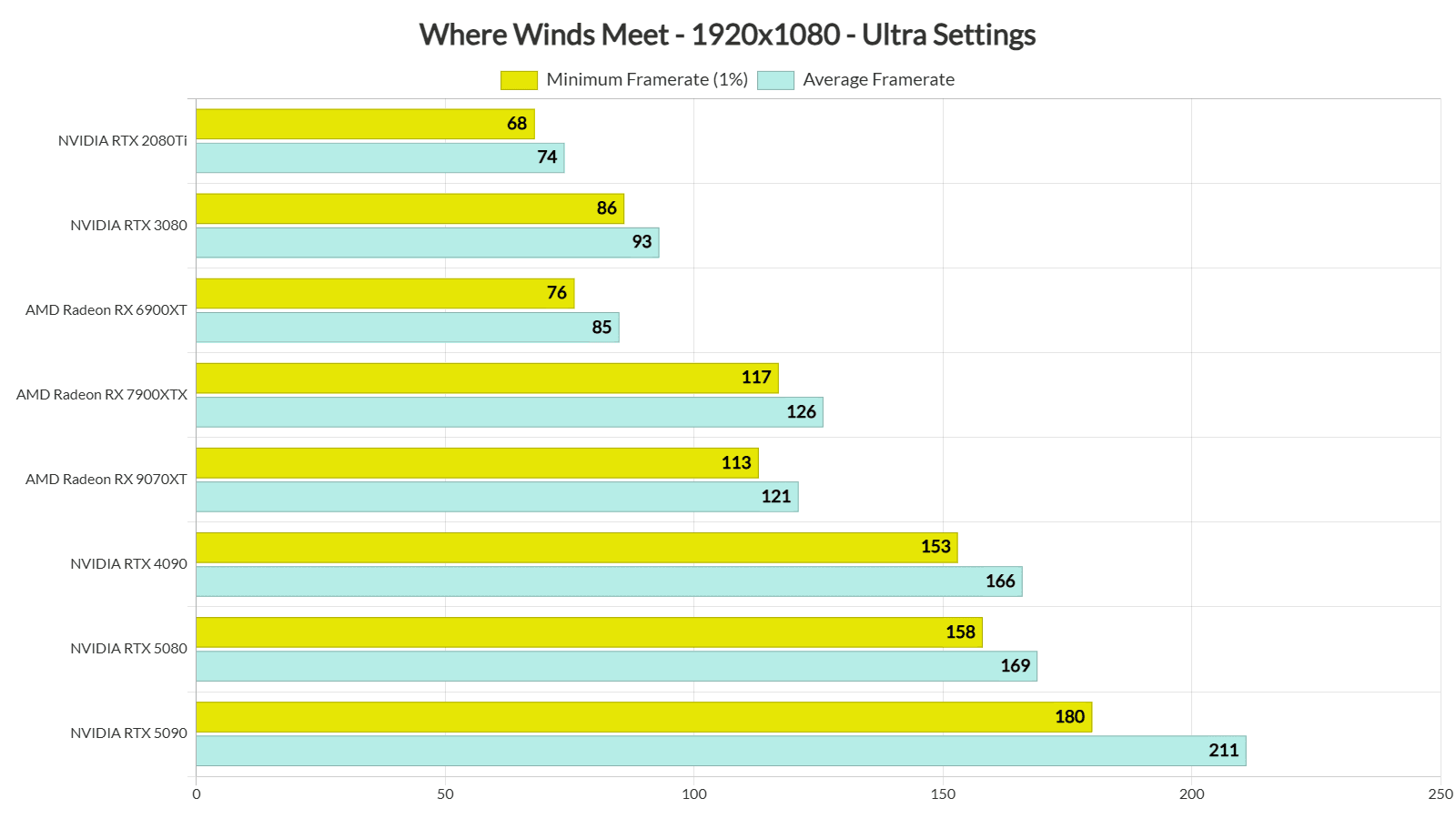
RTX 5090 crushes 126fps at 4K Ultra (175+fps with Frame Gen), or 211fps 1080p Ultra. RTX 4060? Solid 108fps 1080p Performance, 84fps Ultra. GTX 1060 manages 50fps 1080p Performance; Arc A750 pulls 80fps 1080p Quality.
DSOGaming's tests (R9 7950X3D/32GB DDR5) show RTX 2080 Ti at 74fps 1080p Ultra; every GPU they tried stayed above 60fps. Cities feel CPU-bound—RTX 4090 dips to 35-50fps there, but wilderness flies at 90-140fps.
Set up monitoring like a pro: Fire up MSI Afterburner + RivaTuner OSD for FPS, frame times, GPU at 95-98%, CPU usage, temps under 75°C. Run 15min of combat or open-world chaos; log HWiNFO peaks. Before/after? Aim for steady frame times and full GPU utilization.
Best In-Game Graphics Settings for High FPS
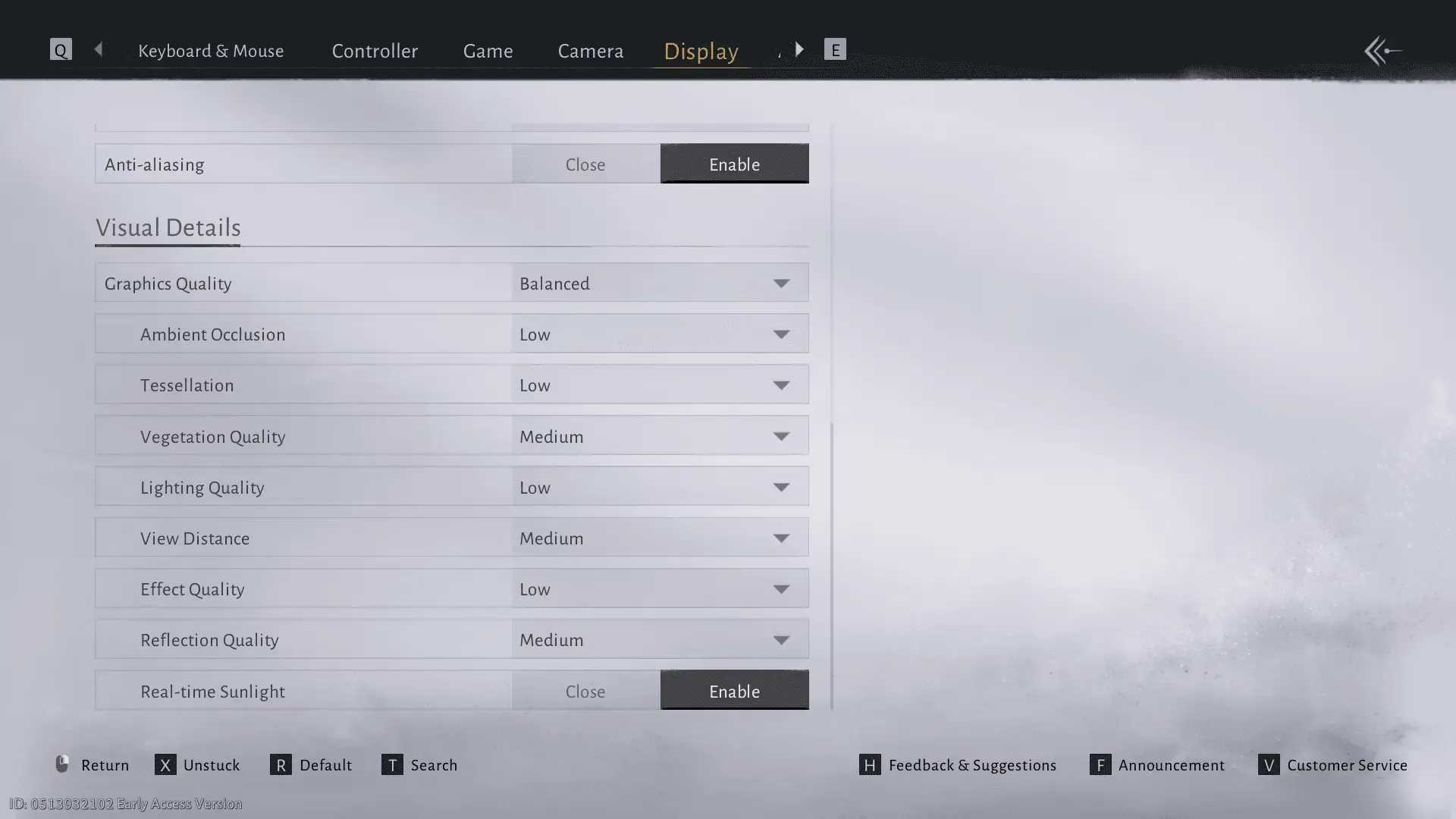
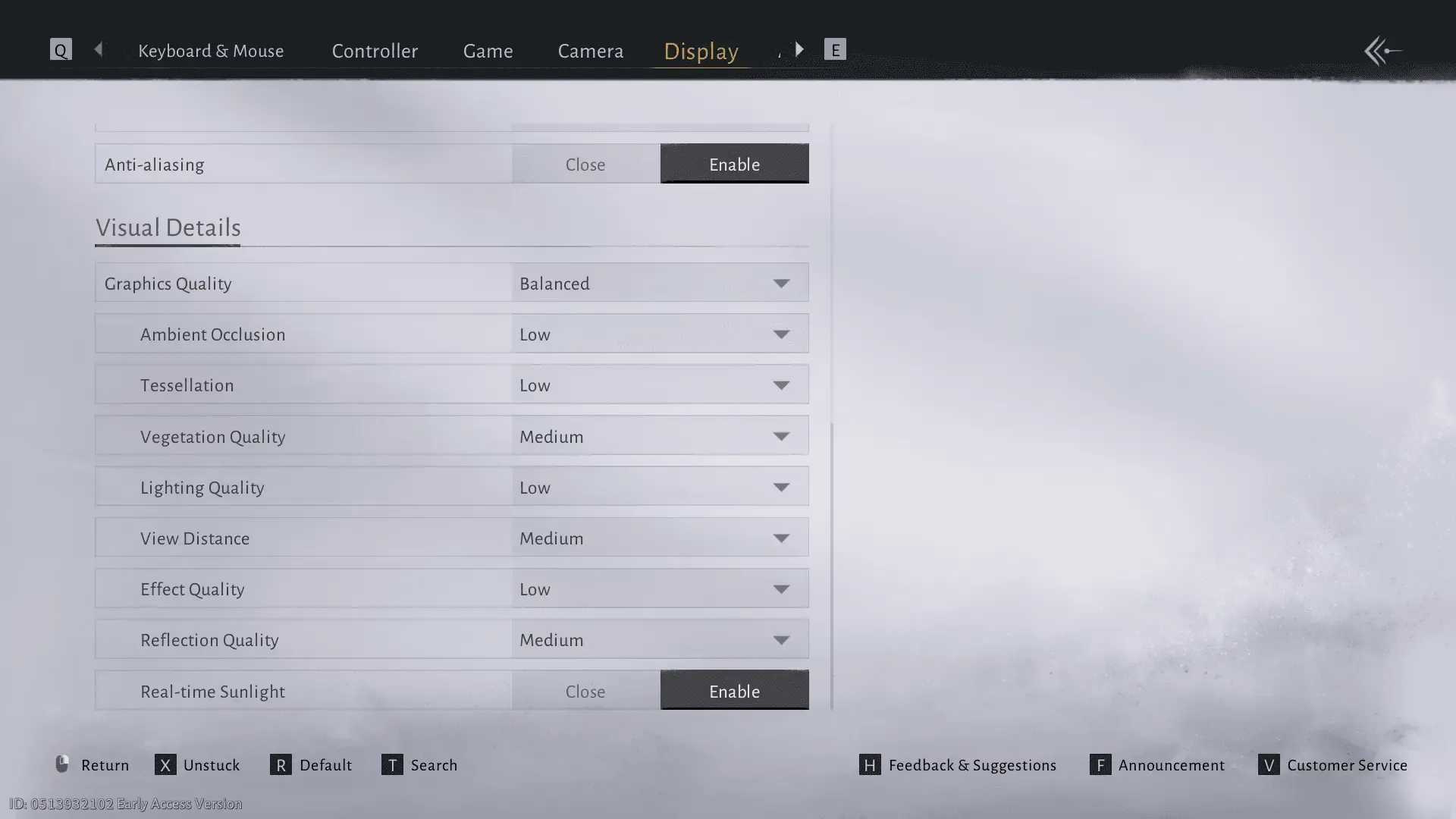
Biggest hits first: Volumetric Clouds OFF (that's ray marching killing your frames). Drop Vegetation to Medium (cuts grass overdraw). Shadows on Low (2K textures vs. 4K with 16-32 samples). AO Low/Medium; Lighting Medium; Tessellation Low/Off (slices geometry 4-16x); Effects Low (nets +15-25fps in fights). Motion Blur? Off.
- Display: Fullscreen, V-Sync Off (cap via driver), Reflex On+Boost (10-30ms win), FPS matched to refresh.
- RTX 4060 example: DLSS/FSR Quality, Tess Low/Med, everything else Ultra—84fps 1080p.
Apply it right: Tweak during combat or cities. View Distance Medium (+8-12fps in urban spots), Reflections Medium. Test shadows and vegetation in Qinghe.
Advanced NVIDIA DLSS and Reflex Settings
DLSS Quality (upscales 1280x720 to 1080p): 25-35% FPS lift. Performance mode? 40-50%. Frame Gen doubles it on RTX 40+ with HAGS. Grab nvngx_dlss.dll 3.7.x via DLSS Swapper (backup first, obviously).
RTX 4060: 66fps 1440p Quality (97fps +FG). RTX 5080: 116fps 4K Quality (189fps +FG). Reflex On+Boost is key for those parry timings.
Nail the tweaks: Launch with -dx12 (RTX 20+/Arc/RX 6000+). Ditch overlays except DLSS. NVIDIA CP: Low Latency Ultra, Shader Cache 10GB+. In combat, kill FG if latency jumps.
where winds meet currency top up via Buffget: fastest worldwide speeds, competitive prices, secure ETH/USDC, top user ratings, hassle-free service.
AMD FSR and Alternative Optimizations
FSR Quality or Balanced (Perf/Ultra? Foliage ghosting nightmare). XeSS Quality shines on Arc or DP4a cards (5-10% behind FSR, way fewer GTX 10 artifacts). FSR Quality gets ROG Ally to 59% at 900p—over 30fps.
Arc A750: 80fps 1080p Quality. B580: 90fps 1080p Ultra. Handhelds or stability chasers? DX11.
Get it running: DX12 launch; Radeon Chill min/max to refresh rate. VRAM 8GB+ on Ally, Effects/Ambient Low. GTX 1060 at 70% FSR? 64fps.
NVIDIA/AMD Control Panel Configurations
NVIDIA: Low Latency Ultra, Power to Max Perf (under 85°C), Anisotropic 16x. AMD: Drivers ≥25.11.1, Chill for FPS/heat control. DDU for clean installs, nuke shader cache.
Menus push RTX 3080/90 past 90°C—pre-launch cap at 60/120fps. HAGS + Balanced power plan.
Step-by-step setup: NVIDIA LLM Ultra + Reflex. Shader Cache 10GB+ to fight stutters. Restart.
Steam Launch Options and Config File Edits
Launch args: -dx12 upscalers. Dive into Engine.ini (%LOCALAPPDATA%\WhereWindsMeet\Saved\Config\WindowsNoEditor\Engine.ini):
[/Script/Engine.RendererSettings]
r.SceneColorFringeQuality=0
r.DepthOfFieldQuality=0
r.MotionBlurQuality=0

[SystemSettings]
r.TextureStreaming=1
r.Streaming.LimitPoolSizeToVRAM=1
r.GTSyncType=1
r.OneFrameThreadLag=1  ; Stutter fix

[/Script/Engine.InputSettings]
bEnableMouseSmoothing=False
bViewAccelerationEnabled=False
Edit safely: Backup. Hit fringe/DoF/blur/CPU/mouse fixes. Pagefile to 20-30GB for streaming. Test inputs in combat.
(Quick editor note: This ini tweak alone fixed my stutter hell in boss arenas—game-changer.)
Common Performance Issues and Fixes
Stuttering? NVMe SSD, r.OneFrameThreadLag=1, kill I/O hogs, idle 5-10min for shaders (cap 30-60fps). Cutscenes: Repair or cache rebuild. Mouse woes: Fullscreen/V-Sync Off + edits. RTX 4090 in cities: Balanced/Shadows Medium (50% CPU relief), no FG/RT, pagefile 20-30GB.
Overheating: Afterburner undervolt (15-25% cooler). Black screens: PSU or drivers.
Fix order: Clear cache/verify Steam. Disable HDR/Game Bar/overlays (except Ryzen X3D). Watch for 90-100% single-core CPU spikes.
Hardware Recommendations and Upgrades
1080p 60fps budget: R5 5600X/i5-12400F, RTX 3060/RX 6600 XT, 32GB, NVMe. Mid-range: 3070/6700 XT. 1440p/4K: DLSS Quality + FG, Low Tess.
32GB is sweet spot; HDD? Unplayable. R7900X3D loves Game Bar on.
Smart upgrades: SSD first, then 32GB RAM. RTX for DLSS; Arc for XeSS.
Post-Optimization Testing and Monitoring
Re-bench Qinghe/forest: >60fps everywhere, stable times. NVIDIA drivers ≥581.80 clean install; clean dust, refresh paste.
Ongoing: Weekly Afterburner checks. Patch-test high-impact settings.
FAQ
How do I get higher FPS in Where Winds Meet?
Disable Volumetric Clouds (+major gain), DLSS Quality DX12 (25-35%), driver FPS cap.
What are the best graphics settings for Where Winds Meet PC?
Volumetric Clouds OFF, Vegetation/Shadows Low/Med, Tessellation Low, Effects Low, Reflex On; combat test.
Does DLSS work in Where Winds Meet?
Yes RTX 20+ -dx12; Quality 25-35% FPS, Frame Gen doubles RTX 40+; DLL 3.7.x.
Why is Where Winds Meet stuttering on my PC?
Shader/LOD; NVMe SSD, r.OneFrameThreadLag=1, cache build, close apps.
Where Winds Meet low FPS on high-end PC fix?
Cities: Shadows Medium (50% CPU), no FG/Volumetric Fog, pagefile 20-30GB, Balanced.
Best NVIDIA settings for Where Winds Meet?
CP: LLM Ultra, Shader Cache 10GB+, Power Max Perf; Reflex +Boost (10-30ms).