

Recommended Discounts

Where Winds Meet
This Top Up service is not applicable to Playstation User.
20% OFF
Related articles


Where Winds Meet: 60+ FPS RTX 3060 1080p Ultra Settings
EverFire Studios' open-world wuxia epic runs smooth on RTX 3060: 60+ FPS at 1080p Ultra. DLSS Quality boosts 25-60%. SSD/NVMe kills stutter. Use DX12, low shadows, Reflex on i7-10700/Ryzen 7 3700X + 32GB RAM.
Buffget
EverFire Studios' open-world wuxia epic runs smooth on an RTX 3060—hitting 60+ FPS at 1080p Ultra. Crank it up with DLSS Quality for 25-60% gains. SSD or NVMe kills stuttering dead. Stick to DirectX 12, dial shadows low, and flip on Reflex if you're rocking an i7-10700 or Ryzen 7 3700X with 32GB RAM.
Where Winds Meet PC System Requirements Overview
Minimum Specs for Playable Performance
You can scrape by on Windows 10/11 x64, an i7-4770K or Ryzen 5 2400G, GTX 750 Ti/RX 550/Arc A380 (2GB VRAM), and 8GB RAM—aim for a 60-100GB SSD. Laptops? Ryzen 7 5800HS with MX450 works, but shader model 5.0 is non-negotiable. Oh, and 16GB RAM? It'll page like crazy in that sprawling open world.
Quick checks:
- Fire up Task Manager—eyeball CPU, GPU, RAM.
- Install to SSD; leave 15% free for shader cache breathing room.
- Update those drivers. No excuses.
Recommended Specs for 60 FPS at 1080p
Step up to i7-10700/Ryzen 7 3700X, RTX 2070 SUPER/RX 6700 XT/Arc A750 (8GB VRAM), 32GB RAM, and 100GB NVMe SSD. RTX 3060 or RX 6600 XT? That's your 60 FPS baseline. Ditch 16GB—stuttering awaits.
Pro tips:
- Run the in-game benchmark first.
- Upgrade to 32GB DDR4/5. Trust me.
- Swap to NVMe. Night and day.
Ultra Specs for 4K 60 FPS
Go big: i7-12700K/Ryzen 9 5950X, RTX 3080/RX 6800 XT (high VRAM), 32GB RAM, 100GB SSD. Arc A750 or RTX 4060? Solid at 1080p Ultra.
Need a progression boost? Purchase Where Winds Meet currency through Buffget—global low prices, instant top-up, secure as hell, with Binance Pay/USDT/ETH support and killer user ratings.
Benchmarking Where Winds Meet Performance
Tested Hardware Configurations
I threw Ryzen 9 7950X3D, 32GB DDR5, and RTX 2080 Ti at it—RTX 3060/RX 6600 XT as the 60 FPS baseline. 1080p Ultra? RTX 2080 Ti averages 68/74 FPS. 1440p dips under 60 without upscaling.
Test yourself:
- Hit that in-game benchmark.
- Overlay GPU/CPU—shoot for 95-98% GPU load.
- Stack it against i5-12400F or Ryzen 5 5600X.
FPS Results Across Graphics Presets
Low preset? GTX 750 Ti sails past 60 FPS. Medium holds steady on RTX 2070 SUPER. Ultra demands RTX 3080 plus tweaks for 60 FPS; 4K Ultra clears 60 with DLSS.
Start here:
- Medium preset as baseline.
- Toggle upscaling—15-60% FPS magic.
- Cap to your refresh rate. Smooth city.
GPU/CPU Utilization Insights
Messiah Engine craves balanced cores. NVMe slashes hitches. DX12 chews CPU, so keep temps under 75°C. GPU at 95% util? Perfect.
Dial it in:
- Watch frame times like a hawk.
- Undervolt GPU through drivers (easy win).
- Airflow. Don't skimp.
Best Graphics Settings for 60 FPS at 1080p
Preset Recommendations
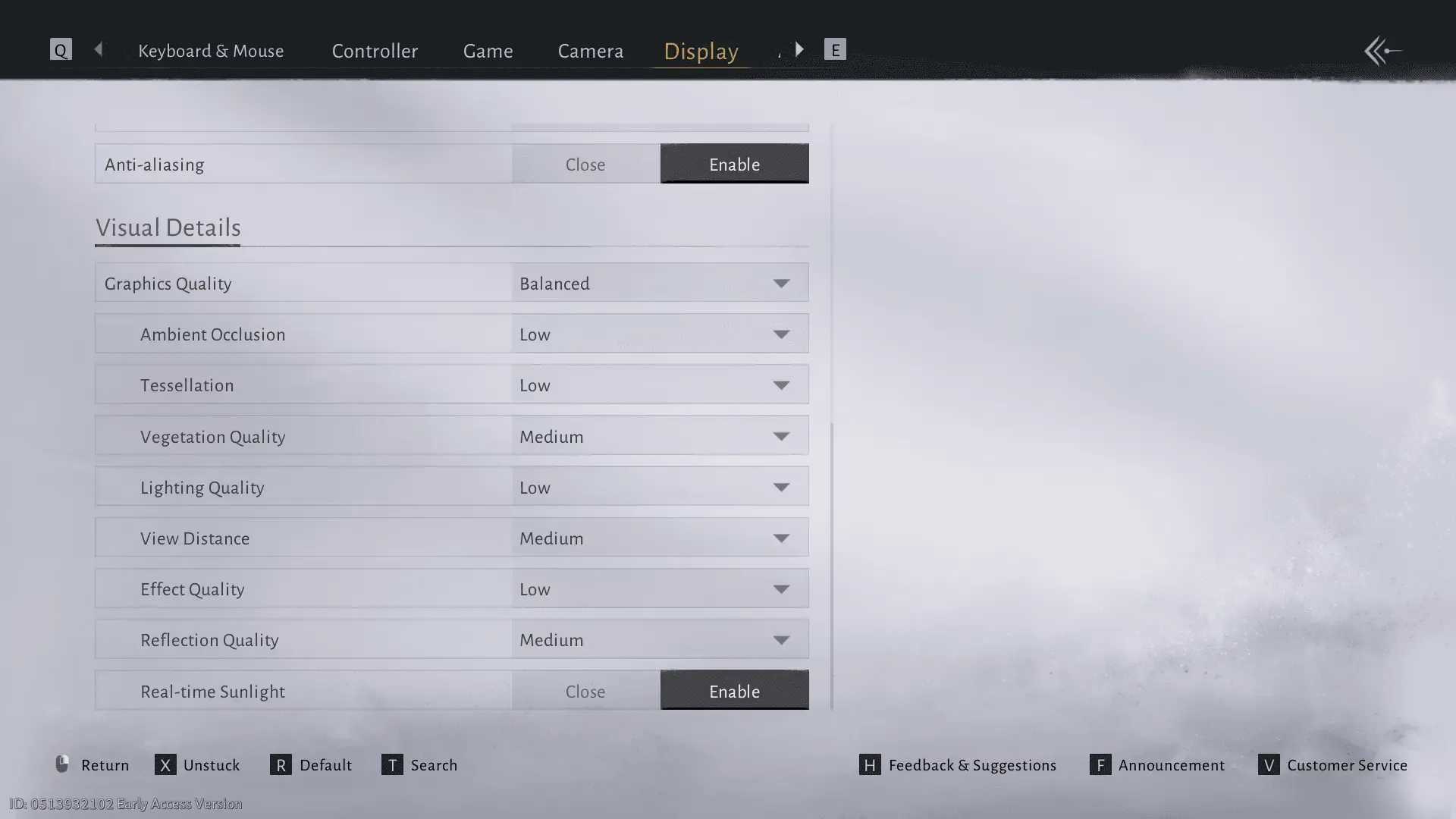
Kill Volumetric Clouds/Shadows. Drop Vegetation/Effects to Low-Medium. Tessellation? Off. That's 20-40% less GPU strain. Motion Blur? Gone.
Essentials:
- Fullscreen, always.
- V-Sync off; limit FPS to refresh.
- NVIDIA Reflex on—shaves 10-30ms.
Key Tweaks: Shadows, Textures, AA
Shadows and Ambient Occlusion low. View Distance medium—15-20% FPS bump. Textures medium (8GB VRAM sweet spot). Ditch damage banners.
Fine-tune:
- Crank Effects down in towns.
- Chat to Exploration Mode.
- Test scene-by-scene. Worlds vary.
DLSS/FSR Implementation
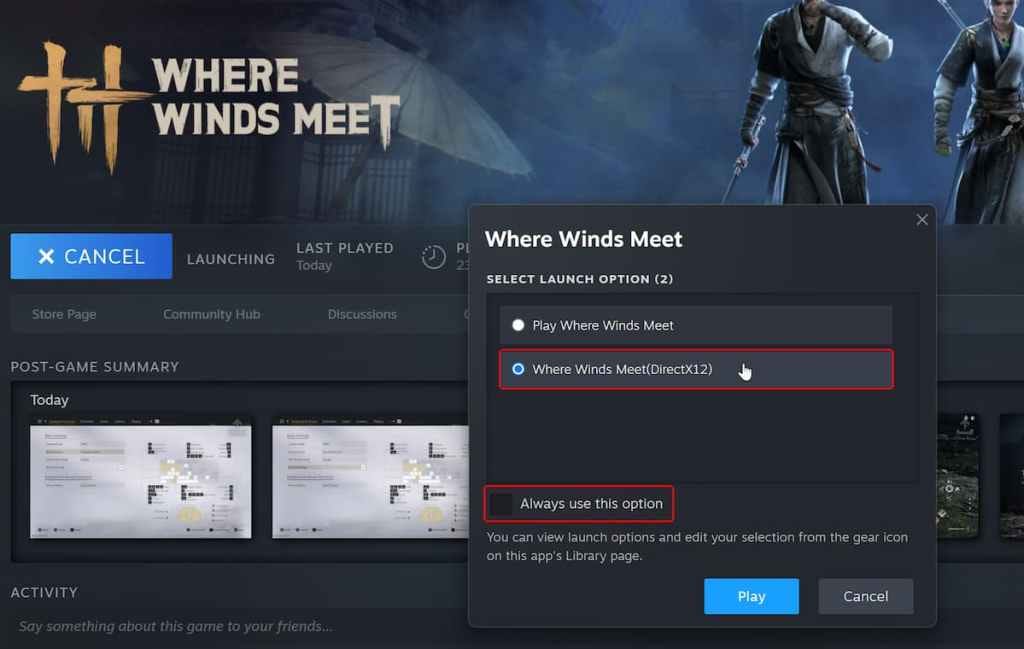
DLSS Quality (RTX 20-series+) delivers 25-60% boosts. FSR/XeSS for everyone; XeSS stays rock-solid. Frame Gen for RTX 40.
Launch smart:
- DX12 via options.
- Quality mode only.
- Idle in menu to build cache.
Supercharge your economy at Buffget's Where Winds Meet top up center: unbeatable prices, lightning delivery, total safety, payments like Bitcoin/USDC/Gate Pay, stellar after-sales, and top-tier user vibes.
High-Resolution Optimization (1440p/4K)
DLSS rules here. RTX 2080 Ti raw at 1440p Ultra? Under 60. Quality mode? 60+. Ray tracing off—no debate.
Push it:
- TSR/FSR at 1440p.
- Medium View Distance.
- Wide zoom out.
Common Performance Issues and Fixes
FPS Drops and Stuttering Solutions
SSD is law. Clear shader cache. HDD? Hitches galore. DX12 stutters on first load.
Fixes:
- Verify files; cap FPS in cutscenes.
- Kill HDR and Game Bar.
- Low Latency Mode on.
Overheating and Throttling Prevention
Cap GPU at 60-120 FPS. Temps below 75°C. Ethernet/DNS shaves 10-30ms ping.
Prevent:
- Game Mode and HAGS on.
- No background refresh.
- Overlay everything.
Laptop and Budget PC Adjustments
Aim 40-60 FPS. MX450 minimum GPU. Balanced power plan. DLSS Quality on low settings.
Adapt:
- MUX to discrete GPU.
- Low Tessellation/Effects.
- 40Hz for Steam Deck.
Monitoring Tools and Metrics
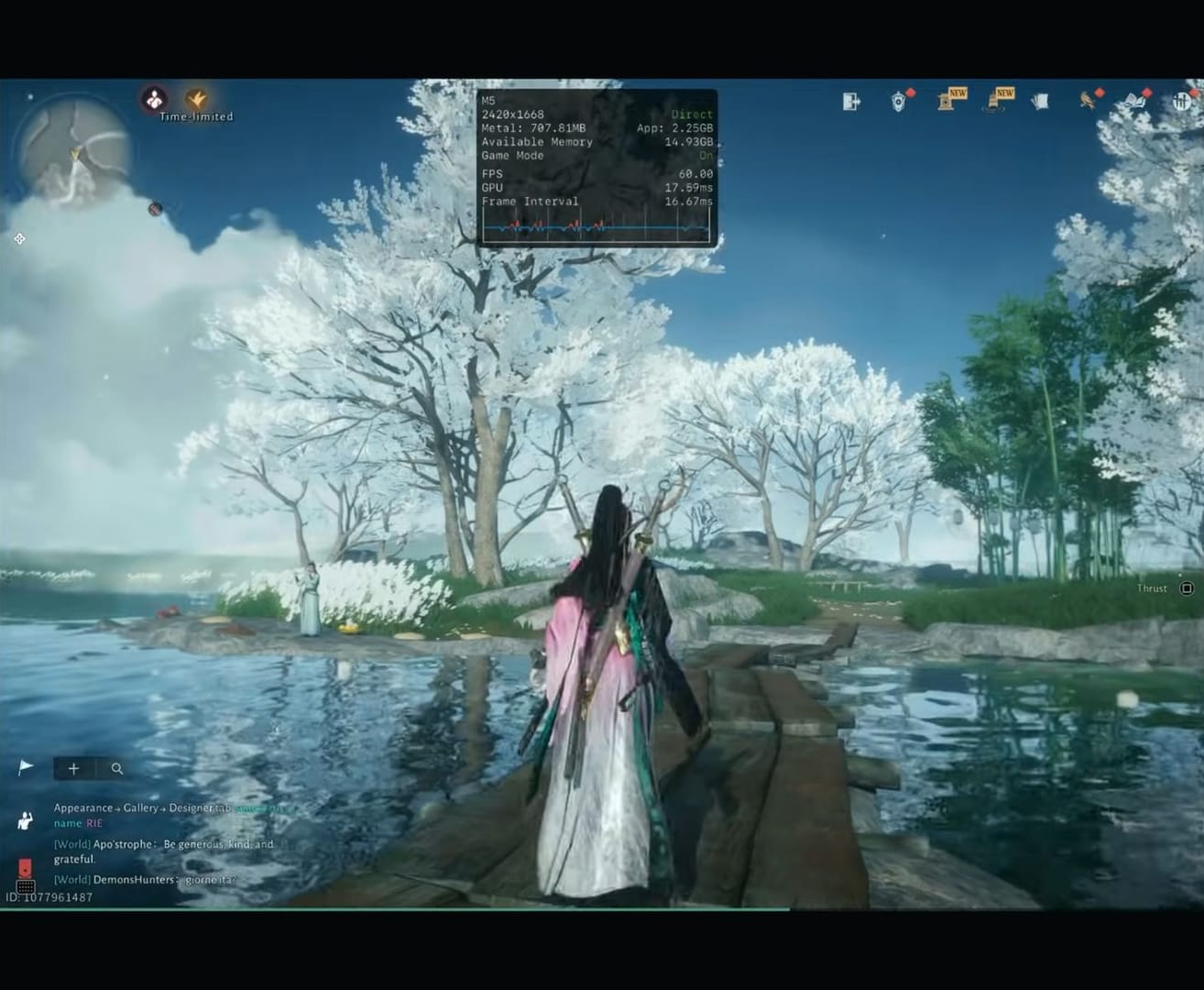
FPS, temps, usage—frame times low, no spikes. GPU 95-98%; CPU balanced.
Gear up:
- MSI Afterburner or HWInfo.
- Real-time overlay.
- Tweak in combat.
FAQ
What are the Where Winds Meet PC requirements?
Minimum: i7-4770K/Ryzen 5 2400G, GTX 750 Ti, 8GB RAM, 60GB SSD. Recommended: i7-10700/Ryzen 7 3700X, RTX 2070 SUPER, 32GB RAM, 100GB NVMe.
How do I get 60 FPS in Where Winds Meet?
DX12, DLSS Quality, low Shadows/Volumetric Clouds, 32GB RAM, NVMe SSD; cap FPS, Reflex On (RTX 3060+ 1080p).
Best graphics settings for Where Winds Meet low-end PC?
Low Effects/Shadows, Medium Vegetation, Tessellation Off, FSR Quality, V-Sync Off (GTX 750 Ti/8GB RAM).
Does Where Winds Meet support DLSS?
Yes, DLSS Quality (RTX 20+ DX12) 25-60% FPS; XeSS/FSR alternatives.
Where Winds Meet FPS drops fix?
Clear shader cache, SSD install, disable Motion Blur/V-Sync, lower View Distance; idle menu pre-build.
Recommended RAM for Where Winds Meet?
32GB no stuttering; 16GB risks open-world paging.