

Recommended Discounts

Where Winds Meet
This Top Up service is not applicable to Playstation User.
20% OFF
Related articles


Where Winds Meet PC vs Mobile: Cross-Save Guide + 57FPS Benchmarks
Where Winds Meet delivers seamless cross-progression across Steam, Epic, PS, PC launcher & Mobile (iOS/Android Dec 12, 2025 UTC)—link before character creation. PC shines with brutal difficulties, DLSS/FSR & deep customization. Mobile hits 60FPS on M5 iPad Pro/iPhone 14 Pro+ (video cutscenes). PC...
Buffget
Where Winds Meet nails cross-progression between Steam, Epic, PS, the PC launcher, and Mobile (iOS/Android dropping Dec 12, 2025 UTC). Link up before you even create a character. PC shines with brutal high difficulties, DLSS/FSR upscaling, and deep customization. Mobile hits 60FPS on M5 iPad Pro or iPhone 14 Pro+, but swaps in video cutscenes. Tweak PC with DX12, low settings, and an NVMe SSD for +40-60% FPS gains. Quick benchmarks: iPad Pro holds 57FPS lows; RTX 2070 clocks 60FPS after tweaks.
PC vs Mobile: The Real Breakdown
Platforms and When They Drop
PC kicked off Nov 14 UTC on Steam, Epic, and the launcher—pulling in 9M players total, with a 250k peak on Steam. Mobile lands Dec 12 at 00:00 UTC for iOS and Android; pre-downloads start Dec 10 at 16:00 UTC. Cross-progression keeps your data, progress, and purchases in sync across the board. PC's minimum spec? i7-4770K or Ryzen 5 2400G, GTX 750 Ti, 8GB RAM, and 60GB HDD. Mobile needs Android Snapdragon 8 Gen 2 or Dimensity 9200, or iOS on iPhone 14 Pro+.
What Feels Different on Each
PC lets you dive into Legend difficulty, tweak mouse controls to perfection, and watch real-time cutscenes unfold. Mobile sticks to Story or Recommended modes with Assist Deflection always on, plus those pre-rendered video cutscenes. Graphics-wise, PC rocks DLSS/FSR/XeSS; Mobile maxes at 2868x1320 on iPhone. Controls? PC: rebind Parry and Dodge to your mouse buttons. Mobile: touch-only, no custom binds—flip on Settings → Other → Cross-Platform to play nice.
Need in-game resources fast? Hit up purchase Where Winds Meet currency on Buffget. Global low prices, delivery under 5 minutes, fully safe, and they take Binance Pay, USDT, or ETH.
Cross-Save Guide: Get It Working Flawlessly
Cross-Save Explained
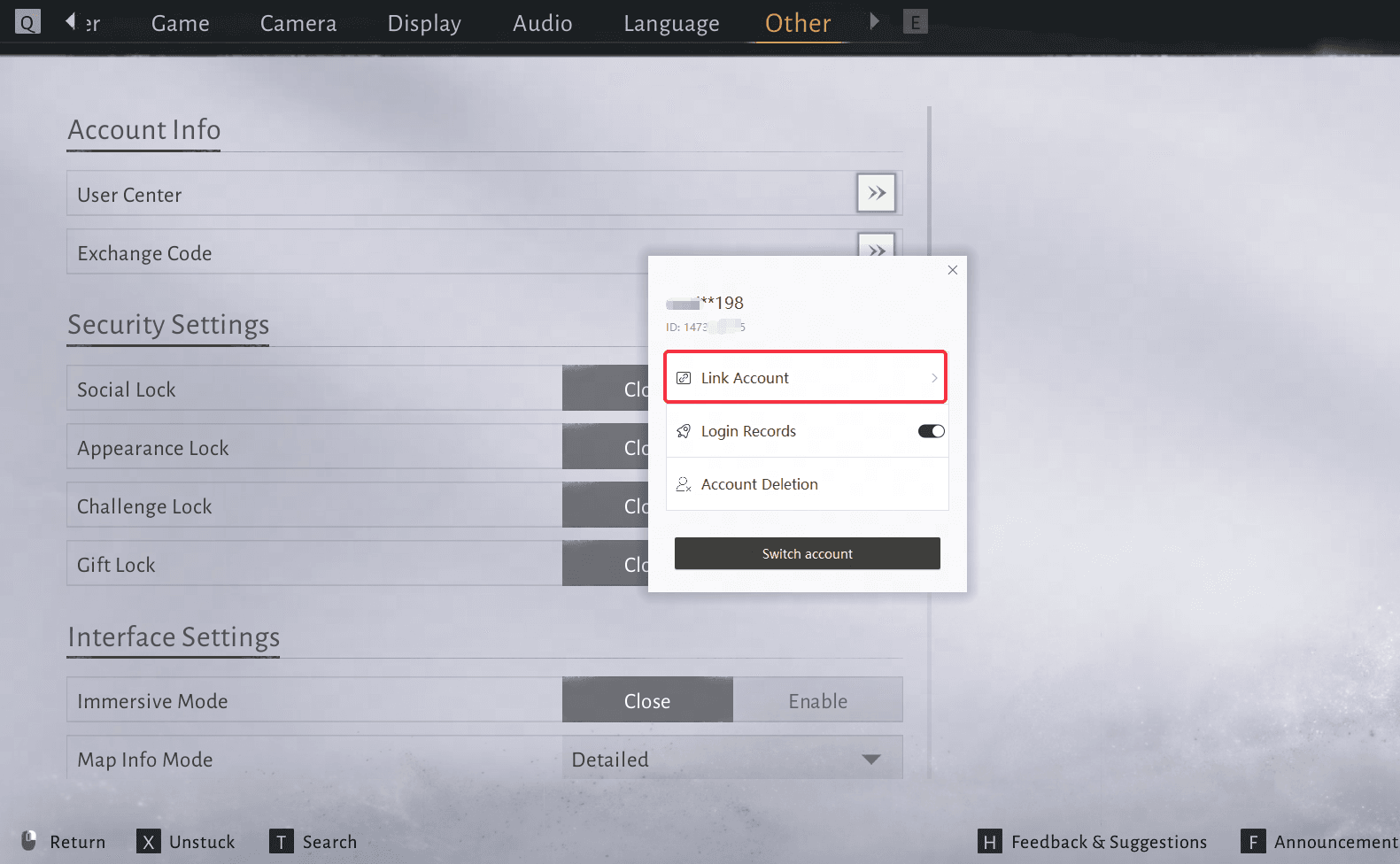
It's full sync for character data, progress, and purchases between Steam, Epic, PC, PS, and Mobile—cross-play's baked in too. Link before character creation. Grab beta or PS rewards via mail at Level 5 or 'Homecoming'; website draws run till Nov 30 with Gmail or NetEase logins. Here's how: 1) Hit Title/Settings → Other → User Center → Link Account. 2) Pick your platform. 3) Log in before making a character.
Who Qualifies and Gotchas
Link only if you've got no characters on either side. Log into PC or console first when jumping to Mobile. Can't unlink manually—email support@wherewindsmeet.global.netease.com to wipe data. Beta testers: reuse the same login on new platforms. Quick checklist: free space on the target platform, no double characters, pre-link any PS pre-orders.
PC to Mobile Transfer, Step by Step
- On PC: Settings → Other → User Center → Link Account. Jot down your ID.

- Fire up Mobile on Dec 12: log in with the same platform before character creation.
- Progress auto-syncs. Snag those Level 5 mail rewards.
Going Mobile to PC? Identical process. Enable Cross-Platform after linking.
Fixing Cross-Save Headaches
Sync Errors That Trip Folks Up
Linking bombs if characters exist on both ends; Cannot link means email support for a data delete. PS or Beta issues? Use your pre-order login pre-character. Fix: 1) Email support with account deets. 2) Wait for the green light. 3) Relaunch and link.
Don't Lose Your Stuff—Ever
No self-unlink; support handles deletes. Pre-link everything early. Link beta accounts ASAP, skip new characters before transfers. Rewards? They auto-sync via mail. On PC, verify files. Mobile: clear cache before launch.
Linking Hacks That Actually Work
Shoot an email to support@wherewindsmeet.global.netease.com with your IDs—no merging post-creation. PS: log in on PS5 first. Discord beta folks: submit your in-game ID. Let PC idle in the menu to build shader cache pre-transfer.
—Quick editor note: I've seen players rage-quit over this, but emailing support sorts 90% of it in a day.
Performance Face-Off: PC vs Mobile
Raw FPS Numbers
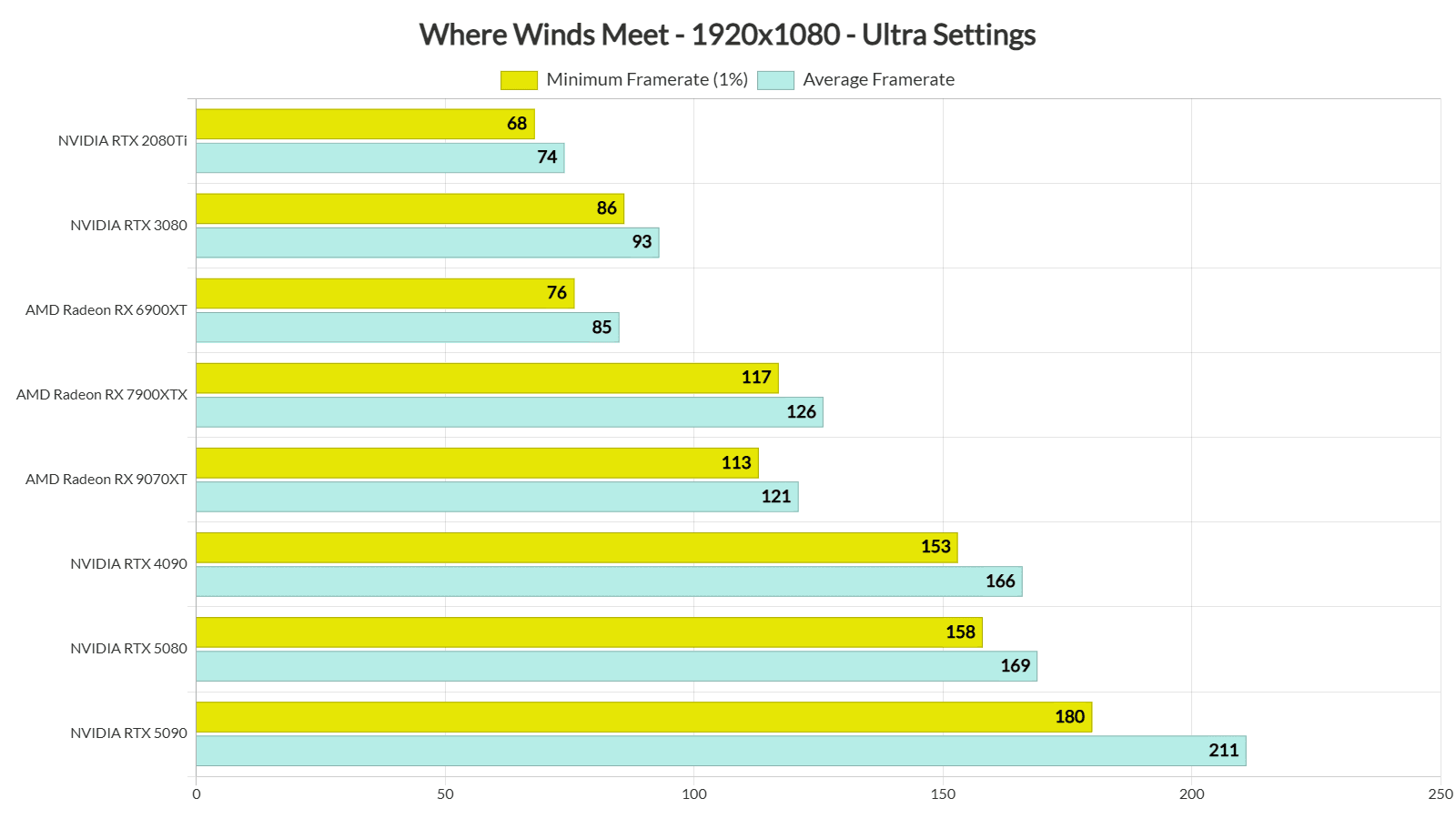
M5 iPad Pro: 57FPS 1% lows at 2420x1668, 17.5ms frames, sipping just 2.25GB RAM. iPhone 17 Pro Max: same 57FPS at 2868x1320, 2.15GB RAM. RedMagic 11 Pro: dips to 48FPS in action, guzzling 65-74% RAM. PC with RTX 2070 Super: steady 60FPS post-DLSS (+40-60% FPS boost). Everything targets 60FPS—these are benchmark devices vs Dec 14, 2025 data.
Loads, Stutters, and Rock-Solid Runs
PC battles LOD stutters and real-time cutscenes. Mobile? Video clips keep it buttery, but data usage spikes—NVMe SSD slashes PC loads by 50%. PC recommends 60GB HDD or 100GB SSD, DX12 adds overhead. Mobile chills at 2GB RAM with easier defaults. Cap PC FPS at 30 in menus.
Mobile Battery and Heat Real Talk
Both Android and iOS aim for 60FPS. iPad Pro thrives with 15GB free RAM. PC can throttle at 90°C+. Undervolt your PC GPU for -15-25% heat. Mobile's video cutscenes save juice. Keep it under 75°C; cap FPS via drivers.
Mid-game gear grinds demand currency. Buffget's Where Winds Meet top up center delivers: killer prices, 99.9% success, 24/7 help, and smooth Bitcoin/USDC.
PC Tweaks to Crush Where Winds Meet
Graphics Settings That Deliver
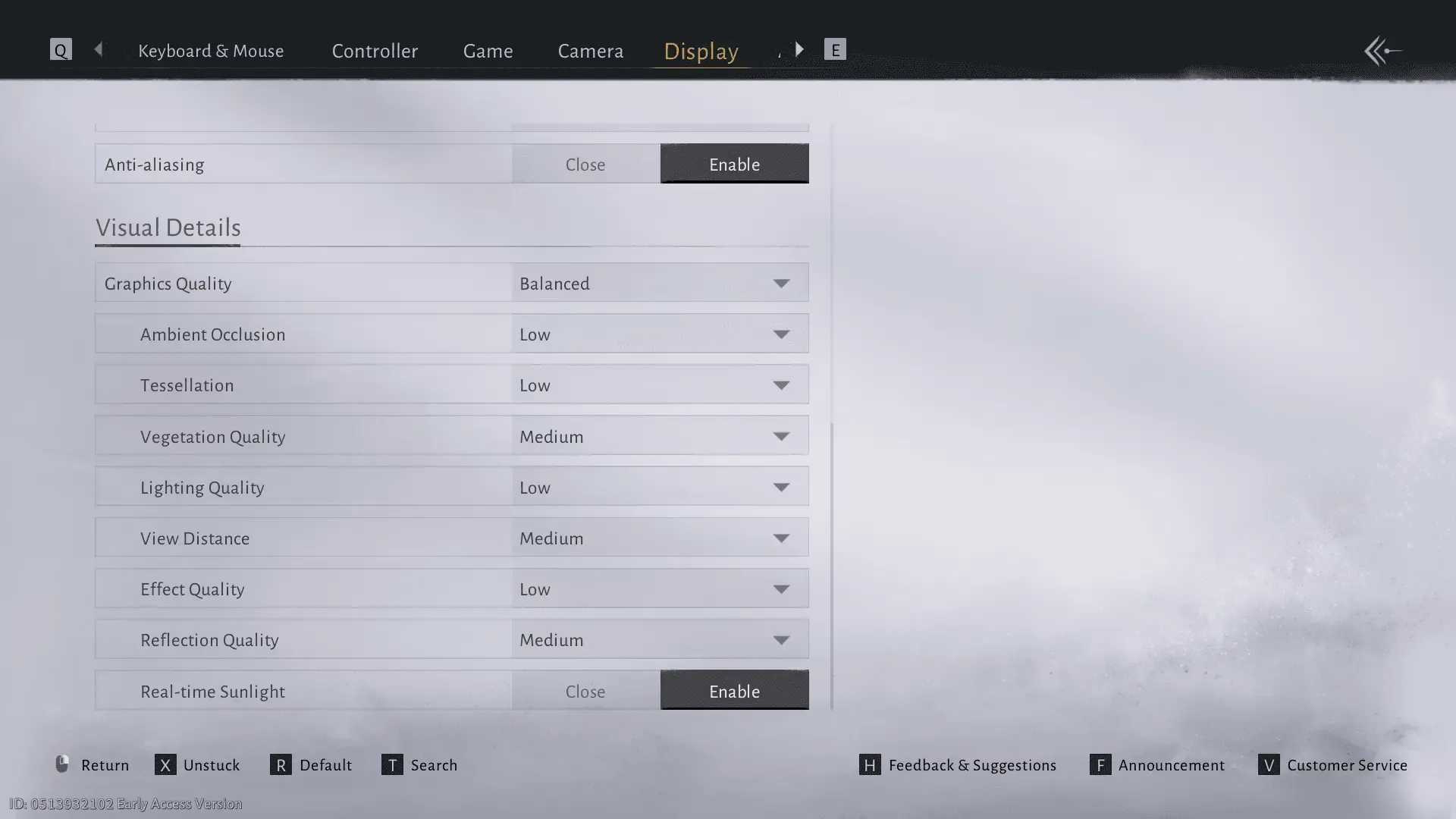
Kill Volumetric Clouds, drop to Medium Vegetation, Low Shadows, AO off, Tessellation off, Effects low. Go Fullscreen, V-Sync off—pair with DLSS Quality at 1280x720 for +40-60% FPS. DLSS rules RTX, FSR hits all GPUs, XeSS for Arc. Do this: 1) Launch with -dx12 shortcut. 2) NVIDIA Reflex slashes 10-30ms latency. 3) 32GB RAM if you can.
CPU/GPU Power Moves
NVMe SSD? Non-negotiable. Verify files, cap FPS to your monitor's Hz, undervolt GPU. Sweet spot: i7-10700 or RTX 2070 Super, 32GB RAM. Steam Deck: Lite 60GB install, Proton Experimental, FSR Balanced for 40FPS. Ditch NVIDIA overlay; stay under 75°C.
Drivers and Mod Lowdown
Fresh drivers plus DX12 unlock DLSS/FSR—no mods yet. Stutter fix: 100GB free SSD, idle in menu for shader cache. Cutscene crashes? FPS cap at 30. Floor specs: Ryzen 5 5600X and RTX 3060.
Mobile Speed Boosts That Stick
Save That Battery
Video cutscenes and Assist Deflection are defaults (turn off Assist for soulslike pain). Go-to: iPhone 14 Pro or Snapdragon 8 Gen 2; 60FPS locked, custom controls coming. Steps: 1) Disable Assist. 2) Crank Detailed Damage Numbers.
Touch Controls Tuned Right
No custom binds, Assist stays on. Set Map to Detailed, Auto Lock on. Touch can't match PC's mouse Parry rebind. PC gets Reflex for lag; Mobile toggles Combat Assist. Experts: unlock Level 30 Legend on PC first.
Cache Clears for Peak Perf
Wipe cache pre-Dec 12, hit min specs. iPad Pro owns foliage and reflections. Video playback dodges spikes. Pre-download Dec 10; watch for ~2GB RAM usage.
Graphics and Controls: Side-by-Side Slugfest
Visuals Under the Hood
PC cranks high settings, upscaling, real-time everything. Mobile matches device res with video cutscenes. Shared engine means PC stutters more; FSR cuts shimmer. Drop PC Effects low for closer parity.
Inputs: Wins and Fails
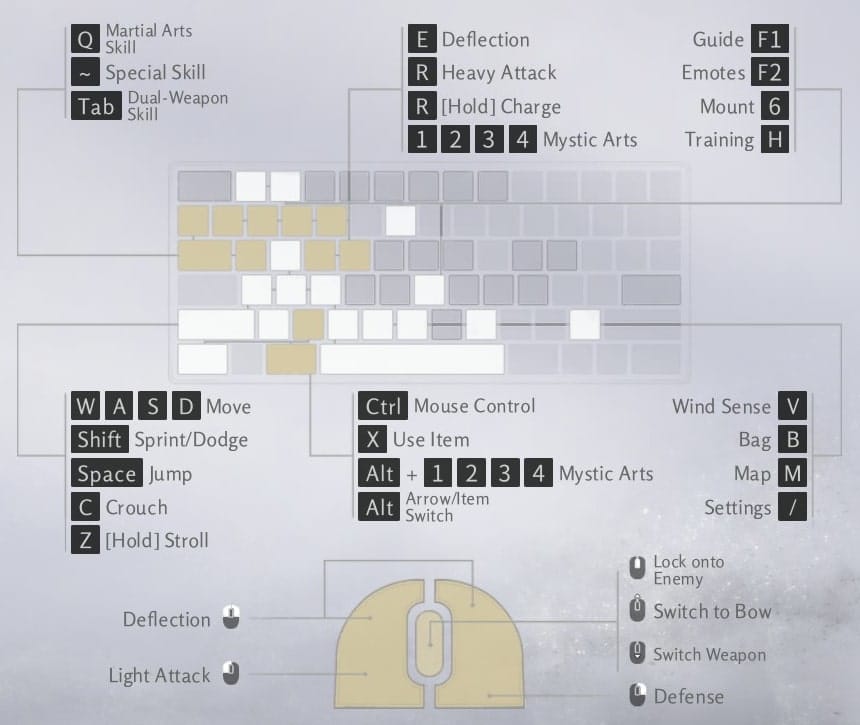
PC: total rebinds, Vibration at 100, Motion 50 on controller/mouse Dodge. Mobile: touch with Assist, custom incoming, no layouts yet. PC Reflex kills lag; Mobile's Combat Assist toggle helps.
What's Next: Updates and Roadmap Buzz
Patches to Watch
Mobile gets custom controls and advanced options soon, full parity post-launch. Cross-play hits day one Dec 12. Keep eyes on official channels for Legend on Mobile.
Key Announcements
Pre-reg rewards are live. PC shader fixes incoming, probably. Enable Cross-Platform, check Level 5 mail.
The Verdict: Pick Your Poison
Quick Rec Matrix
PC for high difficulty and customs (RTX+ advised). Mobile for portability (iPad Pro crushes). Hardcore soulslike? PC. On-the-go action? Mobile. Switching? Nail the pre-link checklist.
Switch Platforms Without Tears
- Link accounts pre-character.
- NVMe SSD on PC, min specs on Mobile.
- Test FPS after sync.
FAQ
Does Where Winds Meet support cross-save between PC and mobile?
Yes, full sync Steam/Epic/PS/Mobile pre-linking; progress/purchases transfer.
How do I transfer my Where Winds Meet save from PC to mobile?
Settings → Other → User Center → Link Account pre-character; same login Mobile Dec 12.
Is Where Winds Meet performance better on PC or mobile?
PC superior DLSS/60FPS highs; Mobile 57FPS stable iPad Pro/video cutscenes.
What are the graphics differences in Where Winds Meet PC vs mobile?
PC real-time/upscaling; Mobile video playback/device resolutions 60FPS stability.
Can I play Where Winds Meet cross-platform multiplayer?
Yes, Cross-Platform enabled.
How to optimize FPS in Where Winds Meet on PC?
DX12/DLSS Quality/low Shadows/Vegetation/NVMe SSD: +40-60% FPS.
(Editor view: PC edges it for me on raw power, but Mobile's stability on iPad? Game-changer for commutes. Test both if you can.)