

Recommended Discounts

Arena Breakout Bonds
Arena Breakout Player ID is numerical!Tap in Personal Information center, your player ID can be found under the avatar.
10% OFF
Related articles


Arena Breakout Best EQ Settings for Footstep Tracking
Set Master Volume to 70–80%, Footsteps to 100%, Gunfire to 100%, Ambient to 0%. Apply EQ boosts at 1.4kHz (+5dB), 1.6kHz (+6dB), and 1.8kHz (+5dB). Enable spatial audio. These adjustments extend enemy detection from 50m to 65m and sharpen positional accuracy in every raid.
Buffget
Why Audio Optimization Wins Raids in Arena Breakout
In a tactical extraction shooter where one mistake costs your entire loadout, audio isn't a comfort feature — it's a survival mechanic. Arena Breakout's sound engine encodes precise positional data into every footstep, reload, and environmental cue. Surviving extraction often comes down to who heard who first.
Default settings are calibrated for accessibility, not competitive edge. They compress dynamic range, flatten spatial cues, and treat ambient noise with the same priority as enemy movement. The Ignition Season update (April 29, 2025) and Arena Breakout Infinite patch (September 15, 2025) both introduced audio engine refinements that make proper EQ calibration more impactful than ever.
For players who want to focus on gear and strategy instead of grinding resources, Arena Breakout Bonds cheap top up through buffget offers fast, secure access to in-game currency.
How the Sound Engine Works
Arena Breakout uses a layered positional audio system assigning directional vectors to sound sources in real time. Footsteps carry left-right panning data, distance attenuation curves, and vertical positioning flags. Standard enemy detection maxes out at 50m — optimized setups with the GS2 headset push that to 65m.
The critical insight most players miss: footstep audio lives in the 1.4kHz–1.8kHz band. Not bass. Upper midrange. And default EQ profiles tend to be flat or suppressed right there.
Why Default Settings Hurt You
Default audio lets ambient sound compete directly with footstep cues. Rain alone muffles footstep audio by over 60% — meaning on outdoor maps like Valley or Farm, you're already fighting environmental masking before any EQ consideration.
EQ Basics: What You're Actually Adjusting
An EQ adjusts the volume of specific frequency bands. For Arena Breakout, the goal isn't making everything louder — it's making footsteps clearer relative to everything else. Over-boosting wrong bands destroys directional clarity by muddying the spatial cues the engine is delivering.
Key Frequency Ranges
- 20Hz–100Hz: Deep rumble, explosion sub-bass. Minimal footstep content. Boosting adds weight but kills directional precision.
- 1.4kHz–1.8kHz: Primary footstep frequency range. Highest-priority boost zone.
- 2kHz–8kHz: Weapon handling, reload clicks, voice cues. Secondary tactical importance.
In-Game Audio Settings: Your Foundation
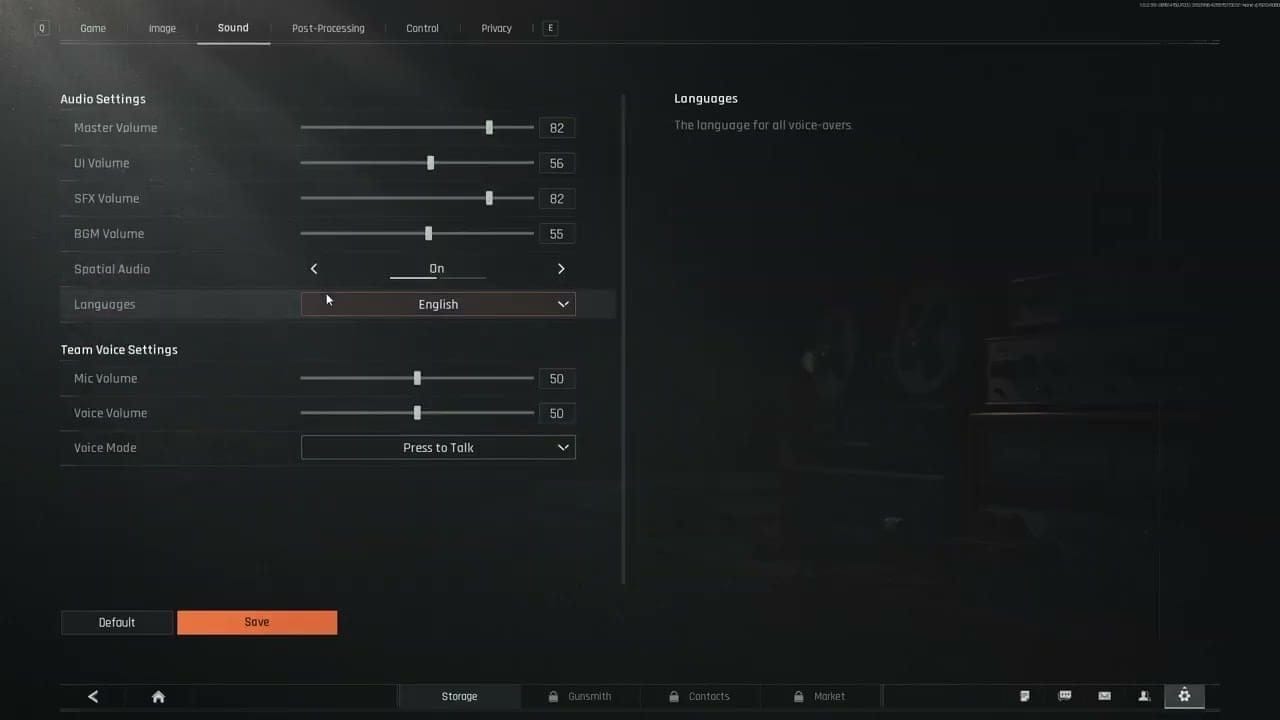
External EQ only works correctly when in-game audio is properly configured first. Applying EQ boosts on top of misconfigured in-game settings creates compounding distortions.
Optimal Slider Values
- Master Volume: 70–80% — sufficient signal strength without hardware-level clipping
- Footsteps: 100% — non-negotiable for competitive play
- Gunfire: 100% — critical for identifying engagement zones and flanking routes
- Ambient: 0% — removes the single biggest source of audio interference
Setting Ambient to 0% in-game strips that layer before it reaches your EQ — far more effective than trying to EQ around it afterward.
Also required: Audio latency below 10ms. Network latency below 50ms. High network latency desynchronizes sound from visual events, breaking positional audio regardless of EQ quality.
Best EQ Settings for Footstep Tracking in Arena Breakout
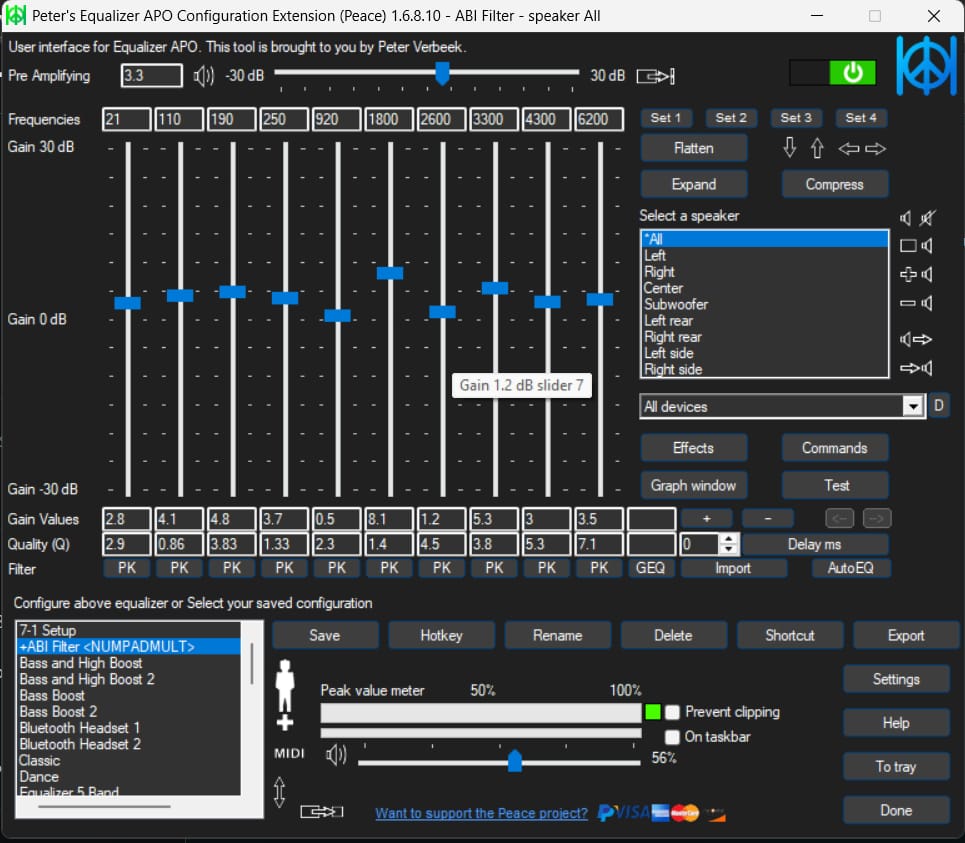
With in-game settings locked, apply this profile through your system audio tools:
- 60Hz: 0dB
- 125Hz: 0dB
- 250Hz: 0dB
- 500Hz: +1dB
- 1kHz: +2dB
- 1.4kHz: +5dB ← primary footstep frequency
- 1.6kHz: +6dB ← peak transient frequency, maximum boost point
- 1.8kHz: +5dB ← upper footstep range
- 2kHz: +3dB
- 4kHz: +2dB
- 8kHz: +1dB
- 16kHz: 0dB
The 1.6kHz peak at +6dB is the single most impactful adjustment. It directly amplifies where Arena Breakout's footstep transients are most concentrated.
EQ Profile Variants by Map Type
Footstep-Priority (Armory, Northridge — indoor close-quarters):
- Full 1.4–1.8kHz boost as above, bass flat
Balanced (Valley, Farm — mixed environments):
- Moderate +3dB at 1.4–1.8kHz, +2dB at 2–4kHz
Gunshot-Priority (open long-range environments):
- Flat at 1.4–1.8kHz, +4dB at 2–4kHz
To complement your audio setup with high-quality in-game gear, buy Arena Breakout safe case Bonds through buffget — competitive pricing, fast delivery, and secure transactions trusted by thousands of players.
Step-by-Step Setup Guide
PC Setup
- Reset all Arena Breakout audio sliders to default
- Apply in-game settings: Master 70–80%, Footsteps 100%, Gunfire 100%, Ambient 0%
- Open Sound Settings in your system audio panel
- Enable Spatial Sound → select Windows Sonic for Headphones
- Set game audio output to Stereo mode — spatial processing works more accurately with a clean stereo signal than virtual surround emulation
- Open your system EQ tool and apply the frequency values above
- Verify audio latency is below 10ms in your audio driver settings
Pro tip: Closed-back headphones with 40mm drivers are the recommended hardware. Passive isolation compounds the benefit of setting Ambient to 0%.
Mobile Setup
- Use device built-in EQ targeting the same 1.4–1.8kHz boost range
- Wired earbuds over Bluetooth — lower latency, better directional accuracy
- Enable spatial audio in device sound settings if available
- Phone speakers can't reproduce directional cues accurately — avoid them entirely
Testing Your Settings
- Equip your in-game headset before entering a raid
- Test audio in a safe pre-raid area to calibrate perception
- Run a low-stakes raid specifically to evaluate footstep clarity — don't test during high-value runs
- Verify left-right directional separation feels accurate
- Adjust individual bands by ±1dB if frequencies feel harsh or insufficient
In-Game Headset Selection
Your EQ settings work with your in-game headset, not instead of it. Key specs:
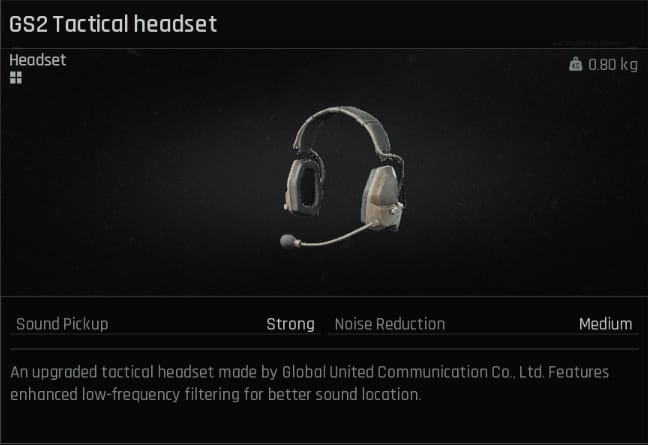
- GS2 (0.8kg): 30% better detection range — extends 50m ceiling to 65m. Top choice for footstep tracking.
- Commander A (0.7kg): 30% better overall audio performance. Comparable to GS2 for competitive use.
- Z038 (0.65kg): Solid mid-tier directional performance.
- M32 (0.6kg): Balanced performance-to-cost ratio.
- Com1 (0.4kg): Entry-level — functional, no detection range bonus.
GS2 and Commander A are the clear picks. Their 30% detection improvement stacks with EQ optimization for a compounding advantage.
Surface-Specific Footstep Audio
Different surfaces produce distinct frequency characteristics — telling you not just where an enemy is, but what surface they're on.
Concrete and Tile (Armory indoors): Sharp, high-frequency transients with fast attack. Most active in the 1.6–1.8kHz range. Easiest to track.
Metal Grating (Northridge upper floors): Resonant mid-range with metallic ring. 1.4kHz band particularly active. Resonance carries further — often easier to detect at range.
Grass, Dirt, Outdoor Terrain (Valley, Farm): Softer, lower-frequency character. Rain muffling exceeds 60%. Crouch-walking on outdoor terrain reduces footstep volume by 60% — a crouching enemy on wet grass is near the absolute detection limit.
Vertical Audio Tracking
Multi-story environments (Armory, Northridge) require distinguishing footsteps above vs. below you.
- Footsteps from above: More low-mid content (~500Hz–1kHz) — floor material acts as a low-pass filter
- Footsteps from below: Slightly more high-frequency content — sound travels upward through open space
The recommended EQ profile's graduated boost from 1kHz through 1.8kHz preserves these vertical cues. Avoid heavy bass boosts in multi-story environments — bass frequencies are omnidirectional and actively degrade vertical positioning accuracy.
Windows Sonic for Headphones delivers a reported 10x improvement in directional performance vs. standard stereo, most pronounced in vertical tracking scenarios.
Common EQ Mistakes
Over-boosting bass: The most common error. Bass frequencies below 200Hz are omnidirectional — they carry zero positional data. Boosting them adds volume, not clarity, and masks the 1.4–1.8kHz footstep range.
Skipping the mid-range boost: The 1.4–1.8kHz boost doesn't sound dramatic in isolation. Players dismiss it after a brief test. The improvement becomes obvious during raids when you detect enemies you previously missed entirely.
Master volume above 80%: Introduces hardware-level distortion and causes listening fatigue within 30–45 minutes. Fatigued hearing misses subtle directional cues. 70–80% is where signal quality and sustained performance intersect.
Leaving Ambient at default: This single change delivers more immediate improvement than any EQ adjustment. Environmental audio is the primary masking agent for footstep cues in Arena Breakout.
Keeping Settings Current After Patches
Arena Breakout patches can alter footstep frequency rendering, detection ranges, and spatial audio processing. Signs your EQ needs re-tuning after an update:
- Footsteps that felt clear now sound muddy or directionless
- Detection range feels shorter despite identical in-game headset
- Left-right spatial separation feels compressed
- Ambient sounds appear louder relative to footsteps even at 0%
After any major patch, reset in-game sliders to default, reapply recommended values, and run a dedicated test raid before returning to high-value runs. The core 1.4–1.8kHz boost range is likely to remain effective across patches — it targets fundamental footstep acoustics — but dB values may need minor adjustment.
FAQ
Q: What are the best EQ settings for hearing footsteps in Arena Breakout? Boost 1.4kHz (+5dB), 1.6kHz (+6dB), 1.8kHz (+5dB). Keep bass flat. Set in-game Footsteps to 100%, Ambient to 0%.
Q: Does boosting bass help hear footsteps? No. Bass is omnidirectional and carries no positional data. It masks the 1.4–1.8kHz footstep range. Keep it flat.
Q: Does headset price determine footstep tracking quality? Hardware matters less than in-game headset selection and EQ config. GS2 and Commander A provide 30% better detection regardless of physical headset price. A mid-range headset with correct EQ beats an expensive one on defaults.
Q: Can mobile players match PC audio clarity? Not fully — phone speaker hardware limits directional tracking. But wired earbuds with the 1.4–1.8kHz boost applied through device EQ bring mobile performance significantly closer to PC levels.
Q: How quickly will I notice improvement? Most players notice improved footstep clarity within the first raid. Developing the perceptual skill to act on it takes 5–10 raids of deliberate practice. The 50m→65m detection range improvement with GS2 is measurable from session one.
Q: How do patches affect my EQ settings? Major patches can shift footstep frequency rendering. After each significant update, run a test raid and compare clarity against your pre-patch baseline before adjusting dB values.
buffget offers competitive pricing, fast delivery, and secure transactions for Arena Breakout players ready to gear up efficiently. Lock in your audio advantage before your next extraction.