

Recommended Discounts
_37751.webp)
Honor of Kings Global
Official Automatic Top-up!! And get extra 100% tokens bonus on first top-up!
44.35% OFF
Related articles


Best Honor of Kings 120 FPS Settings: Unlock Guide
Unlock 120 FPS in Honor of Kings (launched June 20, 2026) on Snapdragon 855+ or Exynos 8890+ processors, 6GB RAM, 120Hz screen, Android 10+, or iOS 14.5+. Set Graphics to High/Ultra frame rate, enable Anti-Aliasing, disable UI Animations. BlueStacks: Performance tab > High performance > 120 FPS slider for 8.33ms input lag—33% less than 60 FPS. Use DNS 180.76.76.76 for 30-50% lower latency. Get smooth Honor of Kings 120 FPS gameplay on supported devices.
Buffget
Why 120 FPS Matters in Honor of Kings Global
120 FPS cuts input lag to 8.33ms vs 16.67ms at 60 FPS—a 33% boost for team fights. Snapdragon 855 hits 110-118 FPS; Snapdragon 778G reaches 110-115 FPS on SEA/NA servers.
Competitive Edge and Real Examples
Lower lag improves responsiveness; network tweaks drop ping from 250ms to 120ms. On Malaysia servers, 120 FPS holds 110+ FPS in 5v5 clashes. Custom matches show smoother animations vs 60 FPS cap.
Enable Display FPS in Battle Settings to track drops in ranked. See Ultimate Honor of Kings Performance Optimization Guide.
Step-by-Step: Enable Honor of Kings 120 FPS
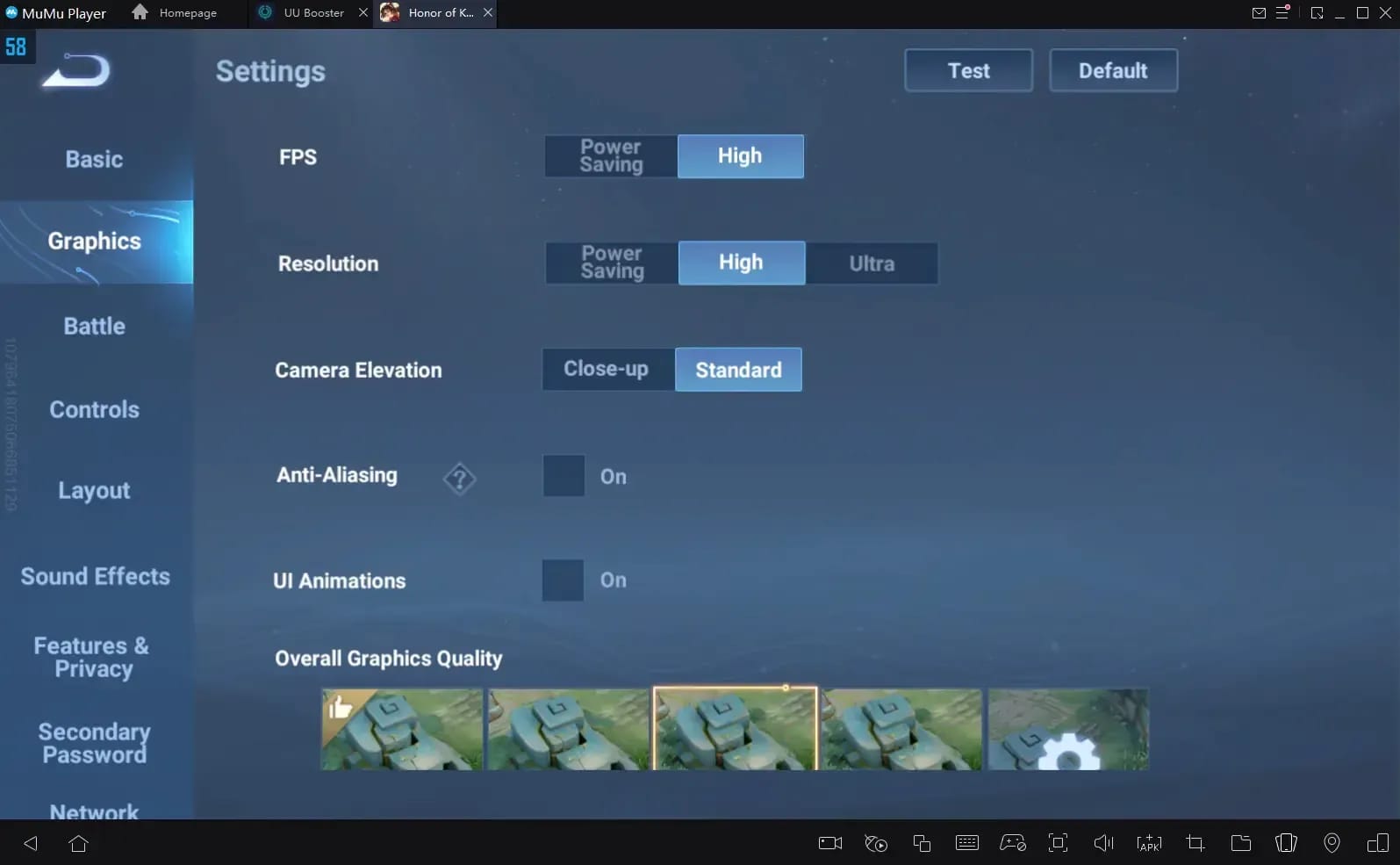
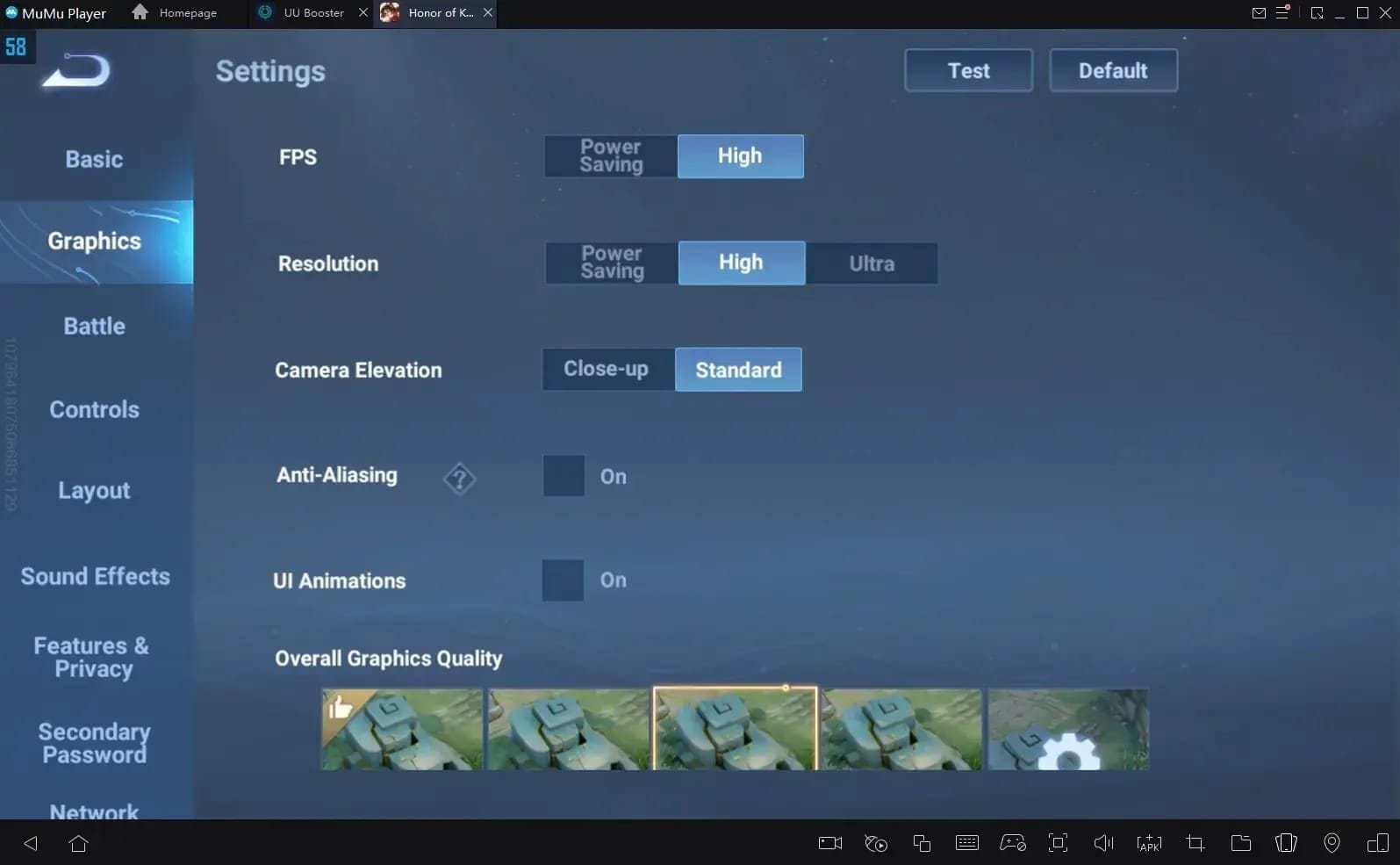
From lobby, tap Settings > Graphics.
- Set Frame Rate to High/Ultra (120 FPS).
- Enable High Frame Rate toggle.
- Slide Refresh Rate to 120 FPS; disable cap.
- Confirm 120Hz screen active.
- Save, restart match.
Supports iPhone 12 Pro+, iPad Pro M1/M2.
Device Requirements for 120 FPS
Minimum Specs:
- Android: Snapdragon 855+, Exynos 8890+, 6GB RAM, 120Hz screen, Android 10+.
- iOS: iPhone 12 Pro series, iOS 14.5+.
- BlueStacks: Windows 7+, 4GB RAM, 5GB free space.
Benchmarks: Snapdragon 855: 110-118 FPS; Snapdragon 778G: 110-115 FPS (LATAM/EU consistent). See 60 FPS vs 120 FPS Comparison.
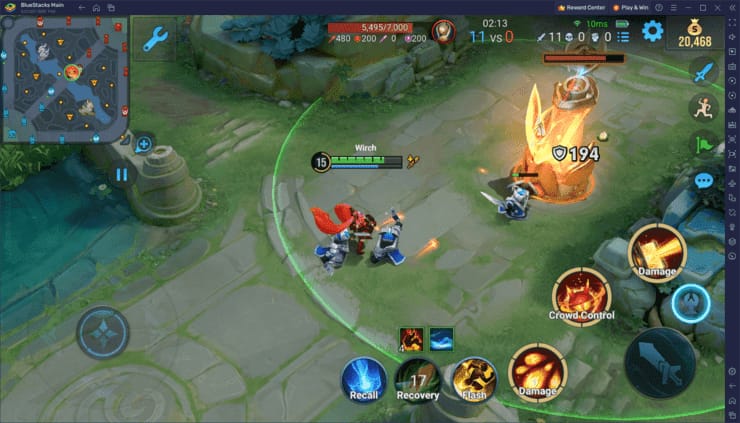
Climb ranks faster—purchase HOK tokens on buffget for competitive prices, fast delivery.
Optimal Graphics for Max Honor of Kings 120 FPS
Prioritize High/Ultra frame rate. Balance with Medium/High Texture.
- Anti-Aliasing: ON (sharpens edges, minimal FPS hit).
- UI Animations: OFF.
- Shadows: Low/Medium (+10-15 FPS).
- Particles: Medium/Low.
- Texture: Medium/High (pro favorite).
Ultra vs High: Ultra risks drops; High sustains 110+ FPS. Pros disable dynamic lighting for Honor of Kings ultra graphics 120 FPS.
Fix 120 FPS Issues in Honor of Kings
Clear 2-3GB cache, free 4-6GB storage to stop drops.
Stuck at 60 FPS?
- Verify Snapdragon 855+ hardware.
- Enable Developer Options: Tap Build Number 7x; check refresh rate.
- Reset Graphics to High/Ultra.
Overheating Fixes: Clear cache pre-match; disable animations to avoid throttling below 110 FPS.
Test and Monitor Honor of Kings 120 FPS
Enable FPS counter in Battle Settings—overlay shows real-time frames post-June 20, 2025 update.
Aim for 110-118 FPS in team fights. Japan/Korea servers: Snapdragon 855 averages 115 FPS. Compare pre/post tweaks.
Battery and Heat at 120 FPS
High refresh drains battery—close background apps, free 4-6GB storage.
Pro Tips:
- Shadows Low/Medium to cut power draw.
- Particles Medium/Low.
- Monitor via Developer Options after cache clear.
- DNS 180.76.76.76 eases CPU load.
Pro Insights on Honor of Kings 120 FPS
Pros use: Camera Sensitivity Fast, Equipment Right, Minimap Left.
33% lag drop rules current patch ranked—post-June 20, 2025 Global favors 110+ FPS edge.
Boost with buffget: buy HOK tokens online—secure, high-rated, wide coverage for quick climbs. See FPS Drops During Team Fights Fix.
Advanced Tweaks for Peak Performance
- DNS 180.76.76.76 in Developer Options: 120ms ping on NA/EU.
- Enable Anti-Aliasing for smooth animations.
- Android: Tap Build Number 7x. iOS: Settings equivalent.
- Post-match: Review FPS logs, target 8.33ms lag. Adjust Particles if <110 FPS.
Supercharge with buffget buffs for instant rank gains!
FAQ: Honor of Kings 120 FPS Settings
How do I enable 120 FPS in Honor of Kings Global?
Settings > Graphics > Frame Rate High/Ultra. Needs Snapdragon 855+, 120Hz (June 20, 2025 launch).
What are the best graphics settings for 120 FPS?
Anti-Aliasing ON, UI OFF, Shadows Low/Medium, Texture Medium/High, Particles Medium/Low.
Does 120 FPS make a difference?
Yes—8.33ms lag vs 16.67ms (33% less); smoother team fights.
Why stuck at 60 FPS?
Check Snapdragon 855+/Exynos 8890+, Android 10+; clear 2-3GB cache; Developer Options.
What devices support it?
Snapdragon 855+, 6GB RAM, 120Hz; iPhone 12 Pro+, iPad Pro M1/M2.
How to reduce lag for high FPS?
DNS 180.76.76.76: 250ms to 120ms (30-50% cut).