

Recommended Discounts

IMO Diamonds
Recharge requires a mobile phone number Please include the countrv code with a + sian
10% OFF
Related articles


IMO Single Tick Meaning: Blocked or Not Delivered?
IMO uses five distinct message status icons. A single tick (√) means your message left your device but hasn't reached the recipient — caused by poor internet, a switched-off phone, a deactivated account, or being blocked. Double tick confirms delivery. A round circle confirms the message was read. Blocked contacts show a permanent single tick combined with hidden profile details and failed calls.
Buffget
What Every IMO Status Icon Actually Means
These aren't decorative symbols — each reflects a specific technical state in the delivery pipeline.
- Clock icon — Message queued, pending delivery; network delay on your end
- Single tick (√) — Message sent to IMO servers; not yet delivered to recipient's device
- Double tick (√√) — Message successfully delivered to recipient's device
- Round circle — Message read by the recipient
- Red exclamation mark — Message failed to send entirely; requires manual retry
Single Tick: Server Acknowledgment, Not Delivery
The single tick confirms only that your message reached IMO's servers. It does not confirm the recipient received it, opened the app, or has an active connection. This is the most misread icon in IMO — and the single tick alone is never sufficient evidence of a block.
Double Tick: Confirmed Device Delivery
Two ticks mean the message reached the recipient's device. Requires an active internet connection at delivery time. No connection means no second tick — the message waits on IMO's servers until the device comes back online.
Round Circle: Read Receipt
Triggers when the recipient opens the conversation. But if they've set Read Receipts to Nobody in privacy settings, the circle never appears — even if they read every word. You'll see a double tick but never a circle. That's a privacy choice, not a block signal.
The Full IMO Message Journey

Every message travels a defined sequence. When any stage breaks, the status icon freezes there — giving you a diagnostic clue.
- Queued on IMO servers — Clock icon appears. Unstable connection here triggers the red exclamation mark.
- Delivery attempt to recipient's device — Requires active internet on their end. Phone off, no data, or IMO not running in background = message waits on server = single tick.
- Read receipt triggered — Round circle fires when they open the chat, but only if Read Receipts are enabled.
The journey breaks at Stage 2 in the vast majority of single-tick situations. Network issues, background app restrictions, and device power states are the most common culprits — not blocking.
5 Real Reasons You're Seeing a Single Tick
Before concluding you've been blocked, work through this complete list. Each produces an identical single tick.
1. No internet connection — Most common cause. Single tick persists until connectivity restores, then delivery completes automatically.
2. Phone is switched off — IMO holds the message on its servers and retries when the device powers back on. Can produce a single tick lasting hours.
3. IMO not running in background — Aggressive battery optimization kills the app. Single tick persists until they relaunch IMO manually.
4. Account deactivated or deleted — No active endpoint to push to. Message stays undelivered indefinitely. Visually identical to being blocked from message status alone.
5. You've been blocked — Does produce a persistent single tick, but always accompanied by additional signals. Never the tick alone.
Pro tip: For users who want to stay connected and active on IMO, platforms like buffget offer IMO international calling credits cheap with fast, secure delivery to keep your account fully functional.
How to Tell If You're Blocked on IMO
Identifying a block requires cross-referencing multiple signals simultaneously. No single indicator is conclusive.
Signal 1: Persistent Single Tick Duration
A single tick resolving within hours = connectivity issue. A permanent single tick across 24–48 hours and multiple message attempts = probable block or deactivated account.
Signal 2: Profile Picture Visibility
Open the chat and check:
- Profile picture visible, name displayed — Strong indicator you're not blocked
- Profile picture absent or generic placeholder — Potential block signal
- Contact name missing or displaying differently — Warrants further investigation
Signal 3: IMO Call Result
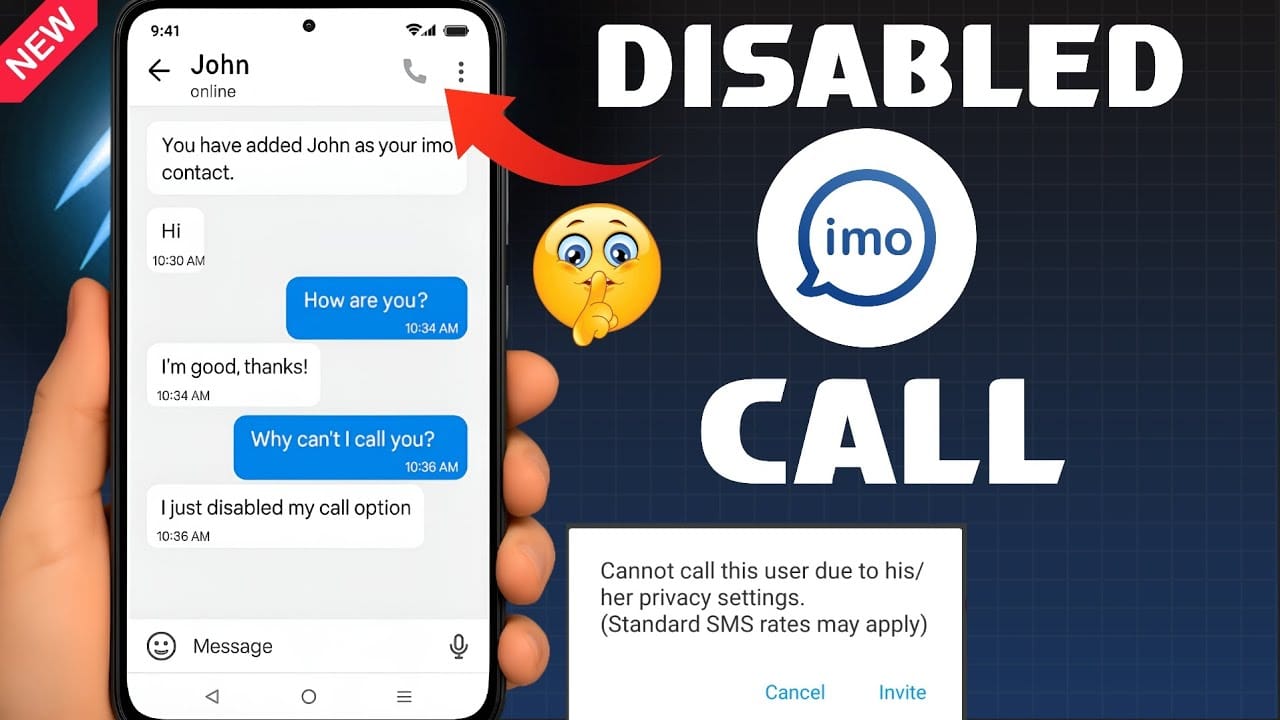
Make a voice call through IMO. Two outcomes indicate a block:
- Call fails immediately with your buddy is not online
- Call declined instantly with Can't call this user due to his/her privacy setting
A call that rings normally but goes unanswered is not a block indicator.
Signal 4: Last Seen Status
If you can see their Last Seen timestamp, they haven't blocked you — blocked contacts hide this entirely. Invisible Last Seen + persistent single tick + missing profile picture = block highly probable.
Blocked vs. Not Blocked: Four Scenarios Compared

Blocked by contact
- Message status: Persistent single tick, never upgrades
- Profile picture: Hidden or absent
- Last seen: Not visible
- Call result: Fails immediately or returns privacy error message
Recipient's phone is off
- Message status: Single tick, upgrades to double tick when phone powers on
- Profile picture: Visible
- Last seen: Last recorded timestamp visible
- Call result: Doesn't connect, no immediate decline
No internet connection
- Message status: Single tick, resolves when connection restores
- Profile picture: Visible
- Last seen: Visible (last recorded time)
- Call result: Fails due to connectivity, not privacy error
Account deleted or deactivated
- Message status: Permanent single tick, never resolves
- Profile picture: May disappear or show placeholder
- Last seen: No longer updates
- Call result: Fails, no specific privacy error message
The key differentiator: The specific text Can't call this user due to his/her privacy setting is unique to the block scenario. It doesn't appear in network or device-related failures.
IMO Privacy Settings That Mimic Blocking
Several legitimate privacy configurations produce block-like symptoms. Don't jump to conclusions.
Hidden Last Seen — A contact restricting their Last Seen visibility won't display their last active timestamp. Hidden Last Seen alone is not a block signal. Combined with persistent single tick and missing profile picture, the picture changes.
Read Receipts turned off — When a contact sets Read Receipts to Nobody, the round circle never appears even when they read your message immediately. You'll get a double tick confirming delivery, but read confirmation is permanently suppressed. And here's the critical point: if your messages are reaching double tick, you're definitively not blocked. Blocking prevents delivery entirely.
Profile picture restricted — Contacts can limit picture visibility to specific groups. If you're excluded from that list, their picture disappears without any block occurring. Always cross-reference with message delivery status.
IMO in Gaming: Squad Communication Scenarios
IMO is widely used for gaming squad coordination, and delivery failures during active sessions create real operational problems.
Single Tick Mid-Session = Almost Always Network
During competitive sessions, players frequently switch between mobile data and Wi-Fi or hit temporary drops. A single tick mid-game almost always reflects a momentary interruption. Messages typically deliver within minutes once connectivity stabilizes.
Group Chat Status Works Differently
In IMO group chats, a single tick means the message hasn't been delivered to all members — not that any specific member blocked you. Group delivery requires all active participants to receive the message before status upgrades.
When Squad Messages Are Stuck on Single Tick
- Confirm your own internet connection is stable first
- Force-close and reopen IMO to refresh the connection
- Switch between Wi-Fi and mobile data to test alternative routes
- Send a follow-up message — sometimes the second triggers delivery of both
- Use IMO group voice calls as fallback when text delivery is unreliable
Step-by-Step Fix for IMO Single Tick Issues
When messages are stuck and you've ruled out a block:
- Check your own connection — Open a browser and load any page. If it fails, the issue is yours, not the recipient's.
- Force-close IMO completely — Fully close from task manager on Android or iOS, then relaunch. Refreshes the server connection.
- Clear IMO app cache — Settings > Apps > IMO > Storage > Clear Cache. Resolves corrupted session data blocking transmission.
- Retry the message — After clearing cache and reconnecting, send a fresh message. Previous stuck messages often deliver alongside it.
- Accept non-delivery when appropriate — Stable connection, functioning app, 48+ hours of single tick, no profile visibility, failed calls with privacy error = contact has likely blocked you or deactivated their account.
For users managing active IMO accounts and wanting premium features, buy IMO Premium Diamonds safe through buffget — competitive pricing and verified secure transactions.
Frequently Asked Questions
Does IMO notify you when someone blocks you? No. IMO sends zero notifications when a contact blocks you. The only way to identify a block is observing the combination of signals: persistent single tick, hidden profile picture, invisible last seen, and failed calls with a privacy error message.
How long does IMO hold undelivered messages? IMO holds messages on its servers while awaiting delivery, but the exact retention period isn't publicly specified. Messages stuck for extended periods should be resent manually — don't assume automatic delivery after a long gap.
Is a single tick the same as a failed message? No. Single tick = message reached IMO's servers successfully. Red exclamation mark = message failed entirely and never reached the server. Two distinct failure points requiring different fixes.
What's the most reliable way to confirm a block? The call error message: Can't call this user due to his/her privacy setting. This appears exclusively in block scenarios — not from network issues, device power states, or privacy settings alone. Combine with persistent single tick and hidden profile details for near-certain confirmation.
Can IMO privacy settings make it look like I'm blocked when I'm not? Yes. Hidden Last Seen, restricted profile picture, and disabled Read Receipts can each mimic aspects of blocking. The critical differentiator: if your messages reach double tick, you're not blocked — regardless of what other information is hidden from you.
Can a blocked contact see my IMO profile? When you block someone, they lose visibility of your profile picture, last seen, and online presence. The block is mutual in terms of information visibility — neither party can see the other's active status details.