

Recommended Discounts

IMO Diamonds
Recharge requires a mobile phone number Please include the countrv code with a + sian
10% OFF
Related articles


IMO VoIP 3G Optimization: Crystal Clear Calls Guide 2026
IMO VoIP bandwidth optimization on 3G relies on data-saver codecs — Opus (6–64 Kbps) and G.729 (8 Kbps) — to compress audio without sacrificing clarity. Voice calls consume as little as 20 KB/minute, requiring a minimum of 64 Kbps. Target benchmarks: latency under 460 ms, stuttering below 0.23%, packet loss well under 60%.
Buffget
Why IMO VoIP Bandwidth Optimization Matters on 3G
3G networks (UMTS and HSPA) deliver 1–5 Mbps under ideal conditions, but congested towers drop effective speeds dramatically. IMO needs a minimum of 64 Kbps to sustain a voice call — and on a congested tower, available bandwidth can dip below that without warning, triggering audio degradation, call drops, and robotic distortion.
For rural users, travelers, and budget data users, this isn't optional. Millions of active IMO users still operate primarily on 3G in 2026, making this optimization essential.
Data-Saver Codecs: The Engine Behind Clear IMO Calls
What VoIP Codecs Do
A VoIP codec converts your voice into compressed digital data for transmission, then reconstructs it on the receiving end. The codec chosen directly determines bandwidth consumption and voice clarity under network stress.
IMO's three key codecs:
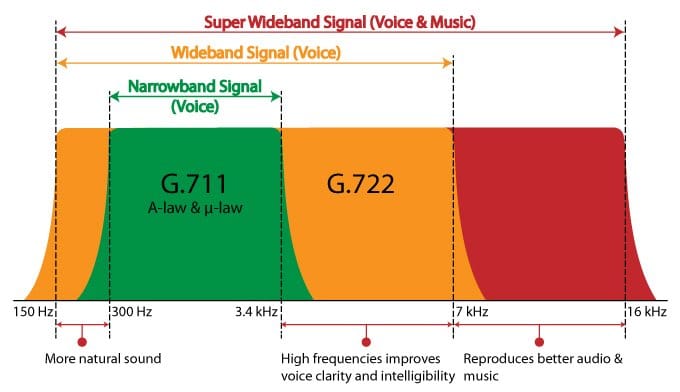
- Opus: 6–64 Kbps, algorithmic delay of 22.5–60 ms, supports 8/12/16/24/48 kHz sample rates — highly flexible across network conditions
- G.729: Fixed 8 Kbps — most bandwidth-efficient option for severely constrained 3G
- G.711: 64 Kbps — highest quality but unsuitable for weak 3G signals
How Low-Bitrate Codecs Preserve Clarity
Lower bitrate doesn't automatically mean worse audio. Opus at 12–16 Kbps delivers intelligible, natural-sounding voice through perceptual audio coding — prioritizing speech-critical frequency ranges while discarding data the ear can't process.
G.729 applies CS-ACELP compression at 8 Kbps, using roughly one-eighth the bandwidth of G.711 while maintaining acceptable clarity for standard calls.
Adaptive Bitrate: IMO's Automatic 3G Adjustment
IMO continuously monitors available bandwidth and switches codec parameters in real time. When signal drops, Opus bitrate moves toward the lower end of its 6–64 Kbps range. When bandwidth recovers, quality scales back up — no manual intervention needed.
This is why imo Lite — designed specifically for 2G/3G — sustains calls even in challenging conditions.
Key VoIP Metrics for IMO on 3G
Four metrics give you a precise diagnostic framework when calls degrade:
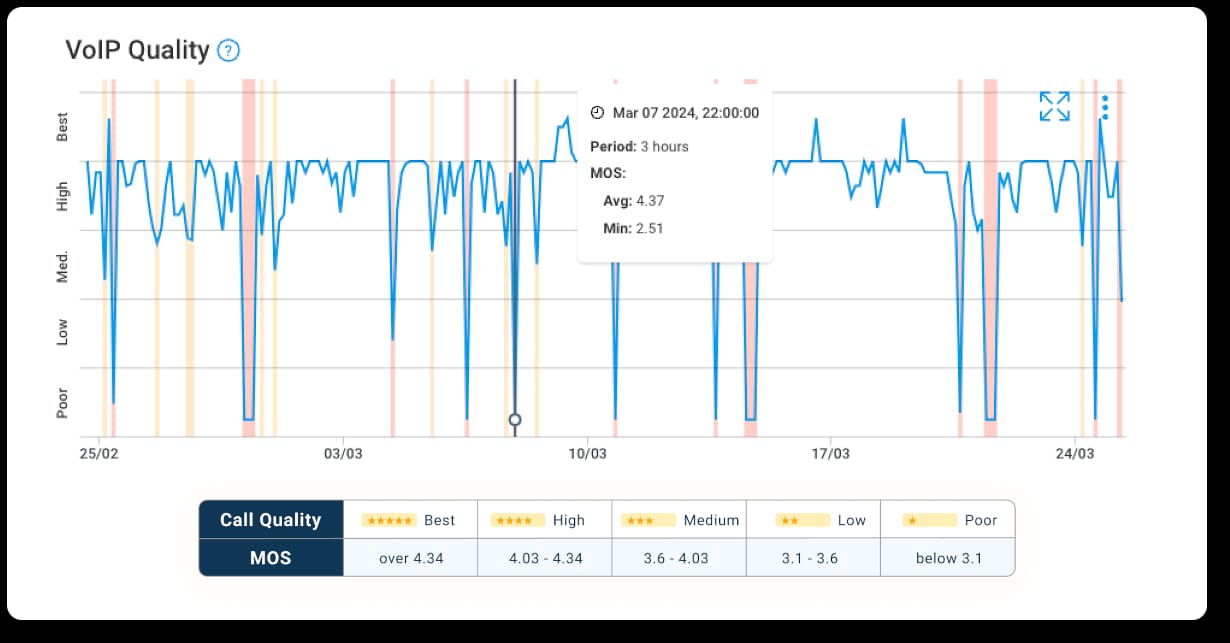
- Bitrate: IMO voice calls use 20–40 KB/minute — just 1–2 MB for a 30-minute call. Only possible because of codec compression.
- Latency: IMO's measured end-to-end latency is 460 ms. General VoIP threshold where delays become noticeable: 150 ms. IMO's maximum tolerated latency before calls become unacceptable: 1,500 ms.
- Jitter: Variation in packet arrival timing. Above 30 ms causes choppy, stuttering audio. IMO's measured stuttering rate under optimized conditions: 0.23%.
- Packet loss: IMO tolerates up to 60% packet loss before calls become completely unusable — but meaningful degradation starts well before that ceiling. Keeping packet loss low is the single highest-impact variable for call clarity on congested 3G.
How to Enable IMO Data Saver Mode for 3G (Step-by-Step)
- Open IMO and navigate to your profile or settings menu
- Locate Low Data or Data Saver within call or network settings
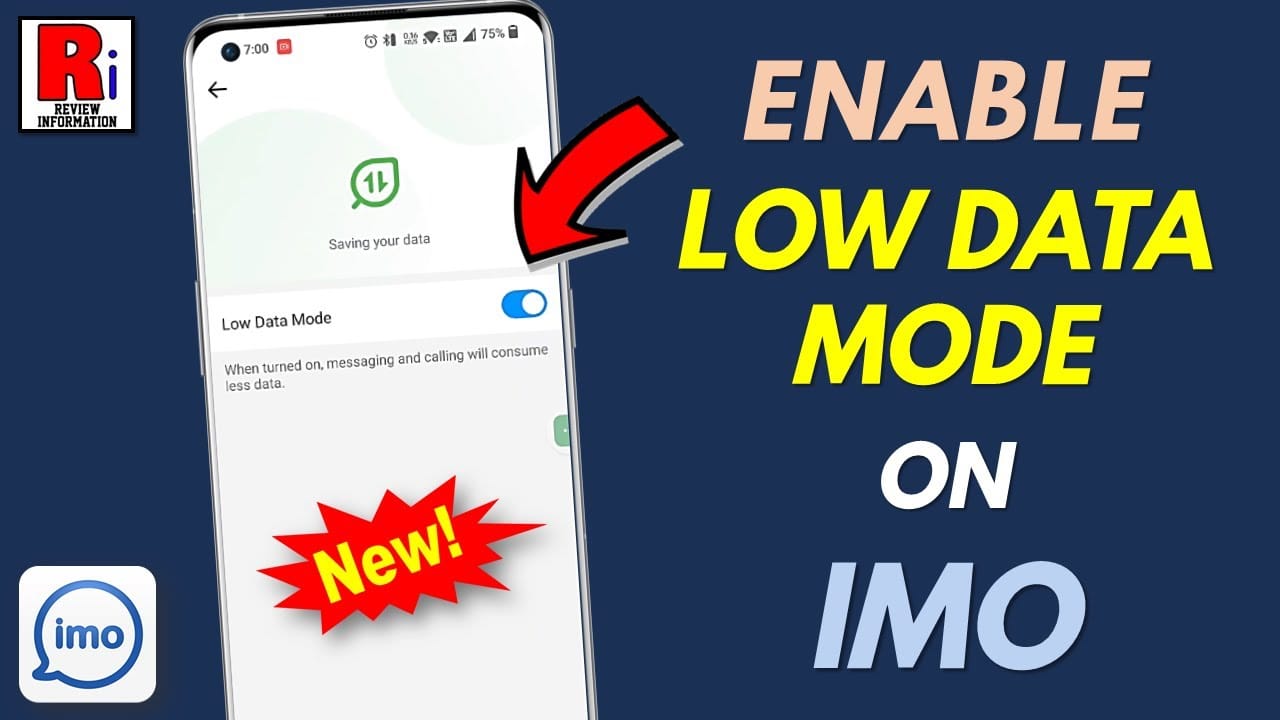
- Enable the toggle — this instructs IMO to prioritize bandwidth-efficient codec parameters
- Switch to audio-only calls by disabling video before dialing on 3G
- Close all unused background apps to free device memory and bandwidth
- Move to stronger signal before calling when possible — even a few meters helps
- Keep IMO updated for the latest codec optimizations
After enabling Data Saver, video quality reduces or disables by default, and Opus operates at its lower bitrate range. Voice clarity is preserved because the codec prioritizes speech frequencies.
For users who want to keep their account credits topped up efficiently, IMO premium credits fast top up through buffget offers competitive pricing, fast delivery, and secure transactions.
Advanced Settings for 3G Bandwidth Optimization
Device-Level Settings That Boost IMO Performance
- Disable Wi-Fi Assist / Smart Network Switch: These cause mid-call network switches that spike packet loss
- Set mobile data priority to foreground apps only — blocks background processes from consuming call bandwidth
- Disable automatic app updates over mobile data during calls
- Turn off background app refresh for all non-essential apps
Managing Background Apps and Network Mode
Background apps with active sync — email, cloud storage, social media — continuously consume bandwidth even when idle. During an IMO call on 3G, every background data request competes directly with your voice packets.
Force-close background apps before calling. On Android, forcing network mode to WCDMA/HSPA (3G only) rather than auto 2G/3G switching reduces mid-call network handoffs that cause brief but disruptive packet loss.
Pro tip: IMO's speed limit threshold is 70 Kbps — just above the 64 Kbps minimum. Keeping effective 3G throughput above 70 Kbps is your practical stability target.
Real-World Scenario: IMO Call on Congested 3G
Placing an IMO call from a rural area during evening peak hours when the local tower is under heavy load:
Pre-call checklist:
- Data Saver mode enabled in IMO settings
- All background apps closed
- Signal strength verified — move to window or outdoors if weak
- Audio-only mode selected before dialing
- IMO app on latest version
During the call: If quality degrades (choppy audio, increased latency), disable any remaining video stream and confirm no new background processes launched. IMO's adaptive bitrate will reduce codec bitrate automatically — but it can't recover bandwidth consumed by competing apps.
Post-call indicators: Stuttering near 0.23% and frame rate around 15.33 fps (video calls) confirm the codec performed within optimal parameters. Higher stuttering points to network congestion that pre-call optimization didn't fully address.
For users managing multiple IMO accounts or group calls — IMO supports up to 10 participants — discount IMO diamonds by phone number via buffget keeps group call features active with verified secure transactions.
Common Myths About IMO Data-Saver Codecs
Myth: Data Saver always means worse call quality. Reality: Opus at 12–16 Kbps delivers speech clarity perceptually equivalent to higher bitrates for standard conversation. Data Saver reduces data consumption, not perceived quality.
Myth: Higher bitrate always equals clearer calls. Reality: On congested 3G, forcing G.711 (64 Kbps) overwhelms available bandwidth, causing packet loss and jitter. A lower-bitrate codec that fits within available bandwidth produces cleaner audio than a high-bitrate codec fighting for insufficient capacity.
Myth: Only the receiver's network affects call quality. Reality: VoIP quality is determined by the weakest link in the bidirectional connection. Both sender upload and receiver download bandwidth matter. Optimizing your own settings improves quality for both parties.
The actual control variables for IMO call clarity on 3G: available bandwidth relative to codec bitrate, packet loss percentage, jitter levels, and latency — not raw network speed alone.
Complete IMO 3G Call Quality Troubleshooting Checklist
Work through this sequence when calls break up:
- Verify available bandwidth exceeds 64 Kbps minimum
- Enable Data Saver mode in IMO settings
- Switch to audio-only — disable video immediately
- Close all background apps consuming mobile data
- Check signal strength — relocate to improve 3G reception
- Disable automatic network switching (Wi-Fi Assist / Smart Network Switch)
- Restart IMO to clear cached network state causing suboptimal codec selection
- Update IMO — codec optimizations ship with app updates
- Check for congestion patterns — consistent degradation at specific times indicates tower congestion, not device settings
- Reinstall IMO as last resort if settings-level fixes don't resolve persistent issues
Clear diagnostic benchmarks: latency above 1,500 ms, packet loss approaching 60%, or jitter consistently above 30 ms all indicate network-level problems that device settings alone can't fully resolve.
Maintaining Clear IMO Calls Long-Term on 3G
After IMO App Updates
Major releases frequently change codec behavior, Data Saver UI, and network handling logic. After significant updates, revisit Data Saver settings — updates occasionally reset user preferences to defaults.
Congestion Patterns to Work Around
3G congestion peaks during evening hours (typically 7–10 PM local time) and weekend afternoons. Schedule important calls outside these windows, or pre-enable all optimization settings before peak periods.
Your IMO 3G Optimization Routine
Three habits that compound over time:
- Pre-call checklist: Data Saver enabled, background apps closed, strong signal confirmed
- Regular app updates: Codec improvements are delivered through app updates, not network changes
- Periodic settings audit: Verify optimization settings remain active after every major update
IMO's 15 MB app size and imo Lite's specific 2G/3G optimization reflect deliberate engineering for low-bandwidth performance. Pair that built-in optimization with consistent device-level settings management for the most reliable path to crystal clear 3G calls.
Frequently Asked Questions
Q: What's the minimum internet speed needed for IMO voice calls? 64 Kbps. With Data Saver and Opus or G.729 active, calls sustain acceptable quality at or just above this threshold on 3G.
Q: How much data does an IMO voice call use on 3G? 20–40 KB/minute. A 30-minute call uses approximately 1–2 MB — one of the most data-efficient VoIP options available.
Q: Which codec does IMO use on slow internet? Primarily Opus (6–64 Kbps) with adaptive bitrate. On severely constrained connections, G.729 at 8 Kbps is most efficient. G.711 at 64 Kbps is reserved for high-bandwidth connections.
Q: Why does my IMO call sound robotic or choppy on 3G? Robotic audio = jitter above 30 ms or excessive packet loss. Choppy audio = codec struggling to reconstruct out-of-sequence packets. Enable Data Saver, close background apps, and improve signal strength to address the most common causes.
Q: Does Data Saver mode significantly reduce IMO call quality? No. For voice calls, it engages lower-bitrate Opus parameters that preserve speech intelligibility. The perceptual difference at 12–16 Kbps versus higher bitrates is minimal for standard conversation.
Q: How does IMO handle poor network conditions automatically? Adaptive bitrate monitors available bandwidth continuously and adjusts Opus codec parameters in real time — reducing bitrate toward 6 Kbps when bandwidth drops, scaling back up when conditions improve. No user action required.