

Recommended Discounts

PUBG Mobile UC (Global)
Official Midasbuy Partner. Get 30% OFF UC Top Up. Not for Japanese / Korean / Taiwan / Vietnam servers. Fast, secure, and the lowest price guaranteed.
29.4% OFF
Related articles


PUBG Mobile iPad FOV vs Smartphone: 15% More Visibility
iPad View delivers 105–115° horizontal FOV vs. 90–100° on smartphones — a 10–15° gap translating to 15–20% more visible battlefield area and enemies spotted 0.3–1.2 seconds earlier. Hip-fire stays effective within 15 meters, extending to 30+ meters on iPad with proper attachments and stance. Here's every mechanical advantage, setting, and drill to exploit both.
Buffget
What iPad FOV Actually Means vs. Smartphone
PUBG Mobile's engine renders a fixed horizontal FOV value mapped onto your screen. Smartphones get 90–100°. iPad View — the dedicated tablet rendering mode — outputs 105–115°. It's not a cheat; it's a deliberate accommodation for larger display hardware.
Requirements: PUBG Mobile version 3.2+, qualifying hardware. Supported devices: iPad Air 5th gen, iPad Mini 6th gen, iPad Pro models. Android 7.0+ on qualifying hardware accesses equivalent tablet-mode rendering.
Critical distinction: Screen size ≠ FOV. The rendering mode determines what the engine outputs. A large-screen smartphone still can't replicate iPad View FOV — the ceiling for smartphones stays below iPad View's floor at max settings. Adjust via Settings > FPP/TPP Camera View, but the smartphone ceiling is hard-capped lower.
iPad Pro 12.9-inch renders at 2732×2048. Standard iPad View runs at 2048×1536. Both exceed typical smartphone resolutions, delivering finer environmental detail at distance. Combined with 40–50% larger viewing area, the result is a substantially expanded battlefield picture.
What iPad Players See That Smartphone Players Miss
Enemy Detection at Multiple Ranges
The 15–20% horizontal visibility increase has concrete combat implications:
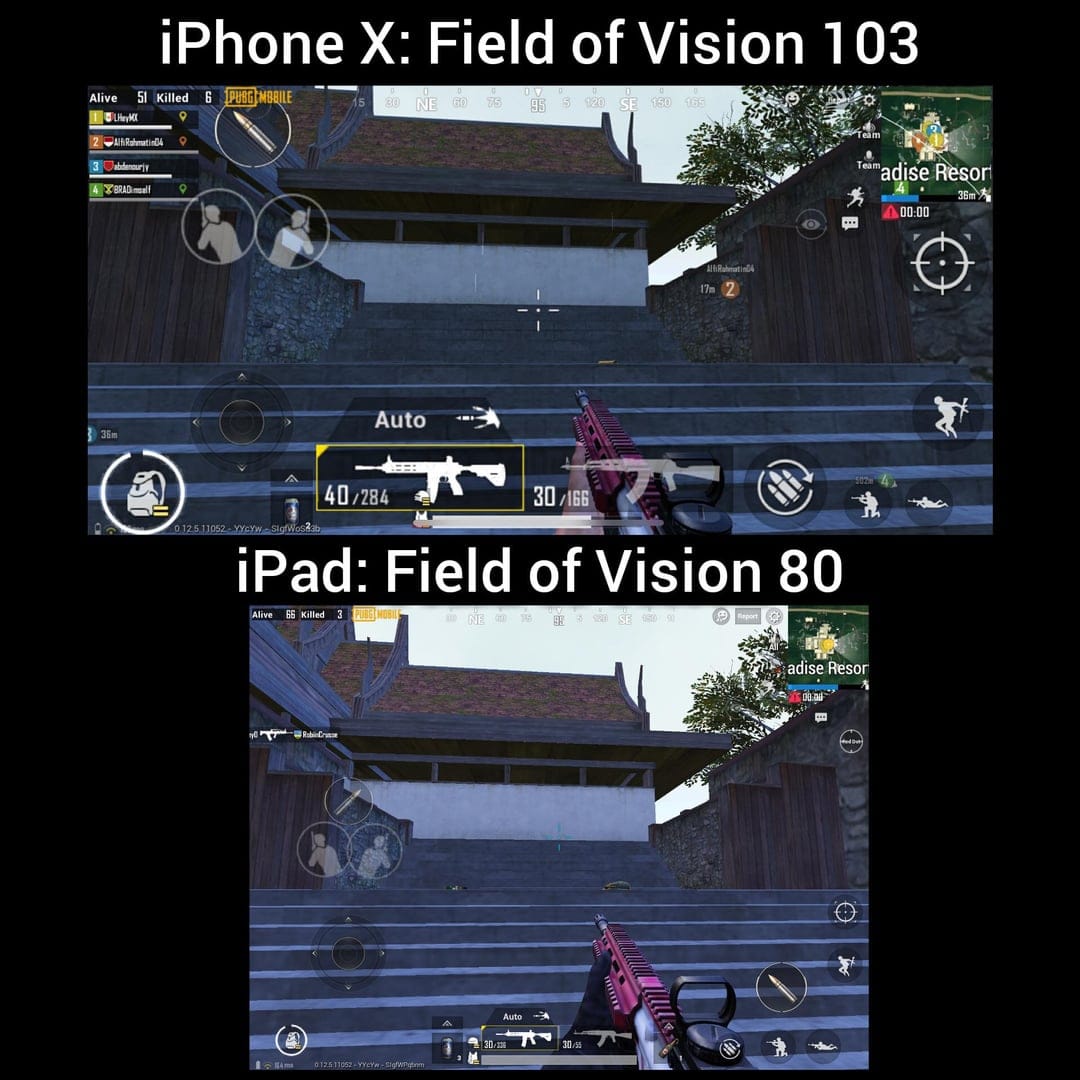
- Close range (Pochinki, school): iPad players detect flanking enemies entering the peripheral frame before smartphone players register movement
- Medium range: More doorways, windows, and cover positions visible simultaneously — fewer blind spots to consciously check
- Reaction window: 0.3–1.2 seconds faster enemy spotting. When SMG/shotgun TTK runs under one second, 0.3 seconds earlier detection means initiating instead of reacting
Peripheral Awareness in High-Density Zones
In Pochinki, school, and Georgopol — where squads converge — iPad players track two threat vectors simultaneously that smartphone players must pan to cover sequentially. This compounds in final-circle engagements where 360° awareness is critical.
The wider FOV also enables pre-aim positioning: knowing an enemy is at frame-edge lets you begin rotating aim before they reach center — a micro-advantage that stacks across an entire match.
Measurable Performance Impact
FOV improvement is mechanical, not psychological. The engine delivers more visual data per frame, so threat information arrives earlier in the engagement timeline. iPad FOV players demonstrate 10–15% better kill-death ratios over time — one of the most measurable device-based advantages in PUBG Mobile.
Hip-Fire Spread Mechanics: Complete Breakdown
How Bullet Bloom Works
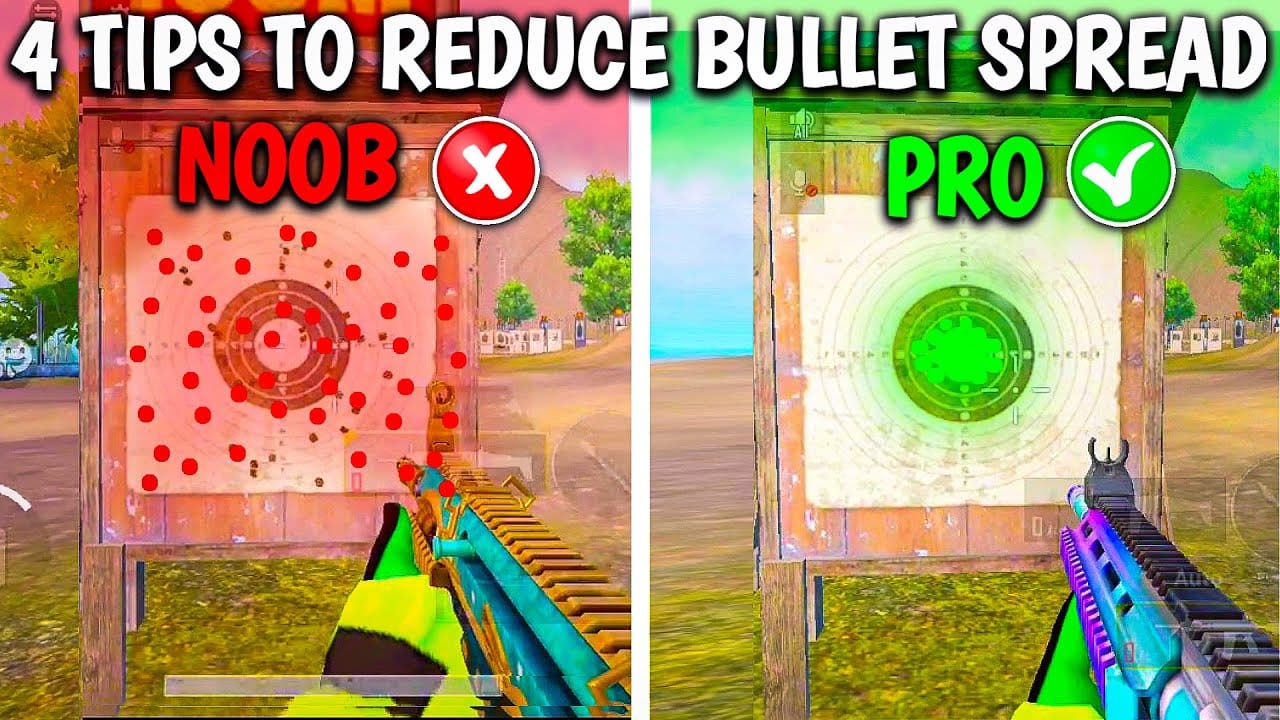
Bullet bloom (hip-fire spread) is the cone-shaped deviation radius within which bullets land when firing without ADS. The engine calculates this dynamically based on:
- Weapon class
- Movement state
- Stance
- Equipped attachments
The cone expands with movement, contracts when stationary or prone. Effective within 15 meters — beyond 20 meters, spread degrades reliable hit probability significantly.
On iPad, the wider FOV lets you identify and close distance to targets more efficiently before committing to hip-fire, making FOV a direct enabler of hip-fire effectiveness.
Stance Modifiers (Most Underutilized Mechanic)
- Standing: Widest spread cone
- Crouching: Reduced spread cone
- Prone: Tightest spread cone
Pro tip: In CQB inside buildings, pre-crouch before the enemy appears at a doorway. You gain a lower profile and tighter spread simultaneously.
The Hidden Movement Accuracy Tax
Running while hip-firing dramatically expands the spread cone. Most players instinctively strafe during close-range fights, unknowingly penalizing every shot. The fix: stutter-steps — short movement bursts interrupted by stationary frames — to reset the spread cone between bursts.
Weapon Hip-Fire Viability by Class
Hip-fire hierarchy from most to least viable:
- SMGs — Tightest base spread, highest fire rate, optimal sub-15m. Competitive spread up to 15m even without attachments; Laser Sight extends effective range further
- Pistols — Low spread, limited damage; viable as CQB secondary
- Shotguns — Pellet spread operates differently (see below); effective under 5m
- ARs — Wider spread than SMGs; hip-fire viable only within 10m without attachments
Shotgun exception: Shotguns don't use standard bullet bloom. They fire multiple pellets with fixed deviation angles — stance and movement modifiers that affect bloom-based weapons don't apply the same way. Under 5 meters, pellet spread is irrelevant. Beyond 8–10 meters, pellet divergence cuts effective damage significantly.
Attachments That Reduce Hip-Fire Spread
Laser Sight — Top Priority
The single most impactful hip-fire attachment. Directly reduces bullet spread and improves CQB consistency. Trade-off: visible laser beam reveals position. In ranked play, the accuracy gain outweighs positional disclosure risk at close range.
Grip Attachments
These work differently from Laser Sight — they improve consistency within the spread cone rather than shrinking it:
- Light Grip — Boosts firing stability and view stability, reducing camera bounce during sustained fire
- Firing Stability attachment — Cuts bullet deviation during full-auto, tightening effective spread in sustained bursts
- View Stability — Reduces screen shake and camera bounce, improving target tracking during hip-fire sprays
In practice: Laser Sight first, then grip attachments to tighten shot consistency.
Want to unlock weapon skins with recoil reduction animations or grab training passes faster? Check out discount PUBG Mobile UC recharge online via buffget for competitive pricing and fast delivery. You can also use fast PUBGM Unknown Cash top up by ID to stay equipped without overpaying.
Why FOV + Hip-Fire Together Is Deadly
Faster Target Acquisition Before Engaging
Wider FOV means you identify threats earlier, giving more time to close distance, select optimal stance, and pre-aim before committing to hip-fire. Smartphone players at 90–100° FOV react to threats already closer to center-frame — a compressed decision window before firing.
Gyroscope Micro-Correction Advantage
iPad's larger physical surface enables finer gyroscope micro-corrections during hip-fire sprays. Recommended gyroscope sensitivity for iPad: 300% close-range, scaling to 100% long-range. The wider screen also means gyroscope tilt inputs translate to proportionally smaller on-screen movements — more precise control per degree of physical tilt vs. equivalent smartphone sensitivity values.
Real Match Scenarios
- School CQB: Wider FOV reveals enemies through multiple windows simultaneously; SMG + Laser Sight closes engagements before ADS is needed
- Final circle: Peripheral threat detection stops flanks; crouched hip-fire + Firing Stability attachment maintains accuracy under pressure
- Vehicle ambushes: Earlier enemy detection provides reaction time to exit and engage before the ambush fully develops
Settings: iPad vs. Smartphone
iPad Recommended Settings
- Camera Sensitivity: 80–100%
- ADS Sensitivity: 60–80% (100% no-scope, 12% at 8x scope)
- Gyroscope: 150–200% baseline; 300% close-range, 100% long-range
- Free Look: 100–120% TPP; 130% FPP
Smartphone Recommended Settings
Compensate for narrower FOV with more aggressive camera sensitivity:
- Camera Sensitivity: 85–105% (faster panning covers blind spots)
- ADS Sensitivity: 65–85%
- Gyroscope: 130–180% (compensates for smaller physical tilt surface)
Advanced Config Modification
The Active.sav file (2–8KB) controls FOV parameters directly.
- Android path:
/data/data/com.tencent.ig/files/UE4Game/ShadowTrackerExtra/Saved/Config/Android/ - iOS path:
/var/mobile/Containers/Data/Application/[UUID]/Documents/ShadowTrackerExtra/Saved/Config/
Modify numerical values in the graphics/camera sections. Lower values narrow FOV, higher values widen it within the engine's permitted range.
Debunking iPad FOV Myths
Myth: iPad players have unlimited/unlocked FOV iPad View is hard-capped at 105–115° horizontal FOV. It's the legitimate rendering output for tablet-class hardware — not an exploit.
Myth: PUBG Mobile doesn't normalize cross-device gameplay PUBG Mobile does implement device normalization for certain performance parameters. What remains a legitimate edge: wider rendered FOV, larger physical surface for touch and gyroscope input, higher resolution rendering. These are hardware-tier advantages the developer has chosen to preserve within the fairness framework.
Training Drills to Master Both Mechanics
4-Step Improvement Routine
- Spread pattern recognition — Fire 30-round bursts at a wall from 10m, 15m, and 20m in Training Ground. Observe spread pattern changes across standing → crouch → prone to build visual intuition for effective range
- Stutter-step hip-fire drill — Practice 2-step movement bursts interrupted by stationary frames. This resets the spread cone between bursts and is the foundation of advanced hip-fire technique
- FOV peripheral tracking — In training mode, identify targets at frame-edges before centering them. Builds the pre-aim habit that converts FOV advantage into faster kills
- Attachment comparison sessions — Run identical engagements with and without Laser Sight to internalize the spread reduction difference
Metrics to Track (7-Day Blocks)
- Hip-fire kill ratio: hip-fire kills ÷ total kills per session
- Average engagement distance on hip-fire kills
- Damage per match on CQB-heavy maps (Sanhok, Livik)
Tracking these over 7-day blocks reveals whether hip-fire technique is improving independently of overall match performance.
FAQ
Does PUBG Mobile give iPad players a bigger FOV? Yes. iPad View renders at 105–115° horizontal FOV vs. 90–100° on smartphones — a developer-sanctioned difference providing 15–20% more visible battlefield area.
How does hip-fire spread work in PUBG Mobile? It's a dynamic cone-shaped deviation radius calculated by weapon class, movement state, stance, and attachments. Most effective within 15 meters, degrades significantly beyond 20 meters without spread-reducing attachments.
Is playing on iPad considered cheating? No. iPad View is an officially supported rendering mode. PUBG Mobile's normalization policies account for cross-device play, and the FOV advantage is a deliberate hardware-tier feature.
Best hip-fire sensitivity for iPad? Camera Sensitivity 80–100%, Gyroscope 300% close-range / 100% long-range, Free Look 120% TPP / 130% FPP. Adjust from these baselines based on your gyroscope habits.
Which attachments reduce hip-fire spread most? Laser Sight is #1 — directly shrinks the spread cone. Light Grip and Firing Stability attachments improve shot consistency within the cone by reducing camera bounce and bullet deviation during full-auto.
Can smartphone players close the FOV gap through settings? Partially. Max camera settings narrow the gap but can't reach 105–115°. The rendering mode — not just settings — hard-caps the FOV ceiling per device class.
Ready to apply these advantages? Visit buffget for the latest PUBG Mobile top-up offers and in-game resources — from training ground to Conqueror tier.