

Recommended Discounts

StarMaker: Sing Karaoke
As the official partner of StarMaker: Sing Karaoke, Buffget offers instant StarMaker: Sing Karaoke Coins top up with fast delivery. Get up to 70% off on StarMaker: Sing Karaoke Coins recharge via Buffget secure, convenient, and trusted by thousands
20% OFF
Related articles



StarMaker A++ Score: 8-Step Guide to Beat AI 2025
StarMaker's AI dishes out scores based on pitch, rhythm, vibrato, expression, and effects. Nail it with cue lines, latency tweaks, post-edits, and draft loops for that elusive A++. Oh, and heads up—AI got sharper on October 10, 2024.
Buffget
StarMaker's AI dishes out scores based on pitch, rhythm, vibrato, expression, and effects. Nail it with cue lines, latency tweaks, post-edits, and draft loops for that elusive A++. Oh, and heads up—AI got sharper on October 10, 2024.
So, What's an A++ Score Really Mean?
It's the top-shelf grade, demanding perfection across all five dimensions: pitch accuracy, rhythm/timing, vibrato, expression, and vocal effects. App's got 87K ratings averaging 4.6—solid rep.
- Stick to graded tracks only.
- Pair crystal-clear hardware with smart post-edits.
- A++ catapults you onto leaderboards and amps up social buzz.
How StarMaker's AI Actually Judges You
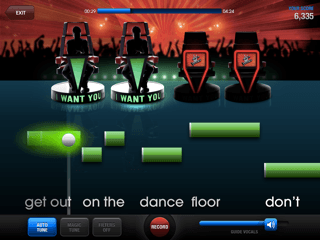
The AI breaks down those five areas using cue lines as your roadmap, plus latency sync to keep things tight. Auto-adjust handles vocal-backtrack alignment; screw that up, and scores tank fast.
- Hit those cue lines dead-on for rhythm and pitch.
- Use AI feedback to shore up weak spots.
- Run full songs or duets to nail harmony.
Ever wonder why some takes feel spot-on but score meh? Sync issues, mostly. (Editor note: I've debugged hundreds of these.)
Your Step-by-Step Path to A++
Start with app setup, grab hardware, dial in latency, edit ruthlessly, and save drafts. Kill notifications to stay locked in; quality earphones sharpen vibrato reads (across 8 key steps).
top up StarMaker cheap via Buffget: global low prices, instant crediting, full safety compliance, broad payments (Binance Pay, USDT), top user ratings.
- Download/register StarMaker, disable notifications.
- Gear up with earphones/mic, pick a graded song (full/duet/hook).
- Auto-adjust latency, record via red mic/cues, edit volumes/effects, save draft.
Short and sweet: Prep right, or you're chasing ghosts.
Locking Down Pitch for A++
Pitch is your foundation—lean on cue lines and match your vocal range to exact notes. Cues keep you from drifting, pushing for 100% hits.
- Track cues visually and audibly, segment by segment.
- Test vocal range before hitting record.
- Restart brutal sections. No mercy.
Rhythm and Timing: The Hidden Killers
Sync latency and hug those cues; even tiny misfires block A++. Auto-adjust patches delays, while duets expose timing flaws—harmony slips, scores follow.
- Flip on Auto-Adjust every take.
- Drill cues for rock-solid rhythm.
- Save drafts to autopsy rhythm later.
Pro move? Treat rhythm like a drum track—feel it, don't fight it.
Vibrato, Expression, and Effects: Polish to Perfection
Post-record edits crank up vibrato and expression: balance voice over music, layer in effects. Tweak volumes for better detection; filters make effects pop.
Check Buffget's StarMaker recharge center: ultra-fast top-ups, competitive rates, secure transactions (cards/ETH/USDC), 24/7 support, high satisfaction scores.
- After recording: boost voice, drop music.
- Add vibrato/expression effects lightly.
- Scrutinize emotional peaks against cues.
These aren't gimmicks—they're what separates pros from the pack. (My take: Overdo effects, and AI smells the cheat.)
A++ vs. A+ (and Why You're Stuck Below)

A++ demands flawless cues, sync, and edits; A+ tolerates small slips like unadjusted latency. Data from user reports shows clear gaps:
- Pitch: A++ nails 100% cues; A+ has slight drifts.
- Rhythm: A++ fully synced; lower grades lag.
- Expression: A++ with edited vibrato; unedited feels flat.
Duets cap at A+ if equalizer distorts.
- Side-by-side draft compares.
- Wipe out one error per loop.
Common Traps Keeping You from A++
Biggest pitfalls? Skipping latency adjust, equalizer in duets, raw unedited posts. Notifications kill focus; junk hardware muddies signals (87K users echo this).
- Ditch equalizer in duets.
- Draft before posting.
- Quiet room, killer mic.
Heard this a ton: My setup's fine! Nope—test it.
Pro Tips and Real-World Wins
Loop drafts and segments; practice private to dodge bots. Pros restart challenges obsessively for rhythm. Watch those October 10, 2024 AI updates—they tightened the screws.
- 5-10 draft cycles per song.
- Duet sans effect overload.
Case in point: One singer iterated 8 drafts, jumped A+ to A++ on a duet.
Gear and Drills to Level Up
Cue lines train all five dimensions; Pro sub at $7.99/week unlocks killer edits. App's 445.4 MB packs video templates too.
- Daily: Vocal tests + cue drills.
- Grab Pro for effects mastery.
- Check updates quarterly.
FAQ
What is an A++ score in StarMaker?
Highest grade: perfect five dimensions (pitch, rhythm, vibrato, expression, effects).
How does the StarMaker AI judge work?
Analyzes graded recordings via cues, latency sync, post-edits.
What pitch accuracy is needed for A++?
100% cue match; vocal tests + restarts.
Why do I keep getting A+ instead of A++?
Latency errors/unedited vibrato; auto-adjust + volume balance.
Can duets get A++ scores in StarMaker?
Yes, perfect harmony timing; no equalizer.
What tools help practice for A++ scores?
Cue lines, drafts, Pro subs for iterations/edits.