

Recommended Discounts

IMO Diamonds
Recharge requires a mobile phone number Please include the countrv code with a + sian
10% OFF
Related articles


IMO Diamond Top-Up Guide 2026: Unlock 50-Person HD Calls
The IMO 2026 Premium Business Suite unlocks 50-person HD conference calls, 100,000-member supergroups, 25GB cloud storage, and 30-day profile visitor history — all powered by IMO Diamonds. Premium subscriptions start at $0.99/month, with diamond packs from 10 diamonds ($0.20) to 41,700 diamonds ($800). Here's how to safely top up diamonds, activate the Business Suite, optimize HD conferences, and fix common issues.
Buffget
What Is the IMO 2026 Premium Business Suite?
Released with version 2026.1.3 on February 5, 2026, the Business Suite transforms IMO into a professional communication platform. It costs $0.99/month or $11.88/year (two months free with annual billing). Activation requires IMO Diamonds, so a imo 50 person conference diamond recharge through buffget is the critical first step.
Core Features
- 100,000-member supergroups — for large orgs, communities, or broadcast channels
- 25GB cloud storage — documents, recordings, and media stored in-app
- 30-day profile visitor history — useful for sales teams and recruiters
- $0.99/month or $11.88/year — one of the most affordable business communication plans
- Priority support access — faster response times
50-Person HD Conference Calls
The headline feature. Standard premium supports 20 participants; the Business Suite pushes this to 50 — covering team meetings, client presentations, remote classrooms, and all-hands calls.
The video codec dynamically adjusts quality based on bandwidth. Each participant needs minimum 3 Mbps for stable HD. Most business meetings involve 10–30 people, so you'll have headroom for larger sessions.
Business Suite vs. Standard Plan
- Group calls: Free = basic; Premium = 20 participants; Business Suite = 50 HD participants
- Storage: Standard = minimal; Business Suite = 25GB
- Supergroups: Standard = limited; Business Suite = 100,000 members
- Profile analytics: Standard = none; Business Suite = 30-day visitor history
- Customization: Premium themes (50–200 diamonds), animated frames (100–500 diamonds), exclusive titles
Understanding IMO Diamonds
What Are They?
IMO Diamonds are the platform's universal in-app currency for premium features, cosmetics, titles, and subscriptions. The exchange rate averages ~53 diamonds per $1 USD, with better per-diamond value on larger packs. Your balance lives in the IMO Wallet under the Me tab.
How Many Do You Need?
- Monthly subscription: ~52–55 diamonds
- Annual subscription: ~630 diamonds
- Profile themes: 50–200 diamonds
- Animated frames: 100–500 diamonds
- Baron title: 1,000–3,000 diamonds
- Viscount title: 3,000–8,000 diamonds
- Earl title: 8,000–15,000 diamonds
Pro tip: For a fully equipped business profile with annual sub + Baron title, budget 2,000–4,000 diamonds total.
2026 Diamond Packages
- 10 Diamonds — $0.20
- 100 Diamonds — $1.90
- 420 Diamonds — $8.31
- 8,400 Diamonds — $166.65 (includes ~16% discount)
- 41,700 Diamonds — $800 (best per-diamond value)
The 8,400+ packs include a confirmed 16% discount over smaller incremental purchases.
Why Safe Diamond Top-Up Matters
Risks of Unofficial Sources
- Account suspension — flagged diamonds from exploits can lock your Business Suite
- Payment fraud — unverified sellers harvest card or banking credentials
- Non-delivery — payment processed, diamonds never arrive, no refund
- Delayed delivery — miss time-sensitive promotions
For business users, an account suspension disrupts team communication, client calls, and operations.
Common 2026 Scams
- Free diamond generators — fake websites that install malware
- Social media resellers — 70–80% discounts using stolen payment methods; diamonds get reversed
- Phishing links — fake IMO login pages disguised as promotions
- Modified APKs — unofficial app versions containing spyware
If a deal drops dramatically below 53 diamonds per dollar, it's fraudulent.
What Safe Top-Up Means
- Uses your numeric IMO ID only — no password required
- Processes through verified payment gateways
- Delivers within 5 minutes (95% of transactions)
- Provides transaction records and order tracking
- Has real customer support for disputes
Before any top-up: Enable two-factor authentication (2FA) in IMO Account Security settings.
Step-by-Step: Top Up IMO Diamonds via buffget
Step 1 — Find Your Numeric IMO ID
- Log in to IMO
- Tap the middle top button → My Room
- Tap upper-right avatar icon
- Enter Online Rank section
- Tap the lower avatar
- Your numeric ID appears under your nickname
Critical: The system requires a pure numeric ID. Usernames, phone numbers, or alphanumeric handles won't work. Wrong ID = diamonds sent to wrong account with no recovery.
Step 2 — Select Your Diamond Package
Navigate to the IMO Diamond Recharge page on buffget. For Business Suite activation, the 420-diamond pack ($8.31) covers an annual subscription with diamonds to spare. For teams equipping multiple accounts, the 8,400-diamond pack ($166.65) delivers the best value.
Step 3 — Enter Your IMO User ID
Enter your pure numeric ID in the designated field. For safe top up imo diamonds business suite, buffget validates the ID format before processing, protecting against misdelivery. Double-check if you maintain multiple accounts.
Step 4 — Choose Payment and Complete
Supported methods:
- Credit card — Visa, Mastercard
- PayPal — with buyer protection
- Mobile banking — direct transfers
- bKash — popular in South Asian markets
Select, confirm total, click BUY NOW. You'll receive an order confirmation immediately.
Step 5 — Verify Your Diamond Balance
- Open IMO → Me tab → IMO Wallet
- Check updated balance

95% of top-ups complete within 5 minutes. If not updated after 10 minutes, check your connection, restart the app, then contact support.
Activating the Business Suite
Navigate to Upgrade Screen
- Open IMO → Me tab
- Go to IMO Wallet or subscription section
- Select Premium Business Suite
- Choose monthly ($0.99) or annual ($11.88)
- Confirm diamond deduction
Annual billing is strongly recommended — saves money and avoids missed renewals.
Confirming Activation
After confirmation, you'll immediately see:
- 50-person HD conference option in call interface
- Supergroup creation up to 100,000 members
- 25GB cloud storage in chat and file-sharing menus
- 30-day profile visitor history
If features don't appear, force-close and reopen the app. Activation typically takes under 15 minutes; contact IMO support with your transaction ID if it exceeds 30 minutes.
Optimizing 50-Person HD Conference Calls
HD Video and Audio Settings
- Enable HD mode in video call settings
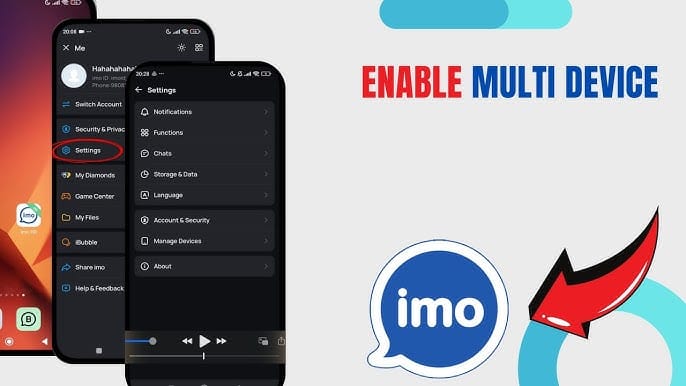
- Use wired internet when possible — Wi-Fi introduces latency
- Close background apps — minimum 1GB RAM required
- Use headsets — IMO's echo cancellation works best with them
- Designate a host for 30+ participant calls to manage muting
Technical Requirements
- Bandwidth: 3 Mbps minimum per participant (5 Mbps+ for hosts)
- Android: 4.0.3+
- iOS: 13.0+
- RAM: 1GB minimum (2GB+ for 30+ participants)
One unstable connection can trigger quality degradation for the entire call.
Managing Large Conferences
- Pre-share meeting links 15 minutes before start
- Use mute-all for presentations
- Assign co-hosts to delegate participant management
- Record sessions using 25GB cloud storage for absent members
Troubleshooting
Diamonds Not Reflecting
- Check internet connection
- Force-close and reopen IMO
- Verify correct IMO ID against top-up confirmation
- Confirm payment fully processed (not pending)
- Contact buffget support with order number
Business Suite Not Activating
- Outdated app — update to version 2026.1.3+
- Regional rollout delays — features phase in across regions
- Insufficient diamonds — pending transactions may affect displayed balance
Try: update app → restart device → clear cache (Android: Settings > Apps > IMO > Clear Cache) → retry.
Contacting Support
In-app: Me tab → Help or Settings > Help & Feedback. Include transaction date, diamond amount, order ID, and screenshots. Contact buffget support simultaneously for faster resolution.
Pro Tips
Best Times for Promotional Bonuses
- February 10–14, 2026: 25–35% bonus on 1,000-diamond purchases
- HTW 12 Event (February 23–27, 2026): 56% more value on 10,000-diamond purchases
IMO schedules promos around major holidays and milestones. Planning bulk purchases around these windows saves hundreds.
Maximize Your Subscription Value
- Annual billing locks in your rate against price increases
- Daily login bonuses: 25 diamonds/day (~750/month)
- Reward ads: 5–10 diamonds each (~150–300/month with consistency)
- Referrals: 2 friends = 50 diamonds; 5 friends = 200 diamonds
- Stack free + paid diamonds to stretch your budget
In practice: Disciplined free diamond earning can cover the monthly $0.99 subscription entirely — making the Business Suite effectively free after initial top-up.
Real Use Cases
- Remote sales teams running daily pipeline reviews with 15–25 reps across time zones
- Educational institutions hosting 30–40 student virtual classrooms
- Client service firms onboarding new clients and extended teams
- NGOs coordinating field teams in regions with limited infrastructure
FAQ
Is buffget safe for IMO diamond top-up?
Yes. buffget requires only your numeric IMO ID — no passwords. Supports credit card, PayPal, mobile banking, and bKash. 95% of transactions complete within 5 minutes with customer support available.
How many people can join a Business Suite HD conference call?
Up to 50 participants in HD. Each needs minimum 3 Mbps bandwidth for stable quality.
What payment methods are accepted?
Credit cards (Visa, Mastercard), PayPal, mobile banking, and bKash. Regional availability may vary.
Why aren't my topped-up diamonds showing?
Common causes: incorrect IMO ID, pending payment, or outdated app. Verify your numeric ID, confirm payment with your bank, update to version 2026.1.3+, and restart. Contact support if unresolved after 10 minutes.
Can free diamonds cover my subscription?
Yes. Daily logins (25/day), reward ads (5–10 each), and referrals (50–200 diamonds) can generate enough to cover the $0.99 monthly cost.
What happens to diamonds if I downgrade?
Unused diamonds stay in your IMO Wallet and don't expire. But you lose Business Suite features until you resubscribe.
Ready to unlock IMO 2026 Premium Business Suite? Top up your diamonds safely through buffget with competitive pricing and fast delivery. Get your diamonds now at buffget and activate 50-person HD conferences today.