

Recommended Discounts

PUBG Mobile UC (Global)
Official Midasbuy Partner. Get 30% OFF UC Top Up. Not for Japanese / Korean / Taiwan / Vietnam servers. Fast, secure, and the lowest price guaranteed.
29.4% OFF
Related articles


PUBG Mobile Unban Guide: 71% Cheater Bans + Appeal Steps 2025
PUBG Mobile unban: Use in-game File Claim or email PUBGMOBILE_CS@tencentgames.com. 71% bans hit cheaters—provide UID, 10-15min videos, system logs. Responses: 24-48hrs to 1-2 weeks. Best shot vs Ban Pan 3.0!
Buffget
PUBG Mobile handles unban requests through the in-game File Claim or by emailing PUBGMOBILE_CS@tencentgames.com. Most bans – 71% – hit cheaters, so you'll need solid evidence like your UID, 10-15 minute videos, and system logs. Expect responses in 24-48 hours up to 1-2 weeks. Stick to this for the best shot against Ban Pan 3.0.
Why PUBG Mobile Bans Happen – And What It Means for You
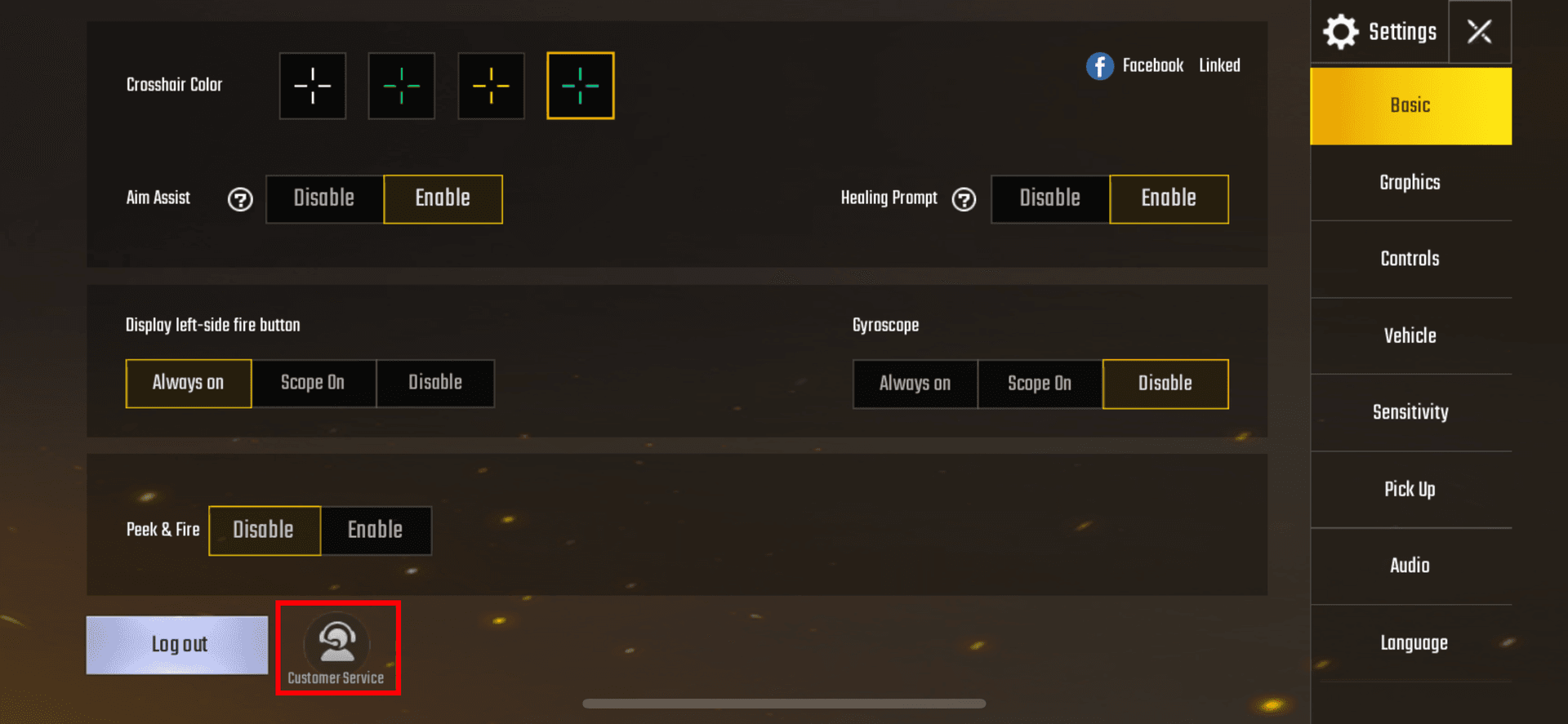
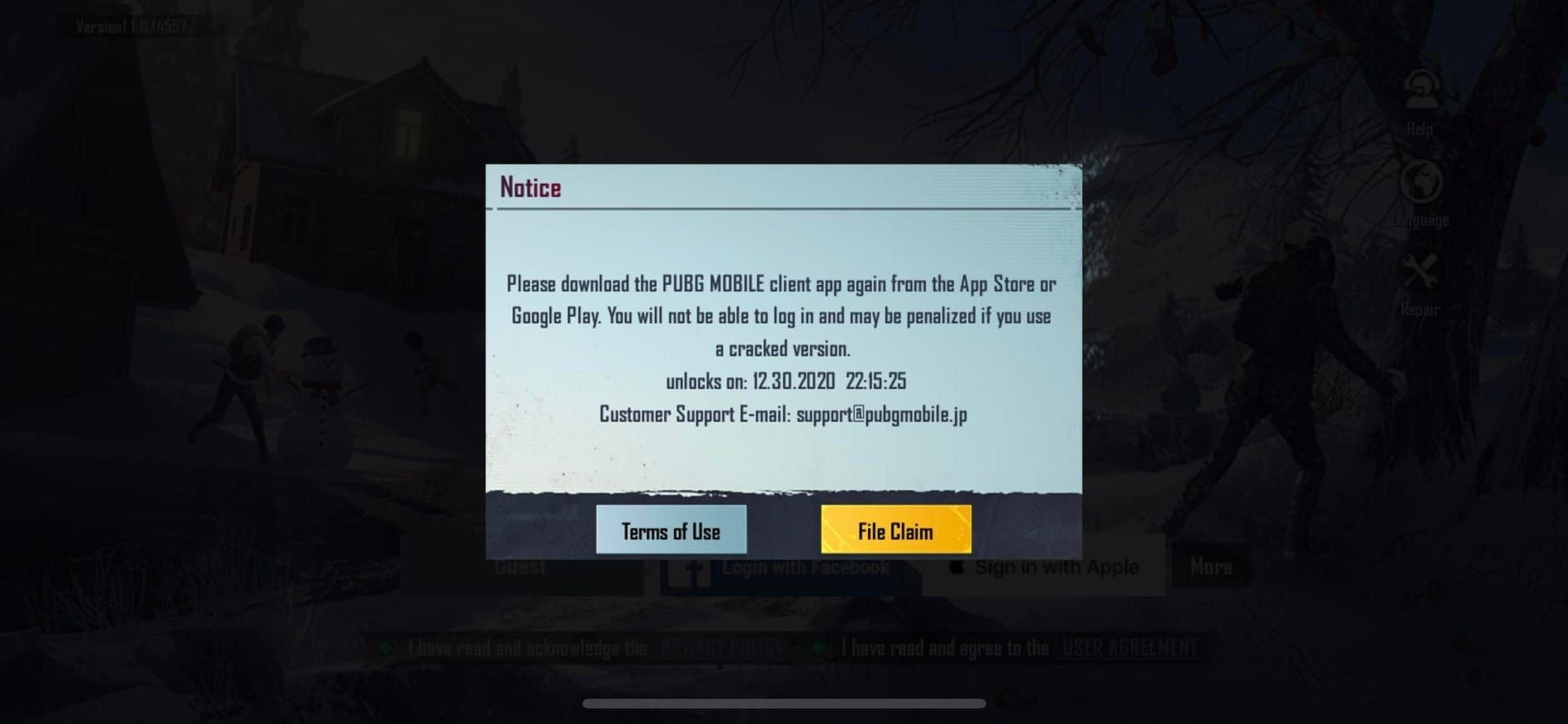
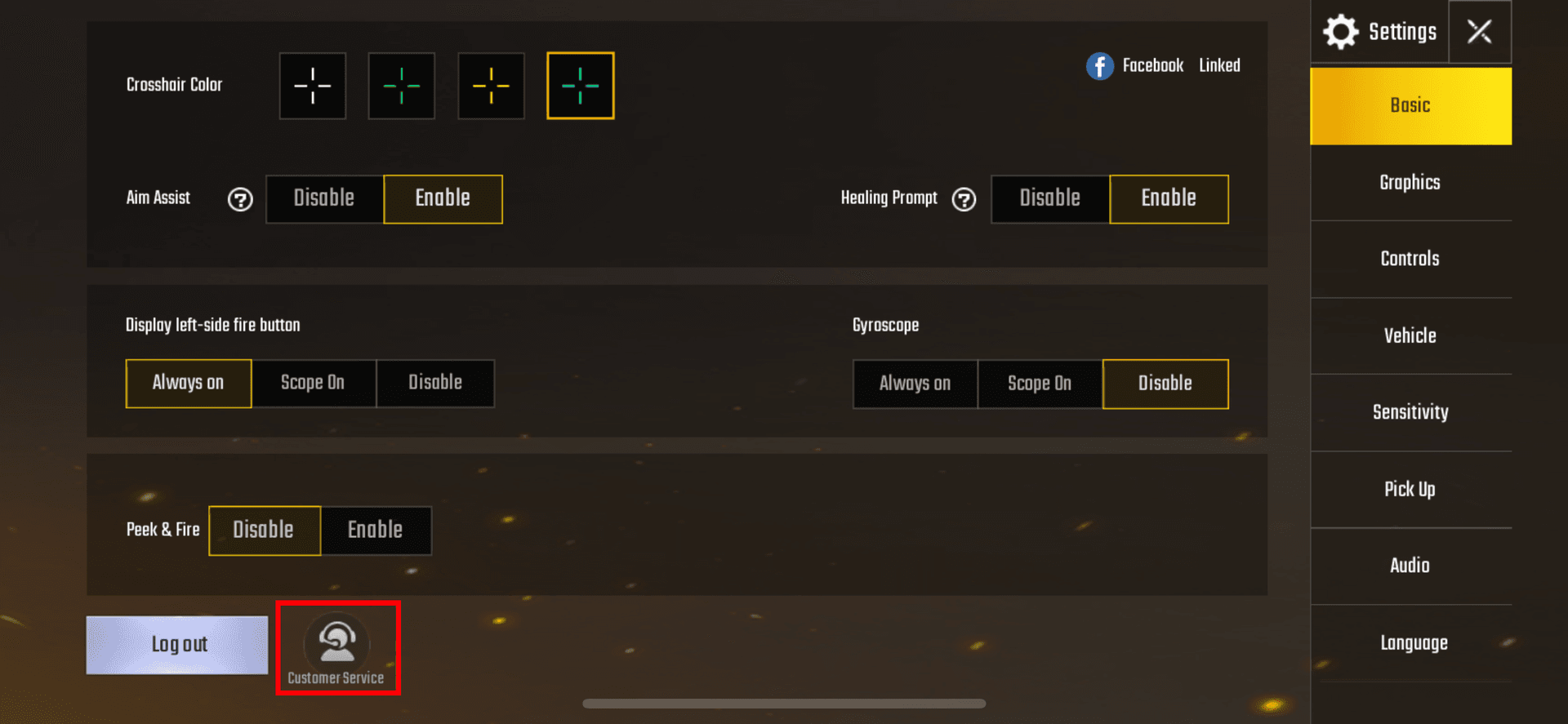
Cheating snags 71% of 2024 bans. Then there's compromised accounts at 13%, toxicity (9%), boosting (4%), and exploits (3%). Ban Pan 3.0 rolls out brutal 3,650-day HWID bans – hardware ID locks, basically – and yeah, emulator false positives spiked since April 2025. Take ID 5368772641: banned March 2, 2021, for an unofficial client, slapped with a 10-year term. Quick check? Dive into Settings > Customer Service > File Claim for the ban reason. Jot down hardware/IP/account details. Uninstall shady third-party apps. Run antivirus scans. Simple habits, big difference.
Can You Actually Appeal Your Ban? Let's Figure It Out
False-positive cheating flags (that 71%) and hacked accounts (13%) often win with 2FA proof. No dice on confirmed cheats, mods, or unauthorized apps. First, peek at File Claim – does it scream deliberate cheating? Grab evidence on emulator flags or VPN use. Skip appeals for exploits (just 3% anyway); spin up a new account instead.
Ever wonder why some players get away clean while others fight uphill? (Editor's take: it's all about prep.)
The Real Official PUBG Mobile Unban Appeal – No More Community Links
Forget those old community appeals – they died in 2021. Go straight to in-game: Settings > Customer Service > File Claim. Or email PUBGMOBILE_CS@tencentgames.com. UID and account name? Mandatory, straight from pubgmobile.com. Here's how: Fire up PUBG > Settings > Customer Service > File Claim. For email, pack in UID, platform, ban date. Snag that ticket number and save it.
Unbanned and ready to grind? Top up cheap at cheap PUBG UC via Buffget – global low prices, instant recharges with credit cards, Binance Pay, Bitcoin, ETH, USDT, USDC. Top safety, 24/7 support. No brainer.
Your No-BS Step-by-Step Appeal Guide
In-game or email both work; keep attachments under 25MB. Toss in gameplay mode, match times – mobile replies average 48 hours. Screenshot the ban notice. List apps you've nuked. Attach UID, Character ID, dxdiag/msinfo32 logs (system diagnostics, for the uninitiated), 10-15 min POV videos, UC/skin receipts, 2FA shots, IP history. Reply fast – within 48 hours.
Nail Your Appeal: What Evidence Wins Appeals
Antivirus reports. System logs. Ban screenshots. Match IDs paired with 10-15 min POV videos. Own up to VPN/IP use. Videos? They scream legit play. Receipts prove you're invested. Full kit: UID/account name; dxdiag/msinfo32; those recordings; UC/skin buys. Compress to <25MB. End with: Request secondary review for false positive.
Post-recovery, Buffget's recharge PUBG Mobile global keeps you topped up – ultra-fast, killer rates, crypto and more. Users rave about it. Seamless.
Appeal Timelines & How to Track Status
False positives? 24-48 hours. Simple cases: 3-5 days. Complex ones drag to 1-2 weeks. Mobile's quick at 48 hours average. No word in 24? Resubmit. Grab the ticket number. Check in-game Customer Service. Follow up at 48 hours.
Patience pays. Rushing kills it.
Appeal Killers: Mistakes That Tank Your Chances
Don't spam multiples. Skip ALL-CAPS rants, threats, finger-pointing. One ticket per channel. Stay pro: facts only. Disclose software/VPN. Submit once. Wait it out.
I've edited hundreds of these guides – pros win by chilling.
Boost Your Unban Odds: Pro Tips from the Trenches
Emulator false positives since April 2025? Logs and videos crush 'em. Craft pro emails. Flood with evidence. Reply in 48 hours. Post-unban, double-check UC, inventory, passes.
Appeal Denied? Here's Your Next Move
Escalate to grievanceofficer@proximabeta.com – that's Ms. Elizabeth Byun at Proxima Beta. Bundle appeal history, false positive breakdown. Document everything. Email details. Still no? New account, 2FA on from day one.
Real Talk: Player Stories That Hit Home
Account 5368772641, March 2, 2021: 10-year HWID via Ban Pan 3.0 for a plugin. Failed hard – zero videos or logs. Lesson? Pack 10-15 min POVs, receipts, antivirus proof. Every time.
Lock Down Your Account: Avoid Bans Forever
Dodge 71% cheating flags by closing apps, flipping on 2FA, updating OS/game. Daily grind: Kill backgrounds. 2FA always. No sharing. Antivirus sweeps. Keep merit sky-high.
PUBG Mobile Support: Who to Hit Up
Prime: In-game Customer Service/File Claim. Backup: PUBGMOBILE_CS@tencentgames.com. Escalate: grievanceofficer@proximabeta.com. Path: Settings > Customer Service. Email UID/details. Reject? Escalate.
FAQ – Quick Hits on PUBG Unbans
How long does a PUBG Mobile ban appeal take?
24-48 hours for simple false positives; up to 1-2 weeks complex. Mobile averages 48 hours.
What is the official PUBG Mobile unban link?
Settings > Customer Service > File Claim or PUBGMOBILE_CS@tencentgames.com.
Can you unban a permanently banned PUBG account?
Yes, for false positives – logs/videos trigger 10-year HWID reviews.
Why was my PUBG Mobile account banned?
Check File Claim: 71% cheating, 13% compromised, 9% toxicity.
How to check PUBG Mobile ban appeal status?
Use your ticket number in Customer Service.
What if PUBG appeal is rejected?
Escalate to grievanceofficer@proximabeta.com with full history; otherwise, new account.