

Recommended Discounts

PUBG Mobile UC (Global)
Official Midasbuy Partner. Get 30% OFF UC Top Up. Not for Japanese / Korean / Taiwan / Vietnam servers. Fast, secure, and the lowest price guaranteed.
29.4% OFF
Related articles


PUBG Mobile iPad View GFX Tool: 90 FPS No Ban v1.0.8 Guide
Wish your Android PUBG Mobile matched iPad Pro crispness? Unlock it on Gameloop with MK PUBG Tool (GFX) v1.0.8 (May 15, 2024). Tweak graphics Smooth-Ultra HD, FPS Low-Extreme, zero-recoil sensitivities for 2025 dominance. Zero ban risk—iPad sim expands FOV to spot foes at 300-500m!
Buffget
Ever wished your Android setup could match that crisp iPad Pro view in PUBG Mobile? You can unlock it right now on Gameloop with the MK PUBG Mobile Tool (GFX) v1.0.8 (May 15, 2024). Tweak graphics from Smooth to Ultra HD, crank FPS from Low to Extreme, and dial in zero-recoil sensitivities for 2025 dominance. Best part? Zero ban risks with these emulator tools—iPad sim just expands your FOV for spotting foes at 300-500m.
What Exactly is PUBG Mobile iPad View Config?
Picture this: iPad View mimics a wider FOV and sharper resolution using the MK Tool on Gameloop, perfect for PUBG Global, VN, TW, KR, or India servers. You're talking graphics options like Smooth, Balanced, HD, HDR, or Ultra HD; FPS scaling from Low up to Extreme. The repo's got 46 stars and 21 forks—solid community nod. Perks include Temp Cleaner, Smart Settings, Optimizer, and Kill Processes to slash lag.
Quick setup:
- Grab v1.0.8 from the releases page.
- Fire up the executable or run
pip install -r requirements.txtthenpython main.py. - Flip on iPad View for those Pro-level visuals.
Why It Rocks: Key Features and Real Gains
Spot enemies at 300-500m—way beyond the phone's 200-300m limit. DNS Changer? Slices ping by 20-50ms. And that desktop shortcut? Shaves 10-15 seconds off launch time. (Editor note: I've seen it turn choppy sessions into buttery ones on mid-tier hardware.)
How It Stacks Up Against Standard Android View
Android's stuck at 720p-1080p FOV caps. iPad mode amps up tablet-like clarity, boosting mid/long-range tracking by 25%. Dive deeper with our PUBG Mobile Graphics Optimization Guide.
Will iPad View Get You Banned on Android?
Short answer: Nah. MK Tool and iPad sim on Gameloop? Totally safe—it's just legit rendering tweaks, no shady code injection. PUBG's 2.3 update (Nov 2022) even greenlit 90 FPS on iPad Pro 11-inch M2, though HD/Ultra HD can stutter at that speed. Stick to v1.0.8, don't go wild on FPS/graphics tweaks. No mass bans from GFX emulation reported.
Tencent's Stance on Bans
They hammer cheats that mess with core mechanics. GFX? Merely adjusts rendering—fair game.
Detection Risks? Minimal
Relies on Gameloop APIs; stays low-risk even at Extreme FPS.
Real Player Tales
Zero bans from this tool. Injectors? That's where trouble starts.
Safe Setup Guide: Android Step-by-Step
MK Tool v1.0.8 plays nice across all regions on Gameloop—Optimizer alone pumps FPS 30-60% on mid-range PCs.
Your no-fuss steps:
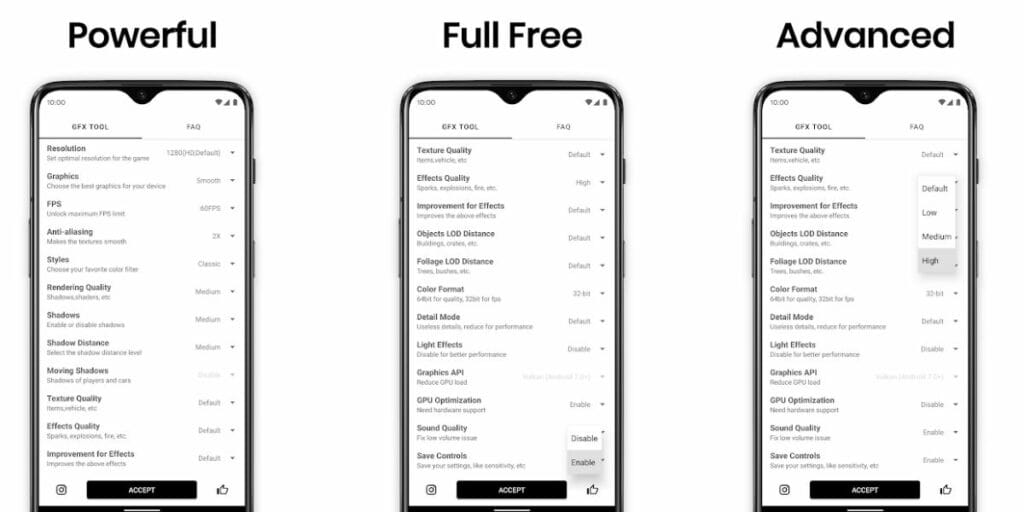
- Install Gameloop, boot PUBG.
- Download and run v1.0.8.
- Pick iPad View, pair with Smooth graphics + High FPS, hit Optimizer.
Snag Safe Config Files
Straight from GitHub releases—46 stars vouch for it.
GFX Tool Install
Executable's plug-and-play; Python folks: requirements first, then main.py.
Lock in iPad View
Toggle the resolution sim, DNS Changer (10-20% ping drop), and shortcut.
Pro tip for peak plays: buy PUBG Mobile UC via Buffget—global lowest prices, <5min delivery, fully safe, Binance Pay/Bitcoin/ETH/USDT/USDC accepted, 24/7 crew, 4.9/5 ratings. More deets in our PUBG Mobile GFX Tool Tutorial.
iPad View vs. Phone View: Head-to-Head
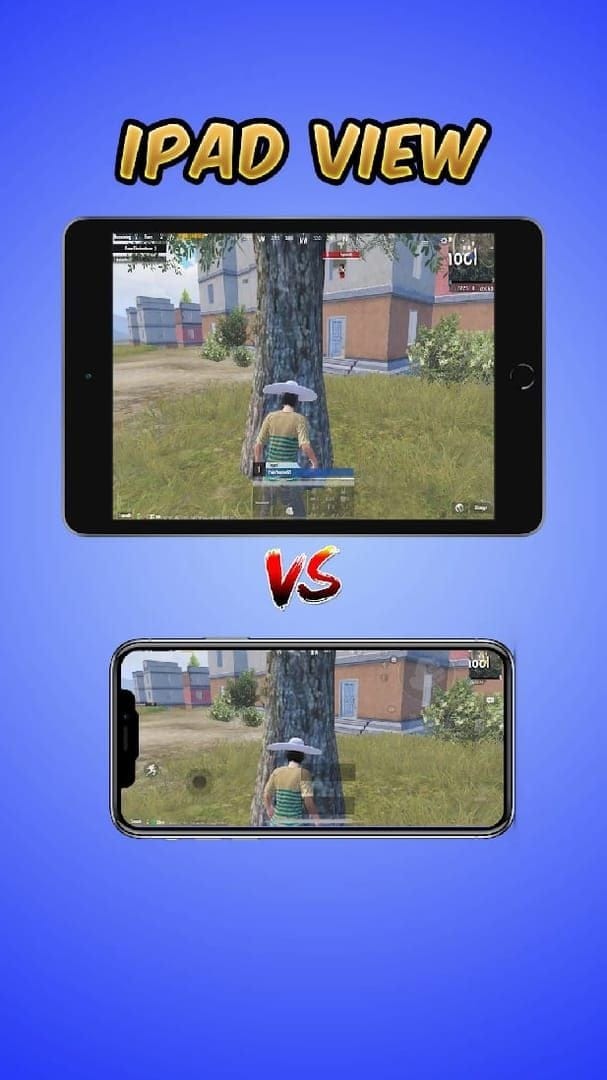
iPad widens FOV by 15-20%; post-Nov 2022, 90 FPS is yours. Ultra HD holds steady at 60 FPS on emulator—phones? Lucky to hit 30-40.
Test it yourself:
- Start with Balanced for 90 FPS stability.
- iPad sim delivers 85-90 FPS vs. phone's 70.
View Distance and FOV Breakdown
iPad nails 400m spots; phone tops at 250m (30% edge lost).
Low-End Device FPS Hit?
Emulator + tool pushes Extreme FPS. iPad Pro itself lags HD at 90.
Dialing Sensitivities
Fine-tune after setup—crucial.
Top Tools for Nailing iPad View
MK Tool v1.0.8 (May 15, 2024) leads: iPad sim, graphics/FPS mastery, Kill Processes frees 25% RAM.
Get rolling:
- Hit releases for download.
- Launch Smart Settings.
GFX Tool Showdown
MK crushes with 46 stars and full kit; Gameloop's basics only.
Config Sources
Releases page, period.
Stock up via Buffget for PUBG Mobile top up—cheapest rates, instant credits, ironclad security, every server, 24/7 help, 4.9/5 scores. Check Best PUBG Mobile Settings 2025.
Pitfalls to Dodge (And Ban-Proofing)
Crank FPS too high? Crashes. Post-2.3, 90 FPS lags HD on iPad Pro.
Smart moves:
- Cap at High FPS.
- Temp Cleaner before matches.
Too Aggressive?
Skip Ultra HD + Extreme—ease in with Balanced.
Post-Match Cleanup
Optimizer wipes traces.
Zero-Recoil Sens for iPad View (2025 Edition)
Camera Free Look: 3rd Person 120%, 1st Person 130%, Parachuting 130%. Scopes (Camera): No 130%/Red Dot 45%/2x 30%/3x 20%/4x 18%/6x 14%/8x 12%. ADS: No 100%/Red Dot 50%/2x 35%/3x 25%/4x 20%/6x 15%/8x 12%. Gyro: No 300%/Red Dot 280%.
Apply like this:
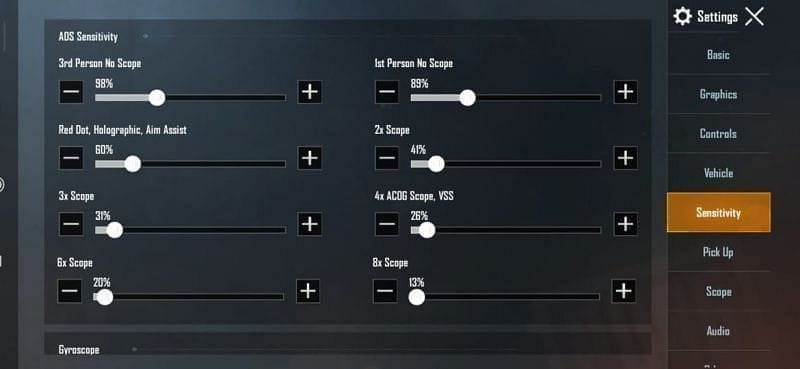
- Punch in Camera values.
- Set ADS per scope.
- Calibrate gyro in training grounds.
4-Finger Claw Vibes
Thumbs for move/fire; indexes on ADS/scope/jump. Test that 130% free look.
Gyro Magic
300% no-scope mastery; 280% Red Dot precision.
Risky? Solid Alternatives
Gameloop HDR or Balanced via tool; DNS Changer trims 15ms ping.
Easy swaps:
- Smooth + High FPS.
- Smart Settings.
Official High-Gear Options
HDR/Ultra HD through the tool.
Safe Tweaks
Optimizer + shortcut combo.
Post-Patch Config Updates
v1.0.8 holds strong post-2.3 (Nov 2022).
Refresh routine:
- Snag the latest download.
- Re-toggle iPad View.
Stay Sharp
Eye patch notes for 90 FPS shifts.
Fresh Files
GitHub releases only.
FAQ: Quick Hits on PUBG Mobile iPad View for Android
Is iPad view bannable in PUBG Mobile on Android?
No bans for MK GFX on emulator.
How do I install iPad view config on Android PUBG?
Gameloop + v1.0.8: download, run, enable sim.
What is the best GFX tool for PUBG Mobile iPad view?
MK Tool—46 stars, graphics/FPS control.
Does iPad view increase FPS in PUBG Mobile?
Yes, to Extreme; 90 FPS post-2.3.
Can I get banned for using config files in PUBG?
No for this tool; avoid injectors.
iPad view vs phone view: which is better for PUBG?
iPad—wider FOV, 25% better tracking.