

Recommended Discounts

PUBG Mobile UC (Global)
Official Midasbuy Partner. Get 30% OFF UC Top Up. Not for Japanese / Korean / Taiwan / Vietnam servers. Fast, secure, and the lowest price guaranteed.
29.4% OFF
Related articles


PUBG Mobile Zero Recoil: Best Sensitivity & Gyro Settings
Quick Answer: Zero recoil in PUBG Mobile requires three synchronized elements — calibrated camera sensitivity, precise ADS values, and gyroscope configuration tuned to your device. The universal zero recoil sensitivity code 1-7435-8846-3421-0303-0728 is your proven baseline, but you'll need to fine-tune based on your device's refresh rate, screen size, and finger layout.
Buffget
For players serious about ranked performance, keeping your UC balance ready for premium skins and battle pass rewards is part of the full experience. Handle your PUBG Mobile global UC fast recharge quickly and securely through buffget — competitive pricing, fast delivery, trusted by thousands.
What Zero Recoil Actually Means
Recoil is the upward and horizontal bullet drift during sustained fire. Every weapon has a predictable pattern — vertical climb plus lateral deviation — that you can cancel through sensitivity tuning and physical input.
Zero recoil doesn't mean no kick. It means your settings and inputs cancel the recoil pattern so your crosshair stays on target through a full magazine. The M416 dumps a 40-round extended mag in 3.28 seconds — every fraction of that spray needs to land. Players who master this consistently get tighter groupings, higher headshot rates, and more reliable kills at medium range across Erangel and Miramar.
Camera Sensitivity Settings
Camera sensitivity controls view speed when dragging without firing — directly affects hipfire accuracy and target tracking across all scope levels.
No-Scope and 1x (Red Dot / Holographic)
- No-scope gyroscope sweet spot: 300–400% — fast enough for 180-degree flicks, controlled enough to avoid overshooting
- 1x ADS sensitivity (M416): 50–60% — keeps crosshair stable during full-auto at 30–50 meters
Mid-Range: 2x, 3x, 4x
Step each scope tier down approximately 5–8% from the previous level to account for increased magnification. The 4x is the most critical AR setting — miscalibration causes visible spray drift at 50+ meters.
Benchmark: Fire a full M416 mag at a wall target 50 meters away in Training Ground. Spray radius under 2 meters = acceptable calibration.
Long-Range: 6x and 8x
- 8x ADS sensitivity: 12%
- 8x gyroscope sensitivity: 80–90%
This combo lets the gyroscope handle micro-adjustments while the low ADS value prevents overcorrection during semi-auto fire.
ADS Sensitivity for Zero Recoil
ADS sensitivity controls crosshair movement while aiming through a scope during active fire — separate from camera sensitivity, more direct impact on recoil compensation.
Key rule: ADS sensitivity should always be lower than camera sensitivity at the same scope level. Camera handles acquisition (fast), ADS handles compensation (precise). Conflating the two is the most common calibration error.
Weapon-specific ADS values at Red Dot:
- M416 / SCAR-L (5.56mm): 50–60%
- AKM (7.62mm): 55–65% — the AKM generates 30% more recoil than 5.56mm weapons, so you need extra range of motion to pull down against its aggressive vertical climb
Gyroscope Settings: Setup and Calibration
The gyroscope uses your device's motion sensors as a second recoil-control layer. Tilt the phone slightly downward during a spray — the gyroscope translates that into crosshair correction on top of your thumb inputs.
Step-by-Step Setup
- Open Settings → Sensitivity → **Layout Management
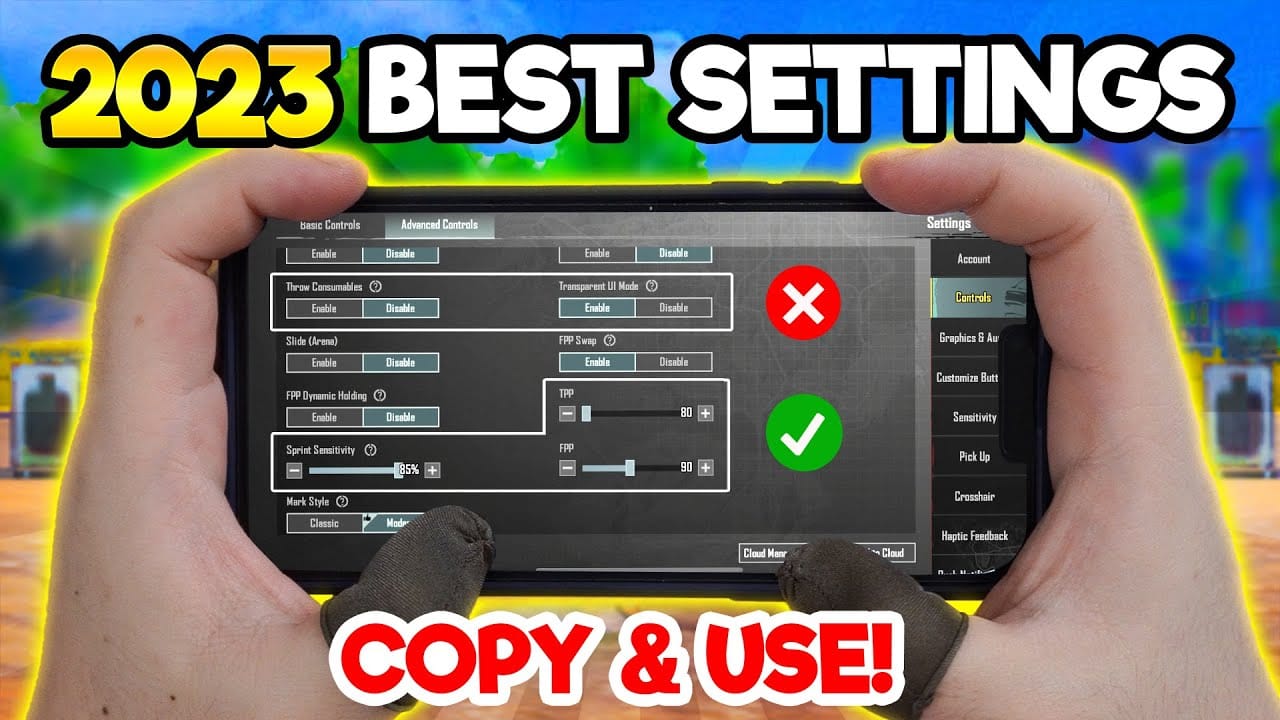
** 2. Tap Search Code, enter your target code 3. Go to Basic settings → enable Gyroscope 4. Set gyroscope mode to Scope Only 5. Run the 180-degree flick test to validate no-scope camera sensitivity 6. Run the 50-meter M416 spray test in Training Ground to confirm vertical recoil calibration
Gyroscope Sensitivity by Scope
- No-Scope: 300–400%
- 1x Red Dot / Holographic: Moderate, aligned with ADS settings
- 8x Scope: 80–90% paired with 12% ADS
Why Scope Only Mode Wins
Scope Only activates physical tilt only when aiming down sights — no accidental camera movement during looting or repositioning, full recoil-compensation benefit during engagements. Most competitive players use this exclusively.
Gyroscope ON vs. OFF
Gyroscope ON adds a natural, intuitive compensation layer that thumb-only players can't replicate at the same speed. Tighter spray groupings at close and mid-range — the majority of ranked gunfights.
Gyroscope OFF is valid for:
- Tablet users (larger screen surface — baseline sensitivity should be 20–30% higher than mobile)
- Stationary play setups
- Devices with unreliable motion sensors
Device performance factors:
- 90Hz+ devices: Require 5–15% higher sensitivity than 60Hz devices for equivalent crosshair speed
- Temperature: Keep device below 40°C — thermal throttling above this degrades sensor accuracy and introduces input lag that makes gyroscope control unreliable
Need to gear up while your settings are dialed in? Buy cheap PUBGM Unknown Cash online through buffget — secure transactions, fast delivery, high user ratings.
Weapon Recoil Patterns and Counters
The November 6, 2025 update (v4.1) reduced AR damage by 10–15%, increasing spray duration per kill — making recoil control more critical than ever.
M416: The Calibration Standard
Predictable 5.56mm pattern, ideal reference weapon. Must-have attachment: Tactical Stock — 15% recoil recovery + 20% aiming stability. Single biggest impact on M416 spray control.
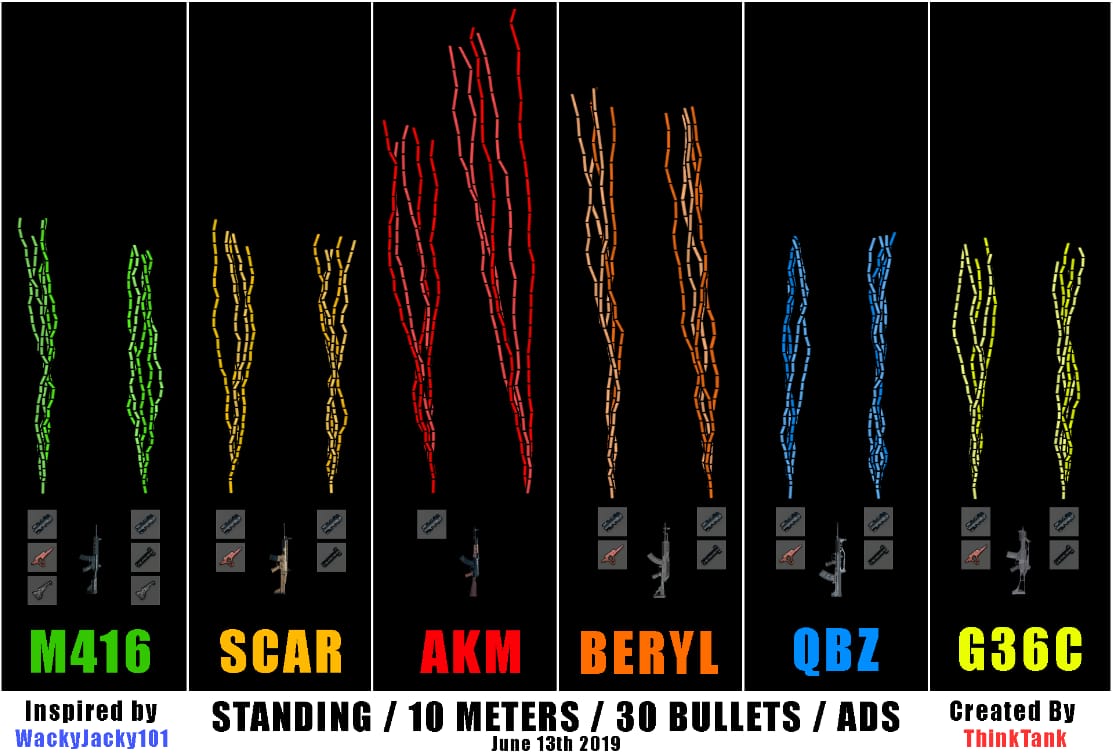
AKM and Beryl M762: High-Recoil Management
Both generate 30% more recoil than 5.56mm ARs.
- AKM: steep, fast vertical climb
- Beryl M762: adds significant horizontal deviation
Priority attachments:
- Compensator: 25% horizontal recoil reduction
- Vertical Foregrip: 15% recoil control increase
Together, these reduce effective recoil enough that your ADS sensitivity stays consistent across weapon types.
Positional Recoil Reduction
Body position multiplies your control — no settings change required:
- Standing: Baseline recoil
- Crouching: 50% recoil reduction
- Prone: 66% recoil reduction
Pro tip: Transitioning to crouch during sustained mid-range sprays is a mechanical habit that directly improves accuracy. Build it in.
Finger Layout and HUD Setup
Recoil control requires firing, scoping, and compensating simultaneously — your layout determines whether that's possible.
Import codes via: Settings → Sensitivity → Layout Management → Search Code
- 4-Finger Claw:
7275-1794-4178-8556-303 - 6-Finger Claw:
6960-4887-1407-8797-709
Layout Breakdown
- 2-Finger: Forces you to choose between firing and compensating. Not viable for competitive ranked play.
- 3-Finger: Balanced entry point. Simultaneous fire and scope control, one thumb on movement. Good for intermediate players.
- 4-Finger Claw: Competitive standard. Dedicated fingers for fire, scope, movement, and compensation. Fastest ADS transitions, most consistent spray control.
- 6-Finger Claw: Maximum input density. High practice investment, highest ceiling for recoil precision.
Training Mode Drill Protocol
Never test new settings in ranked. Use this structured sequence:
- Import sensitivity code via Layout Management
- 50-meter M416 spray test — full 40-round mag at stationary target. Pass = spray radius under 2 meters
- 180-degree flick test — assess overshoot/undershoot to calibrate no-scope camera sensitivity
- Scope-level test — 10 controlled bursts per scope, 1x through 8x
- Adjust in 2–3% increments only — no large jumps between sessions
- Repeat 3–5 sessions before evaluating — muscle memory needs repetition
Track these metrics:
- Spray drift direction (consistent left/right = horizontal sensitivity imbalance)
- Headshot zone hit rate during controlled bursts
- Recoil recovery speed between burst sequences
Common Mistakes to Avoid
Copying pro settings without device calibration. Pro configs are optimized for specific devices, refresh rates, and grip styles. Code 1-7435-8846-3421-0303-0728 is a starting point — not a final answer.
Sensitivity too high. Creates the illusion of responsiveness, destroys spray control. If your crosshair moves more than 2 meters off-target at 50 meters, it's too high.
Skipping post-update recalibration. The v4.1 update (November 6, 2025) altered AR damage values, changing effective time-to-kill and spray duration requirements. Any major patch warrants a full Training Ground review before returning to ranked. Recalibrate every 60 days or immediately after major patches.
Ignoring device temperature. Above 40°C, thermal throttling introduces sensor lag that makes gyroscope compensation inconsistent. Close background apps, take breaks during extended sessions.
FAQ
Q: What's the best zero recoil sensitivity code for PUBG Mobile?A: Use 1-7435-8846-3421-0303-0728. Import via Settings → Sensitivity → Layout Management → Search Code. Always validate with the 50-meter spray test before ranked play.
Q: Gyroscope on or off?A: ON for most players — set to Scope Only mode. OFF is more practical for tablet users or devices with unreliable motion sensors. Tablet players should run baseline sensitivity 20–30% higher than mobile values.
Q: What's the difference between camera and ADS sensitivity?A: Camera sensitivity = view speed when dragging (target acquisition). ADS sensitivity = crosshair movement while aiming through a scope during fire (recoil compensation). ADS should always be lower than camera at the same scope level.
Q: Which attachments cut recoil the most?A: Top three: Compensator (25% horizontal recoil reduction), Vertical Foregrip (15% recoil control increase), Tactical Stock for M416 (15% recoil recovery + 20% aiming stability).
Q: Do I need to recalibrate after updates?A: Yes. The v4.1 update (November 6, 2025) reduced AR damage by 10–15%, extending spray duration per kill. Recalibrate after any patch that alters weapon behavior, and review every 60 days regardless.
Q: How does a 90Hz device change my sensitivity?A: 90Hz+ devices require 5–15% higher sensitivity than 60Hz devices for equivalent crosshair speed. If you upgraded your device or enabled 90fps mode, recalibrate all values upward within that range and re-run your Training Ground drills.
Settings locked in? Make sure your account is ready to match. Top up your PUBG Mobile UC instantly through buffget — fast, secure, and trusted by thousands of players worldwide. Don't let a low UC balance hold you back from the gear your skills deserve.