

Recommended Discounts

Where Winds Meet
This Top Up service is not applicable to Playstation User.
20% OFF
Related articles


Buy Where Winds Meet Golden Ingots Safely – 2026 PC & Mobile Guide
Where Winds Meet supports full cross-progression across PC (launched November 14, 2026) and mobile (launched December 12, 2026). Premium currency — Echo Beads (Golden Ingots) — must be purchased per platform and can't transfer between stores. Link accounts via User Center *before* creating any character, then top up through [buffget](https://buffget.com/goods/where-winds-meet) for secure, instant delivery.
Buffget
What Is Cross-Progression in Where Winds Meet?
How It Works
One account carries characters, story progress, and inventory across Steam, Epic Games, Official Launcher, PlayStation 5, iOS, and Android simultaneously — one of the most comprehensive cross-platform systems in the action RPG genre.
Critical setup rule: Link accounts at the Title Screen → User Center before creating a character on any secondary platform. If both accounts already have characters, linking is permanently blocked. That's a hard system restriction, not a bug.
What Carries Over (and What Doesn't)
- ✅ Character levels, story completion, inventory — all sync seamlessly
- ✅ Cross-play supported across PC, PS5, iOS, Android (max 5 players per co-op session)
- ❌ Echo Beads bought through a platform store stay tied to that store's wallet
Why 2026 Matters
PC launched November 14, 2025. Mobile followed December 12, 2025. The 2026 window is the first full year both platforms run simultaneously on a mature cross-progression infrastructure. Set up account linking correctly now — every character pull, quest, and progression milestone becomes accessible on any device.
Golden Ingots Explained: Where Winds Meet's Premium Currency
What They Are
Echo Beads are the in-game premium currency (Golden Ingots in regional contexts), used exclusively for cosmetics and premium Shop items. The top-up system unlocks at player Level 5 — roughly 30–60 minutes of gameplay. New players can't spend on launch day without completing the early tutorial first.
For a streamlined experience, the where winds meet cross progression top up service at buffget delivers directly to your Player ID, skipping platform store friction entirely.
Full Pricing Breakdown
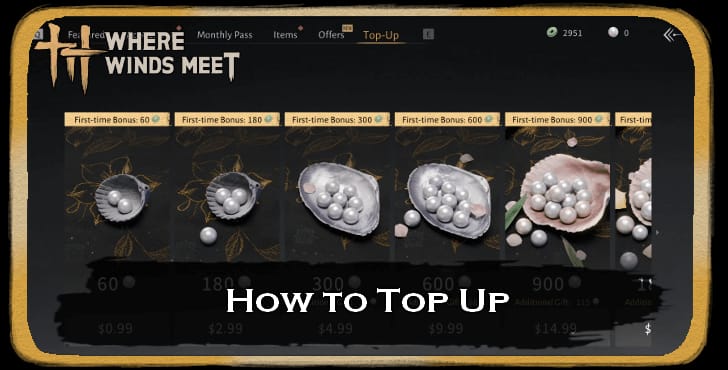
- 60 Echo Beads — $0.99 + 60 Echo Jades (first-time bonus)
- 180 Echo Beads — $2.99 + 180 Echo Jades (first-time bonus)
- 300 Echo Beads — $4.99 + 300 Echo Jades + 30 Echo Beads (first-time bonus)
- 600 Echo Beads — $9.99 + 600 Echo Jades + 68 Echo Beads (first-time bonus)
- 900 Echo Beads — $14.99 + 900 Echo Jades + 115 Echo Beads (first-time bonus)
- 1800 Echo Beads — $29.99 + 1800 Echo Jades + 268 Echo Beads (first-time bonus)
- 3000 Echo Beads — $49.99 + 3000 Echo Jades + 458 Echo Beads (first-time bonus)
- 6000 Echo Beads — $99.99 + 6000 Echo Jades + 1200 Echo Beads (first-time bonus)
- 12000 Echo Beads — $199.99 + 2400 Echo Beads (first-time bonus)
⚠️ The first-time bonus fires once per account — not once per platform. Plan your first purchase at the highest tier you're comfortable with. Splitting across small purchases wastes the bonus on low-value tiers.
Best Spending Priorities
- Monthly Pass ($4.99): 300 Echo Beads over 30 days + one Lingering Melody reward after 20 login days — best sustained value for consistent players
- $49.99 tier (3000 + 458 bonus): ~15% effective bonus, best mid-range value
- $99.99 tier (6000 + 1200 bonus): ~20% effective bonus, strongest per-bead return
- F2P entry point: The $4.99 Monthly Pass lets you test paid progression before committing to larger purchases
Before You Top Up: Account Setup Checklist
Linking PC and Mobile Accounts (Do This First)
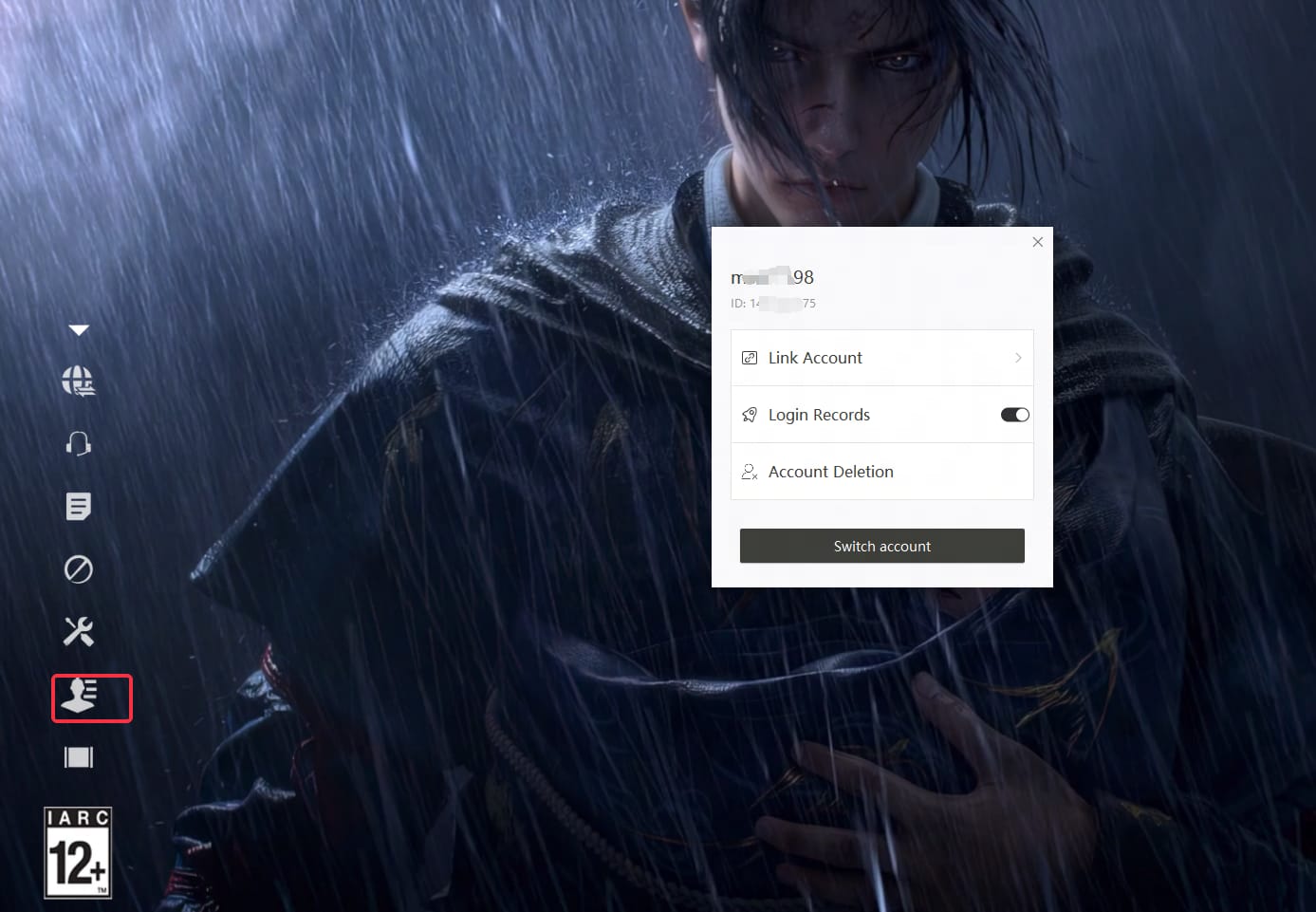
- Log in to the Title Screen on your primary platform
- Navigate to User Center → Link Account
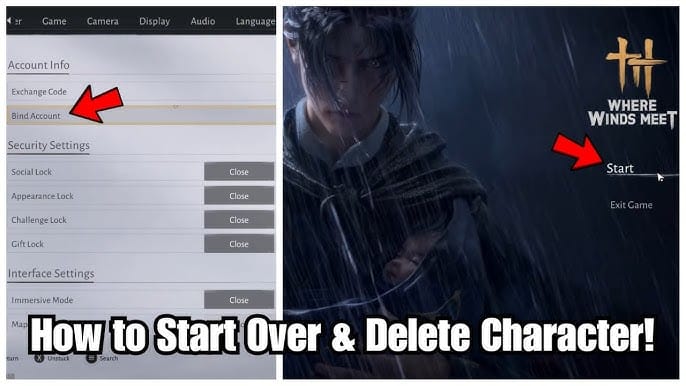
- Or go to Settings → Other → User Center → Link Account
- Complete linking before character creation on any new platform
- Confirm the link is active before purchasing anything
Supported login methods: NetEase Games, Google, Facebook, Steam, Epic Games, X. Note: PlayStation isn't supported for certain client configurations — verify your setup before assuming full cross-progression.
Pre-Purchase Verification
- Copy your Player ID by clicking your avatar in-game
- Confirm account linking is active in User Center
- Verify you've reached Level 5 (top-up system must be unlocked)
- Enable two-factor authentication on your login method
- Confirm you're purchasing on the platform where you'll spend the currency
Mistakes That Cost You
Creating a character on a second platform before linking permanently blocks the link function — no workaround exists. And don't assume the first-time bonus resets per platform. It doesn't. One account, one bonus, one chance to maximize it.
How to Buy Golden Ingots Safely
Why Platform Stores Create Problems for Cross-Progression Players
iOS App Store, Google Play, PlayStation Store, and Steam each maintain separate wallets. Currency bought through one store can't be accessed from another — that's a platform-level restriction. A player who tops up via iOS while primarily playing on PC has effectively siloed their currency.
Using a Player ID-based top-up service sidesteps this entirely. When you buy golden ingots where winds meet through buffget, Echo Beads are credited directly to your account — accessible from any linked platform.
Step-by-Step: Top Up via buffget
- Reach Level 5 in-game (30–60 minutes of gameplay)
- Click your avatar and copy your Player ID / Game UID
- Visit buffget → Where Winds Meet top-up page
- Select your Echo Beads tier
- Enter your Player ID / Game UID at checkout
- Pay via Visa, MasterCard, or PayPal
- Echo Beads credited within minutes of payment confirmation
If Your Golden Ingots Don't Appear
- Wait 5–10 minutes, then fully restart the game client
- Verify the Player ID at checkout matches your in-game ID exactly (copy-paste, don't type manually)
- Check the in-game Shop's transaction history for pending credits
- Contact buffget support with your order confirmation and Player ID for expedited resolution
Pro tip: Incorrect Player ID entry causes nearly all delivery failures. Always copy-paste directly from the game.
Platform-Specific Considerations
iOS vs Android vs PC: What's Different
The in-game Shop method works universally: Main Menu → Shop → Top Up → select amount → purchase. But iOS and Android route through their app stores, which apply platform fees affecting effective pricing.
The NetEase Client supports Global Servers and HK/TW/MO Servers specifically. Confirm your server selection before linking accounts — server transfers aren't supported after character creation.
Avoiding Wallet Lock-In
Use a Player ID-based service rather than platform store purchases. Your Echo Beads land on your account, not in a platform wallet, giving you full flexibility across all linked devices.
Best Value Tiers at a Glance
- Best entry: $4.99 Monthly Pass (sustained daily value)
- Best mid-range: $49.99 (3000 + 458 bonus, ~15% effective bonus)
- Best overall: $99.99 (6000 + 1200 bonus, ~20% effective bonus)
- First-time rule: Always spend your first-time bonus at the highest comfortable tier
Account Safety: Protecting Yourself When Buying Golden Ingots
Red Flags to Avoid
- Any service requesting your account password or login credentials — legitimate top-up only needs your Player ID
- Prices dramatically below the official rate sheet
- Requests to share your screen during a transaction
Two-Factor Authentication Checklist
- Enable 2FA on your primary login method (Google, Steam, or NetEase)
- Use a unique password for your game login, separate from your email
- Don't share your Player ID publicly after making a purchase
- Review linked devices periodically through User Center
Why buffget Works for Cross-Progression Players
buffget delivers Echo Beads directly to Player IDs across the full tier range ($0.99–$199.99), accepts Visa, MasterCard, and PayPal, and provides customer support for any delivery issues. No login credentials required — just your Player ID.
FAQ: Where Winds Meet Cross-Progression Top-Up
Q: Does Where Winds Meet support cross-progression between PC and mobile? Yes — fully supported across Steam, Epic Games, Official Launcher, PS5, iOS, and Android. Link accounts via User Center before creating a character on any secondary platform.
Q: Will my Golden Ingots transfer between PC and mobile? No. Platform store purchases stay in that store's wallet. Using a Player ID-based service like buffget delivers currency directly to your account, bypassing this restriction.
Q: How do I link my PC account to mobile? Title Screen → User Center → Link Account (or Settings → Other → User Center → Link Account). Do this before creating a character on the new platform. Linking is blocked if both accounts already have characters.
Q: When's the best time to top up? Before using your first-time bonus. Choose the highest tier within your budget — the bonus applies once per account. The $49.99 and $99.99 tiers offer the best per-bead value.
Q: Is it safe to buy from third-party top-up sites? Yes, when the platform only requires your Player ID — never your password. buffget uses Visa, MasterCard, and PayPal, and delivers directly to your account without login credentials.
Q: Why didn't my Golden Ingots appear after purchase? Almost always an incorrect Player ID. Copy it directly from the game (click avatar → copy Player ID), restart the client after 5–10 minutes, and contact the platform's support with your order confirmation if it persists.
Top up Golden Ingots safely and instantly at buffget — competitive pricing, secure transactions, and fast delivery for cross-progression players heading into 2026.