

Recommended Discounts

StarMaker: Sing Karaoke
As the official partner of StarMaker: Sing Karaoke, Buffget offers instant StarMaker: Sing Karaoke Coins top up with fast delivery. Get up to 70% off on StarMaker: Sing Karaoke Coins recharge via Buffget secure, convenient, and trusted by thousands
20% OFF
Related articles


StarMaker AI Voice Filter 2026: VIP Coin Unlock Guide
The StarMaker 2026 AI Voice Filter update dropped January 8, 2026 (app version 9.23.1), bringing 30+ AI-enhanced effects to the Premium Audio Studio — including Karaoke, Studio, Superstar, Gig, and Pop modes. Unlocking these filters requires VIP Coins, with the $35.99 pack (95.8 coins/dollar) and $180 bundle (95.6 coins/dollar) offering the best recharge value. Here's everything you need to record at professional quality without guesswork.
Buffget
What Is the StarMaker 2026 AI Voice Filter Update?
What Changed for Singers
Version 9.23.1 replaced StarMaker's legacy reverb/echo presets with a full AI-driven filter engine inside the Premium Audio Studio. VIP members now access 30+ AI-enhanced effects that analyze vocal input in real time.
The biggest addition: MultiTrack Recording. You can layer lead vocals, harmonies, backgrounds, and ad-libs across five separate tracks — previously a desktop DAW exclusive. Combined with AI pitch correction, noise cancellation, and studio emulation modes, this update turns StarMaker into a serious mobile recording platform.
How the AI Filters Work
StarMaker's AI filters analyze your vocal waveform as you sing, applying real-time adjustments based on the selected profile:
- Pitch Correction AI — detects off-pitch notes and nudges them toward correct frequency (requires reasonably accurate input)
- Noise Cancellation Filter — isolates vocal frequencies from ambient sound, critical for untreated rooms
- Harmonizer — generates complementary vocal lines based on the song's key signature
For streamlined coin purchases, starmaker ai voice coin recharge through buffget offers competitive pricing, fast delivery, and secure transactions.
Before vs. After 9.23.1
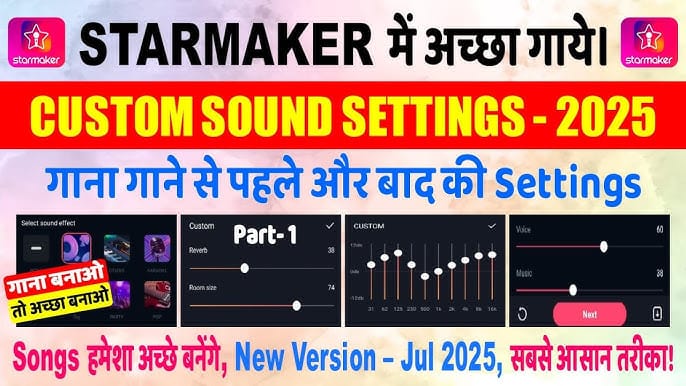
Pre-update: roughly 8-10 static audio presets, no real-time AI processing. Post-update: 30+ effects with dynamic adjustment. The Premium Audio Studio now requires iOS 13.0+, 434.4 MB for the app, plus at least 2 GB free storage for MultiTrack project files.
Complete List of StarMaker 2026 AI Voice Filters
Pitch Correction AI
Operates on a spectrum from subtle to aggressive:
- 10-30%: Gently smooths pitch wobble without artifacts — ideal for ballads and acoustic
- 70-100%: Produces the characteristic tuned sound popular in pop and hip-hop
- Won't fix fundamentally off-key singing; input must be within approximately one semitone of target
Reverb & Echo Engines
Categorized under three modes:
- Studio mode — tight, controlled reverb simulating a treated recording booth
- Gig mode — spaciousness of a live venue
- Superstar mode — polished, radio-ready reverb chain with subtle compression
Each allows adjustment of decay time, pre-delay, and wet/dry mix.
Noise Cancellation Filter
Suppresses air conditioning hum, traffic noise, keyboard clicks, and room resonance. Optimal recording distances:
- Lead vocals: 6 inches from mic
- Harmonies: 8 inches
- Background vocals: 10 inches
Harmonizer, Vocal Warmth & Studio Emulation
- Harmonizer — generates up to two harmony lines based on detected key
- Vocal Warmth — adds low-mid frequency richness for thin-sounding mobile recordings
- Studio Emulation modes (Karaoke, Pop) — composite chains combining EQ, compression, reverb, and pitch correction in one tap
Free vs. Premium Filters
- Free tier: 3-4 static presets, no real-time AI, no MultiTrack, no noise cancellation
- VIP tier: 30+ AI effects, MultiTrack (5 tracks), Pitch Correction AI, Noise Cancellation, Harmonizer, all Studio Emulation modes, custom filter chain building, audio export
- Visibility impact: VIP recordings get a confirmed 50% visibility boost in the feed and leaderboard algorithm
How to Recharge VIP Coins (Step-by-Step)
Finding the Recharge Screen
- Launch StarMaker (version 9.23.1+)
- Tap the Me tab
- Copy your 10-digit SID from your profile — required for all recharge methods
- Navigate to your preferred recharge platform and enter the SID
Coins arrive within 5-30 minutes. Avoid recharging during peak hours (7-11 PM local time) — server load extends delivery.
Recharge Tiers Ranked by Value
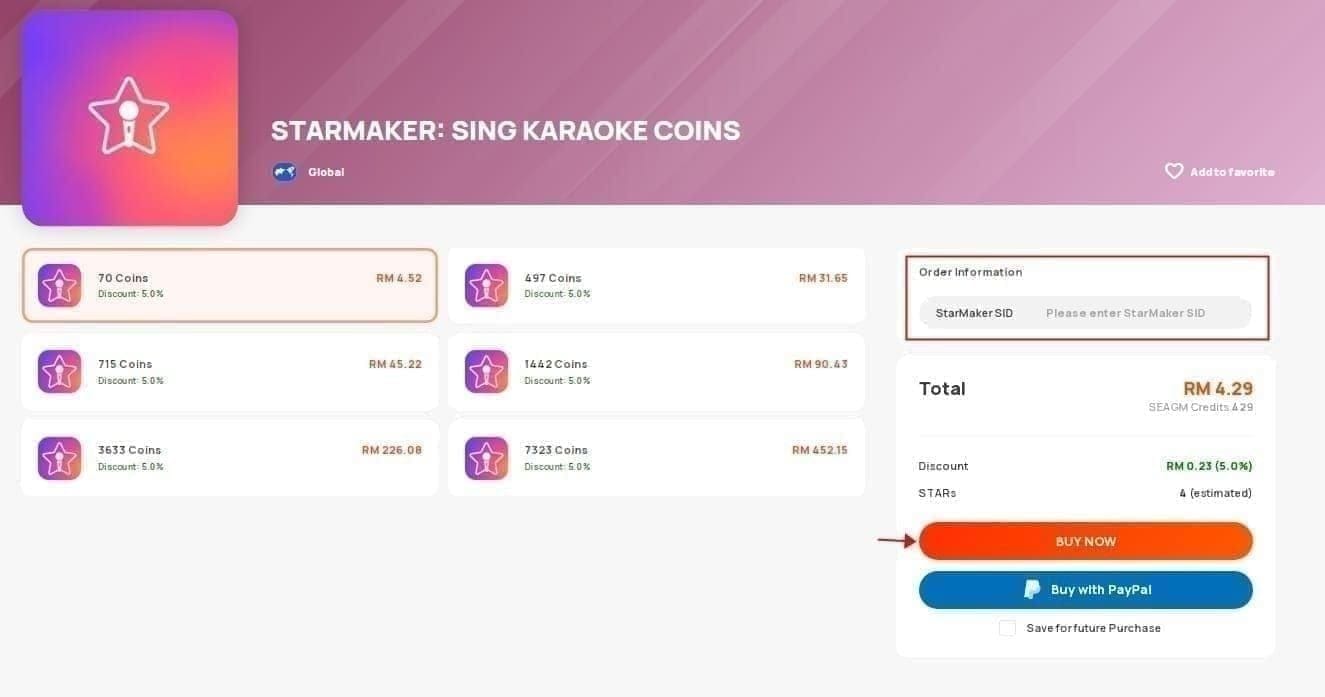
- $0.99: 65 coins (65.7 coins/$) — testing only
- $3.79: 325 coins (85.8 coins/$) — light spenders
- $6.99: 420 coins — mid-range
- $7.70: 600 coins (77.9 coins/$) — lower efficiency
- $35.99: 3,450 coins (95.8 coins/$) — best per-dollar value
- $180: 17,200 coins (95.6 coins/$) — best for heavy users/events
- $199.99: 16,800 coins (84.0 coins/$) — worse than $180 despite costing more
Pro tip: The $35.99 and $180 packs offer 10-20% bonus coins during Q2 2026 (April-June). First-time rechargers get +100 bonus coins. Referring a friend who recharges earns another +100.
Payment & Confirmation
Standard app store purchases carry a 15-30% platform fee — experienced users often use dedicated recharge services to maximize yield. After payment, check your coin balance under the Me tab. If coins haven't appeared within 30 minutes, verify your 10-digit SID. Incorrect SID is the #1 cause of missing coins.
Unlocking Premium Audio Studio with VIP Coins
VIP Tier Breakdown
- Monthly VIP ($4.99): Basic Premium Audio Studio, 1.2x score multiplier, standard AI filter set, 400-500 coins equivalent
- Quarterly VIP ($24.99): Full filter library, 1,200-1,400 coins equivalent, priority support
- Annual VIP ($59.99 in S1/S3/S4/S5): Complete Premium Audio Studio + MultiTrack, 2.5x multiplier, 50% visibility boost, all 30+ AI effects, 4,500-5,000 coins equivalent
- Annual VIP ($129.99 in S2): Same features, higher seasonal price — buy during other seasons
For maximum value on coin purchases, buy starmaker vip coins premium studio through buffget for competitive rates and fast delivery.
Activating Premium Audio Studio
- Open StarMaker → tap Profile
- Select Subscriptions
- Choose your VIP plan
- Confirm payment and wait for activation
- Navigate to Studio — Premium tools are now unlocked
- Browse songs using genre filters for your first project
Premium Audio Studio: Tools & Settings
EQ Mixer
Cut frequencies below 80 Hz to remove rumble. Boost gently around 3-5 kHz for vocal presence and clarity. The AI-assisted EQ mode analyzes your voice and suggests starting points based on vocal range.
AI Filter Chain Builder

Stack multiple effects in sequence. Optimal chain order:
- Noise Cancellation (first — cleans raw input)
- Pitch Correction AI (genre-appropriate intensity)
- Vocal Warmth / EQ adjustment
- Reverb / Studio Emulation (last — adds space)
Sound Profile Presets
Five core presets optimized for specific use cases: Karaoke (vocal clarity), Studio (professional environment), Superstar (polished radio-ready), Gig (live venue feel), Pop (brightness + compression).
Audio Export
VIP members export at higher bitrates. MultiTrack projects can be bounced to stereo or exported as individual tracks. Maintain 2 GB free storage to prevent export failures.
Best AI Filter Settings by Genre
Pop & Dance
Start with Pop preset. Pitch Correction at 50-70%. Superstar reverb with 1.2-1.5s decay. EQ boost at 4 kHz. Pan harmonies 30% left/right for stereo width.
R&B & Soul
Start with Studio preset. Vocal Warmth at medium. Pitch Correction at 20-35% — R&B needs natural expression. Medium reverb decay (1.8-2.2s). Lead on track one, harmonies on tracks two and three with Harmonizer.
Ballad & Acoustic
Karaoke preset for clean, transparent processing. Pitch Correction below 20%. Minimal reverb — Gig preset at low wet/dry. Prioritize Noise Cancellation to protect intimate vocal quality.
Hip-Hop & Rap
Custom chain: Noise Cancellation → EQ boost at 2-4 kHz → Pitch Correction at 60-80% (melodic rap) or 0% (spoken) → very short reverb (under 1s). Ad-libs on track five with slightly higher reverb for depth separation.
Regional & Folk
Gig preset for natural room ambience. Pitch Correction at 10-15% to preserve microtonal inflections. Adjust EQ per style — brighter for higher-register folk, warmer for deeper traditional vocals.
Do AI Filters Improve Your Score?
Scoring Algorithm
Pitch Correction AI directly improves pitch accuracy metrics. Combined with the VIP 2.5x multiplier (Annual plan), AI-filtered recordings see compounded score benefits.
Engagement & Visibility
The 50% VIP visibility boost means your content reaches far more listeners. During peak hours (7-11 PM), engagement multipliers of 3-5x are achievable — the optimal publishing window for polished recordings.
Common Misconceptions
- Filters don't make bad singing sound professional — they enhance decent input
- Premium filters require active VIP subscription, not a one-time unlock
- Over-processing creates artifacts — 2-4 well-chosen effects beat a maxed-out chain
Troubleshooting
Recharge Failed or Pending
- Verify your 10-digit SID — one wrong digit routes coins elsewhere
- Don't recharge during peak hours (7-11 PM)
- Wait the full 30-minute delivery window
- Contact your recharge provider with your transaction ID if unresolved
AI Filters Not Showing
- Confirm app version 9.23.1+
- Check device requirements: iOS 13.0+, 434.4 MB app, 2 GB free storage
- Clear app cache and restart
- Verify active VIP under Profile → Subscriptions
Studio Lag or Crashes
- Close background apps to free RAM
- Ensure 2 GB free storage
- Start with two tracks, add more after initial recording
- Disable real-time AI preview while recording; apply effects during mixdown
Pro Tips
Hardware Setup
Use wired headphones with built-in mic — wireless earbuds introduce latency that disrupts MultiTrack sync. Maintain recommended mic distances: 6** lead, 8** harmonies, 10** backgrounds.
Creator Recording Workflow
- Lead vocal on track one with Noise Cancellation
- Lower harmony on track two, panned 30% left
- Upper harmony on track three, panned 30% right
- Background vocals on track four at reduced volume
- Ad-libs on track five
- Apply AI filter chain during mixdown, not live recording
Coin Strategy for Events
SupernovaX Spring 2026 runs Q2 (April-June): 7 phases, 14 days each, 515 coins per phase entry.
- Recharge the $35.99 pack during Q2 for 10-20% bonus
- Budget 3,605 coins for all 7 phases
- Reserve coins for Crown gifts (1,200 coins) or Yacht gifts (6,000 coins) for max event impact
FAQ
Q1: What are AI Voice Filters in StarMaker 2026? Real-time vocal processing effects from the January 8, 2026 update (v9.23.1). They apply pitch correction, noise cancellation, reverb, harmonization, and vocal warmth. 30+ effects available to VIP members.
Q2: How much does Premium Audio Studio cost? Requires active VIP: Monthly $4.99, Quarterly $24.99, Annual $59.99 (S1/S3/S4/S5) or $129.99 (S2). Annual at $59.99 is best value — full studio, 2.5x multiplier, 4,500-5,000 coins equivalent.
Q3: Can you use AI Filters without VIP? Free gets 3-4 basic presets only. No AI processing, no MultiTrack, no noise cancellation. Full 30+ effects are VIP-exclusive.
Q4: Best recharge pack for value? $35.99 pack: 3,450 coins at 95.8 coins/dollar. $180 bundle: 17,200 coins at 95.6 coins/dollar. Both get 10-20% bonus during Q2 2026.
Q5: Recharge not working — what do I do? Verify 10-digit SID. Avoid peak hours (7-11 PM). Wait 5-30 minutes. Contact recharge provider with transaction ID if unresolved.
Q6: Do filters improve recording scores? Yes. Pitch Correction boosts pitch accuracy metrics. With VIP 2.5x multiplier and 50% visibility boost, filtered recordings consistently outperform unfiltered ones. But filters enhance good singing — they won't fix poor technique.
🎤 Ready to unlock every StarMaker 2026 AI Voice Filter? Visit buffget for the latest recharge deals, coin strategies, and pro guides that turn your recordings into chart-toppers. Don't just sing — sing smarter with buffget.